SERVICE MANUAL –Post eVolve Smart
7 - CHARGE POINT SLAVE DEVICES
CIRCONTROL, S.A. – Innovació, 3 – 08232 – Viladecavalls (Barcelona)
Tel.: +34 937 362 940 – Fax: +34 937 362 941 30
Web: www.circontrol.com – E-mail: circontrol@circontrol.com
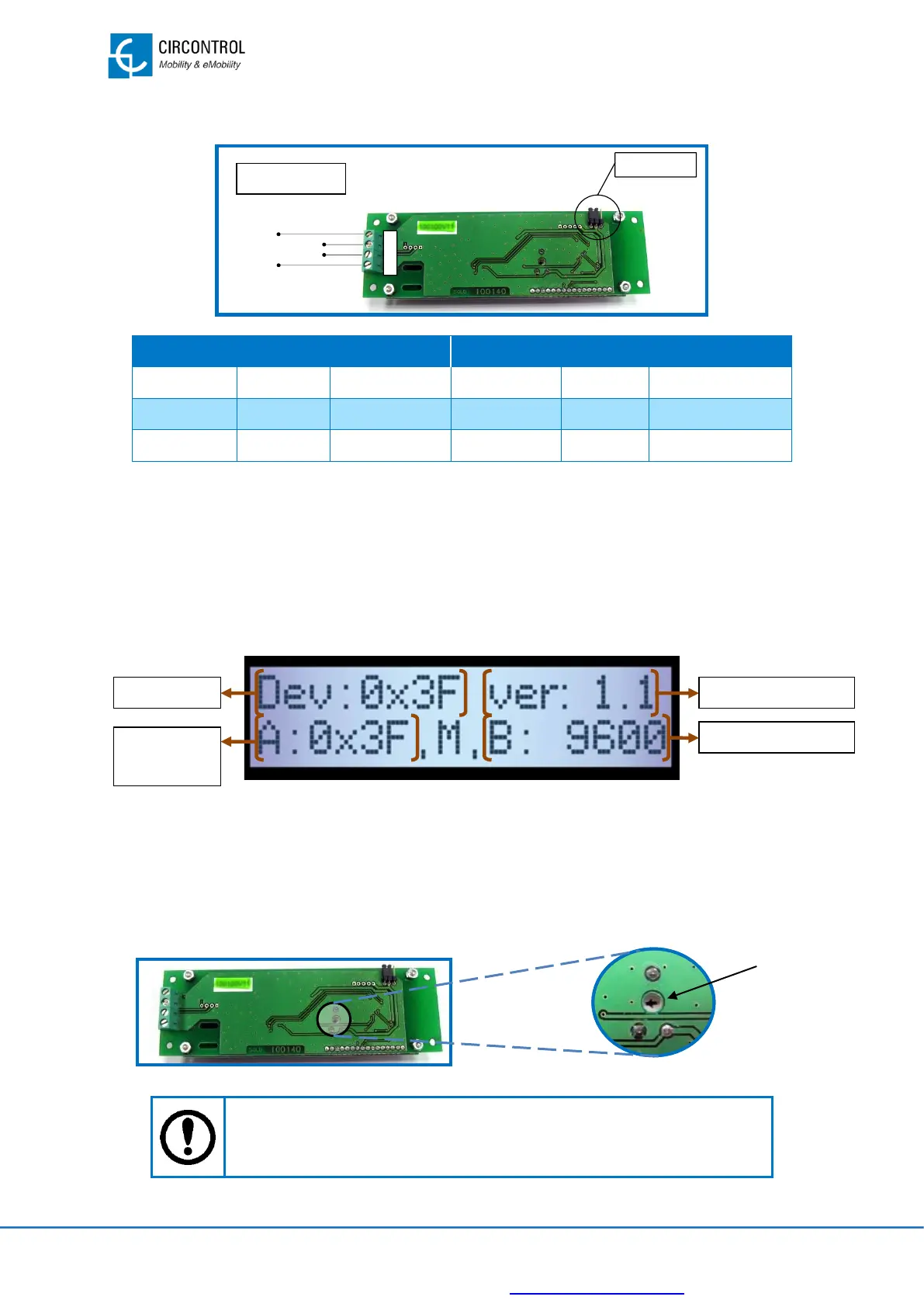
7.3.2 WIRING CONNECTION
7.3.3 DEVICE CONFIGURATION PROCEDURE
• No additional configuration is required to operate with LCD display.
7.3.4 ADDITIONAL INFORMATION
INFORMATION ON POWER UP
Display shows the following message when device is powered up:
Note. Peripheral number is shown as hexadecimal number
DISPLAY CONTRAST
LCD display allows changing the screen contrasts manually with a screwdriver.
Look for a potentiometer at the back of the display, as shown in the following image:
- Position of the potentiometer can be different in each display.
- Do not modify it if the screen contrast is correct.


 To Next Page