SERVICE MANUAL –Post eVolve Smart
12 - ERRORS AND TROUBLESHOOTING
CIRCONTROL, S.A. – Innovació, 3 – 08232 – Viladecavalls (Barcelona)
Tel.: +34 937 362 940 – Fax: +34 937 362 941 80
Web: www.circontrol.com – E-mail: circontrol@circontrol.com
12.3 OCPP 1.6 COMMON ERRORS
After applying new settings, please go to the following URL from Charge Point in order
to check the proper connection of the integration chosen:
http://<IP>/services/cpi/log?app=ocpp1.6
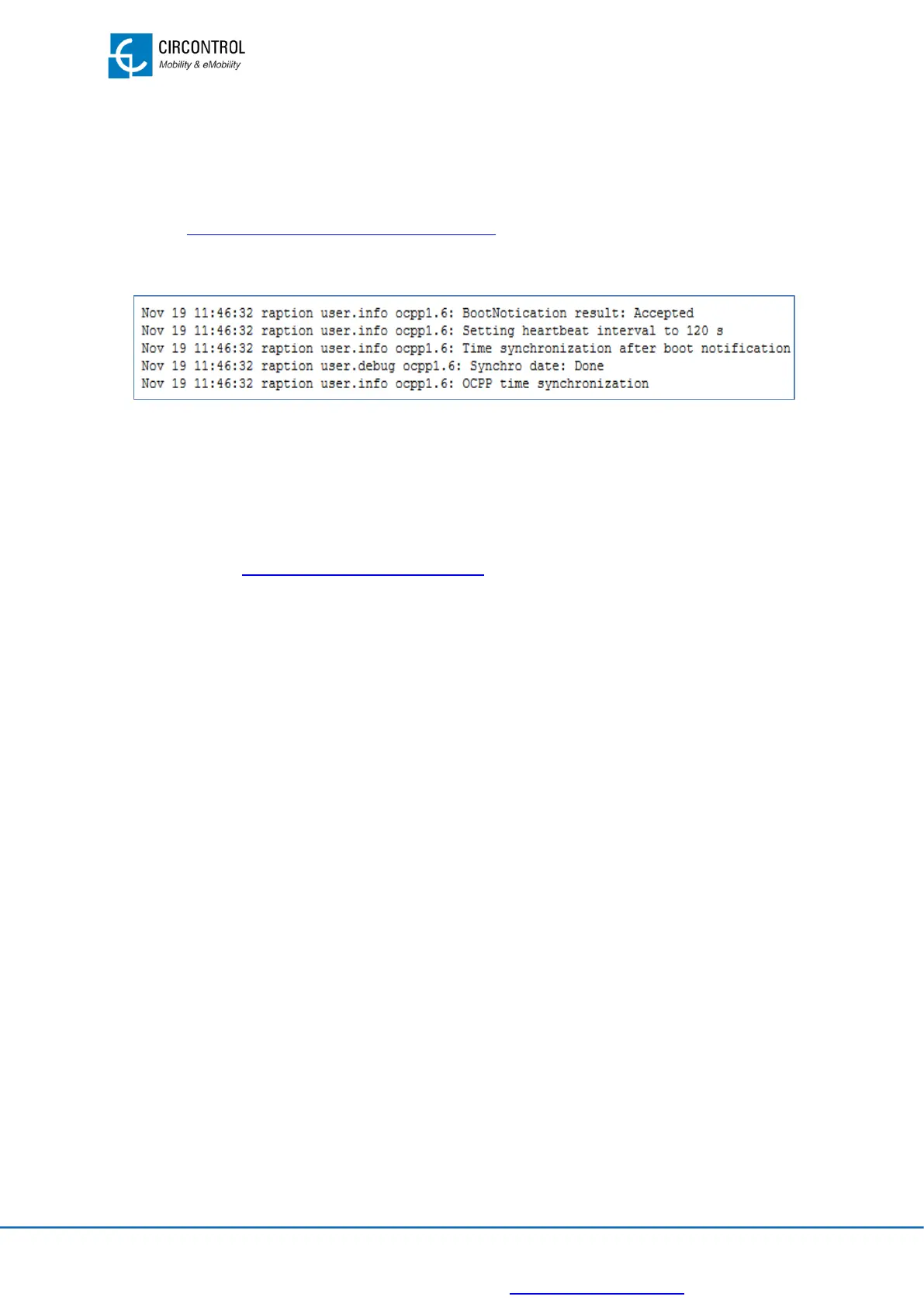
Look especially for the following messages:
If ‘BootNotication result: Accepted”: Charge Point is properly connected to the Central
System.
Otherwise, if the message shown is ‘Registering CB in the CS: failed’, check the
following list of errors and refer to the following URL:
http://<IP>:8080/html/setup.html
12.3.1 CS Connection FAILED. Fail reason: Underlying Transport Error
Hostname cannot be resolved in the Charge Point side:
The host URL introduced is not correct. Check it in the OCPP configuration.
• Check if embedded the modem is connected to the network. Otherwise, check
modem parameters (some cellular providers require special APN configuration).
• If there is no modem, ethernet IP address shall be static, using the gateway and
DNS from this network. Do not use DHCP=ON.
12.3.2 CS Connection FAILED. Fail reason: Timer Expired
Charge Point has resolved the DNS of the URL but it is not able to reach CS.
• Check if the embedded modem is connected to the network. Otherwise, check
modem parameters (some SIM card providers require special APN
configuration).
• If there is no modem, then ethernet IP address must be static, using gateway and
DNS from this network. Do not use DHCP=ON.
12.3.3 CS Connection FAILED. Fail reason: Invalid HTTP status
The Charge Point reaches the CS, but it has rejected the Charge Point ID configured.
• CS should check if Charge Point has been added in their side.
• Check Charge Point ID in the OCPP configuration on CP side.


 To Next Page