SERVICE MANUAL –Post eVolve Smart
10 - CHARGE POINT ADVANCED SETTINGS
CIRCONTROL, S.A. – Innovació, 3 – 08232 – Viladecavalls (Barcelona)
Tel.: +34 937 362 940 – Fax: +34 937 362 941 68
Web: www.circontrol.com – E-mail: circontrol@circontrol.com
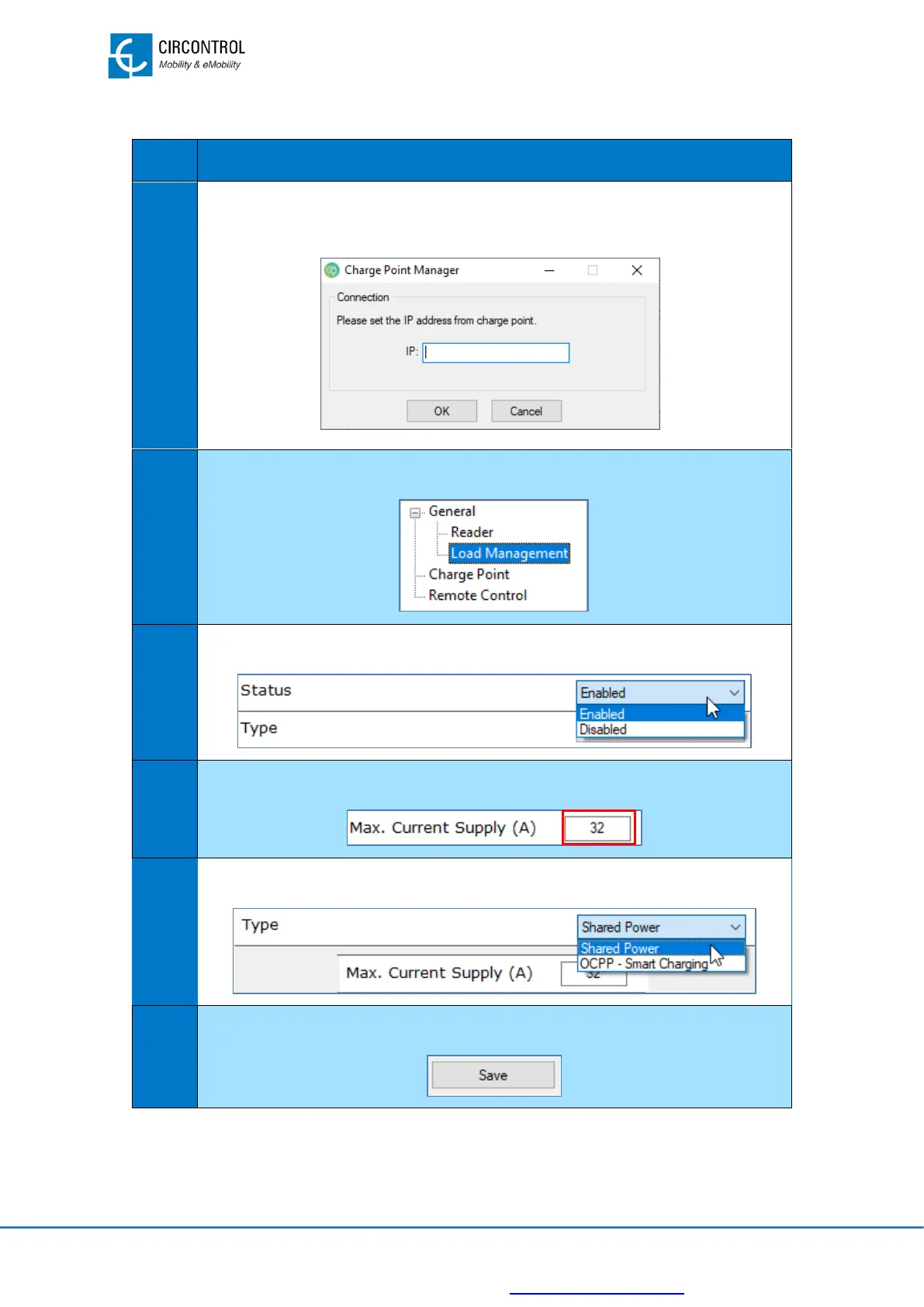
To change the Charge Point current rating, follow the steps below:
Set the IP address of the Charge Point.
IP address shall be previously assigned using IPSetup.
Select “Load management” at “General” menu.
Change the “Status” from disabled to enabled
Set the new current value to be applied at the Charge Point.
Make sure that “Shared Power” option is selected
Click the "Save” button and wait until the process ends.
For further information please, refer to Charge Point Manager Instruction Manual.


 To Next Page