SERVICE MANUAL –Post eVolve Smart
10 - CHARGE POINT ADVANCED SETTINGS
CIRCONTROL, S.A. – Innovació, 3 – 08232 – Viladecavalls (Barcelona)
Tel.: +34 937 362 940 – Fax: +34 937 362 941 70
Web: www.circontrol.com – E-mail: circontrol@circontrol.com
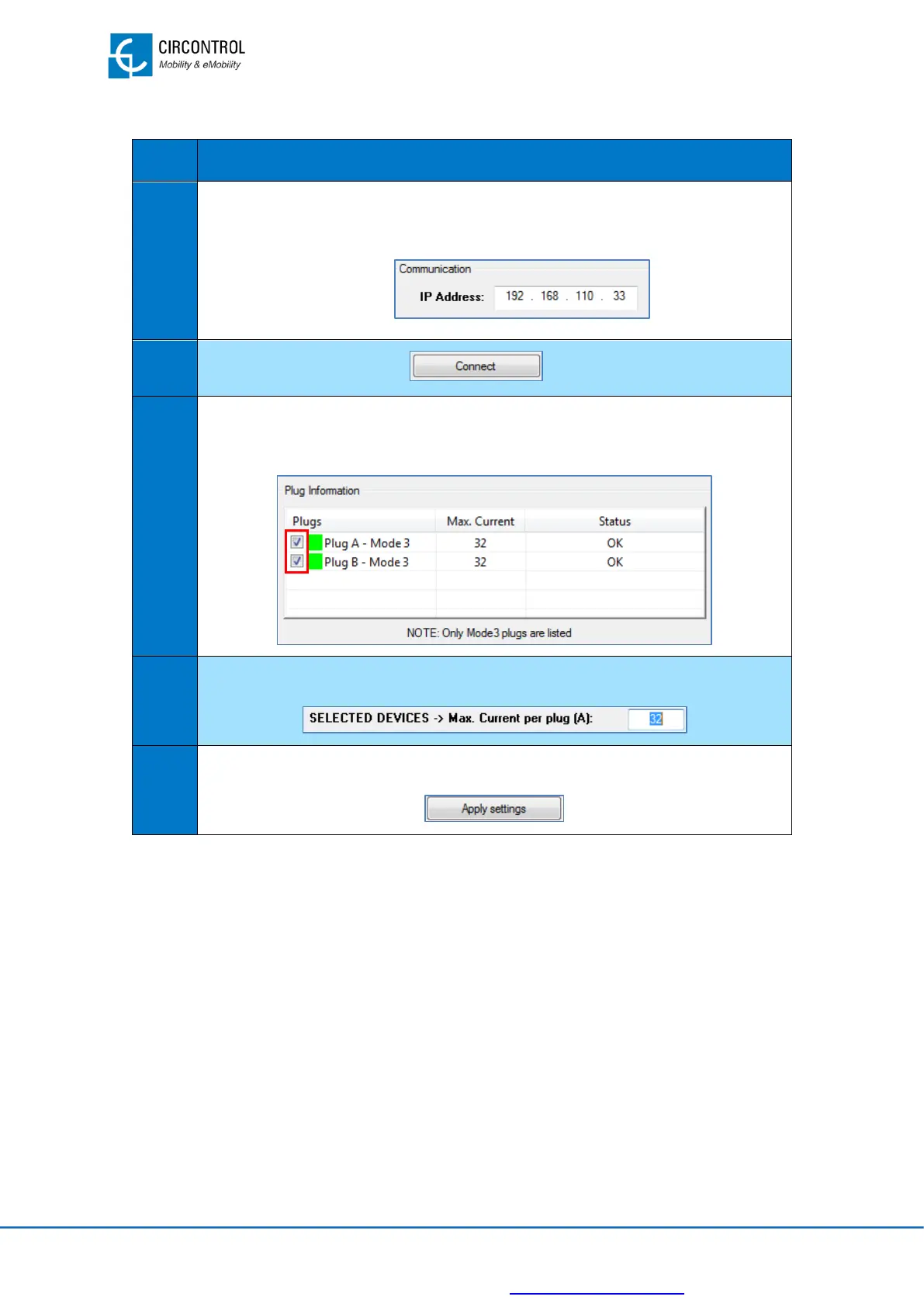
To change the Charge Point current rating, follow the steps below:
Set the IP address from the Charge Point.
IP address shall be previously assigned using IPSetup.
Click on “Connect” button.
Select the desired plugs to modify the current value. By default, all plugs are
selected.
Set the new current value to apply on each plug.
Click on “Apply settings” button and wait until the process ends.
For further information please, refer to Charge Point Setup Instruction Manual
NOTE: Charge Point Setup is available for the Charge Points with two socket/outlet type
2 but, if the current is limited by plug, the maximum current supplied by the Charge Point
will be the most restrictive set by the CPS and CPM.


 To Next Page