P2544PM | 2022-12 | REV H
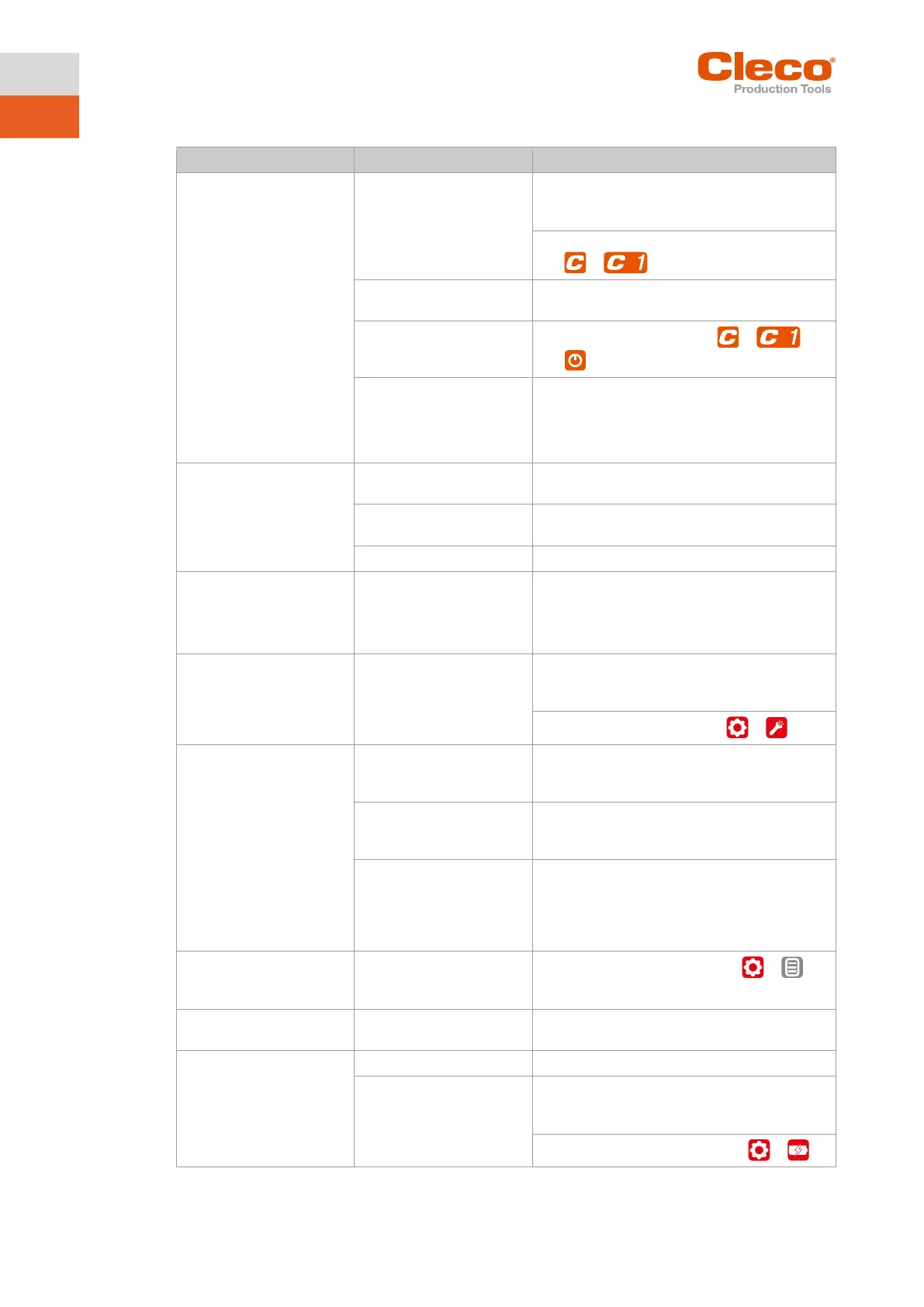
7.3 Tool problems
► Check Linking group. In the mPro mode,
select Navigator> Standard or Navigator>
► Check FastApps. In the FastApps mode:
> .
Controller is waiting for tool
enablement.
► Enable the input Tool Enable or, if not re-
quired, deactivate Tool Enable.
Fast-Apps mode disabled.
► Enable FastApps mode: > >
.
Self-identification data are
not recognized after tool
change.
Accept Tool Settings again:
1. Navigator > Tool Setup.
2. Select the line with the tool.
3. Select Tool Settings> Accept.
► Check controller and measuring card soft-
ware.
FastApps mode is acti-
vated.
► Disable FastApps mode to connect to the
controller.
counterclockwise rotation
activated.
With counterclockwise ro-
tation, parameter for speed
is set to 0
1
/min.
Parameterize Speed left rotation
► Select on the controller Navigator > Stand-
ard > Tool Groups > Settings For Speed
Disabled by parameter set-
ting.
► Parameterize the tool light on the control-
ler screen: Navigator> Advanced > Tool
Group > Extended Tool Settings.
► To activate the work light: >
Tool shuts off prematurely.
trigger before the controller
► Make sure that the operator keeps the start
trigger pressed throughout the entire se-
ceeds the standard time of
► Increase the fastening time.
setpoint.
► Check the fastening sequence to ensure
that the torque shutoff value and/or angle
setpoint are correct. Adjust as necessary.
► Check whether the fastening joint has
Control menu on tool is not
enabled or only partially
Disabled by parameter set-
ting.
► To enable the control menu: >
No-load speed not
reached.
Battery voltage is too low.
► Use a fully charged battery.
downs is not achieved with
one charge of the battery.
Battery is not fully charged.
► Use fully charged battery.
The warning threshold for
undervoltage is not set to
the minimum value.
► Reduce the Undervoltage (V) on the con-
trol screen: Navigator > Tool Setup > Tool
Settings > Others > Low Level [V].
► To set the warning threshold: >



 To Next Page