Single-point option
Page 92 CM6200 Operating Manual
Do the following to install the feed box:
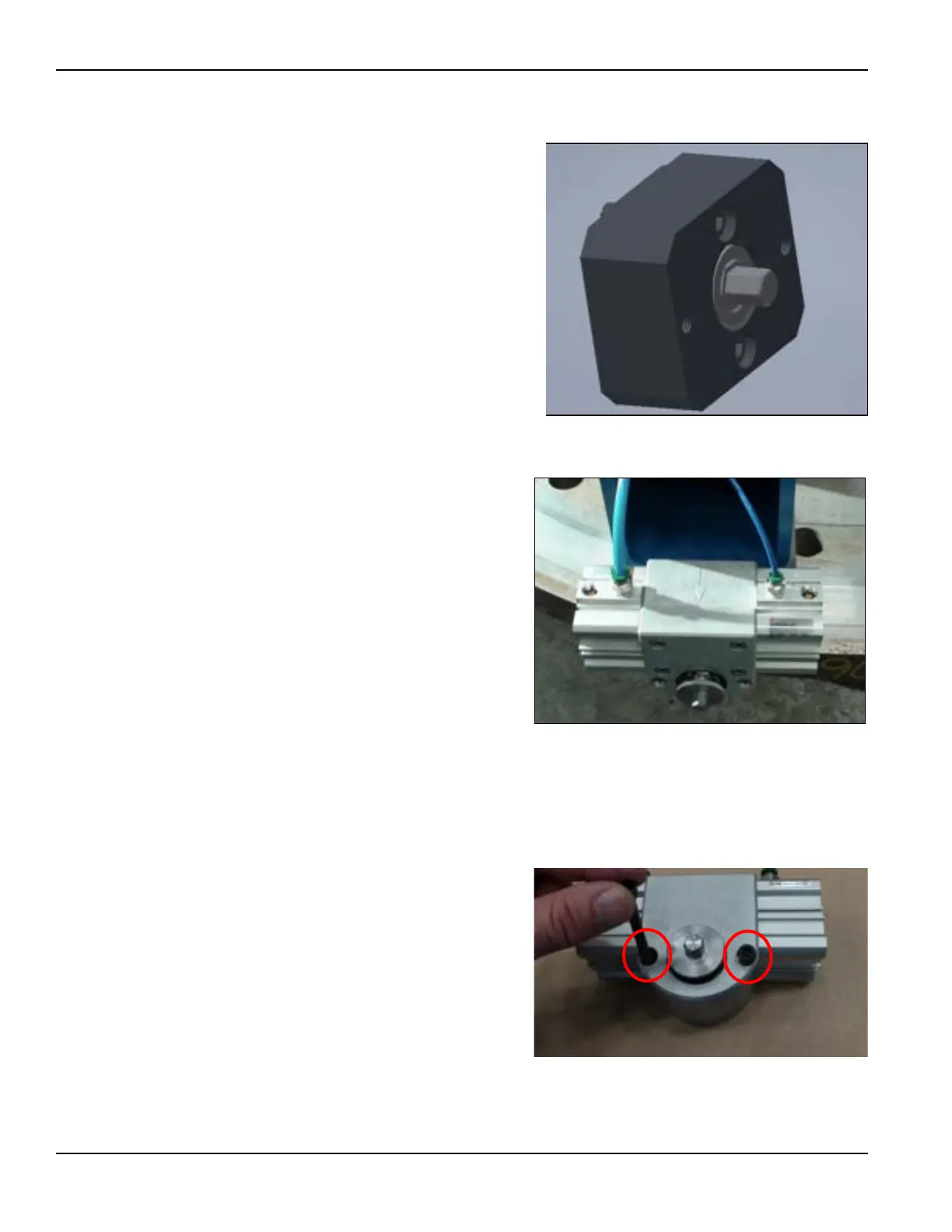
1. Install the feed box adapter
assembly (P/N 62994, seen in
Figure 4-42) onto the end of
the turning arm by bolting it
down with the two M6 x 1.0 x
30 mm SHCS.
2. Take the pneumatic feed box
assembly (P/N 58671) and
mount it onto the feed box
adapter assembly by bolting it
down with the two M6 x 1.0 x
60 mm SHCS.
When mounting, check that the
arrow is pointing in the intended
feed direction (see Figure 4-43.)
4.5.5 Reversing the feed box direction
The feed box only feeds in one direction, without a setup change.
Do the following to reverse the feed
box direction:
1. Remove the feed shaft and
two bolts connecting it to
the arm (Figure 4-44).
Disconnecting and switching
the hoses will NOT reverse
the feed direction.
FIGURE 4-42. PNEUMATIC FEED BOX ADAPTER
FIGURE 4-43. FEED DIRECTION OF FEED BOX
FIGURE 4-44. REMOVAL OF BOLTS TO REVERSE FEED DIREC-
TION



 To Next Page