Operation
2023-05 D111XXXXXX | 05 87
7.2.2 Charging state display
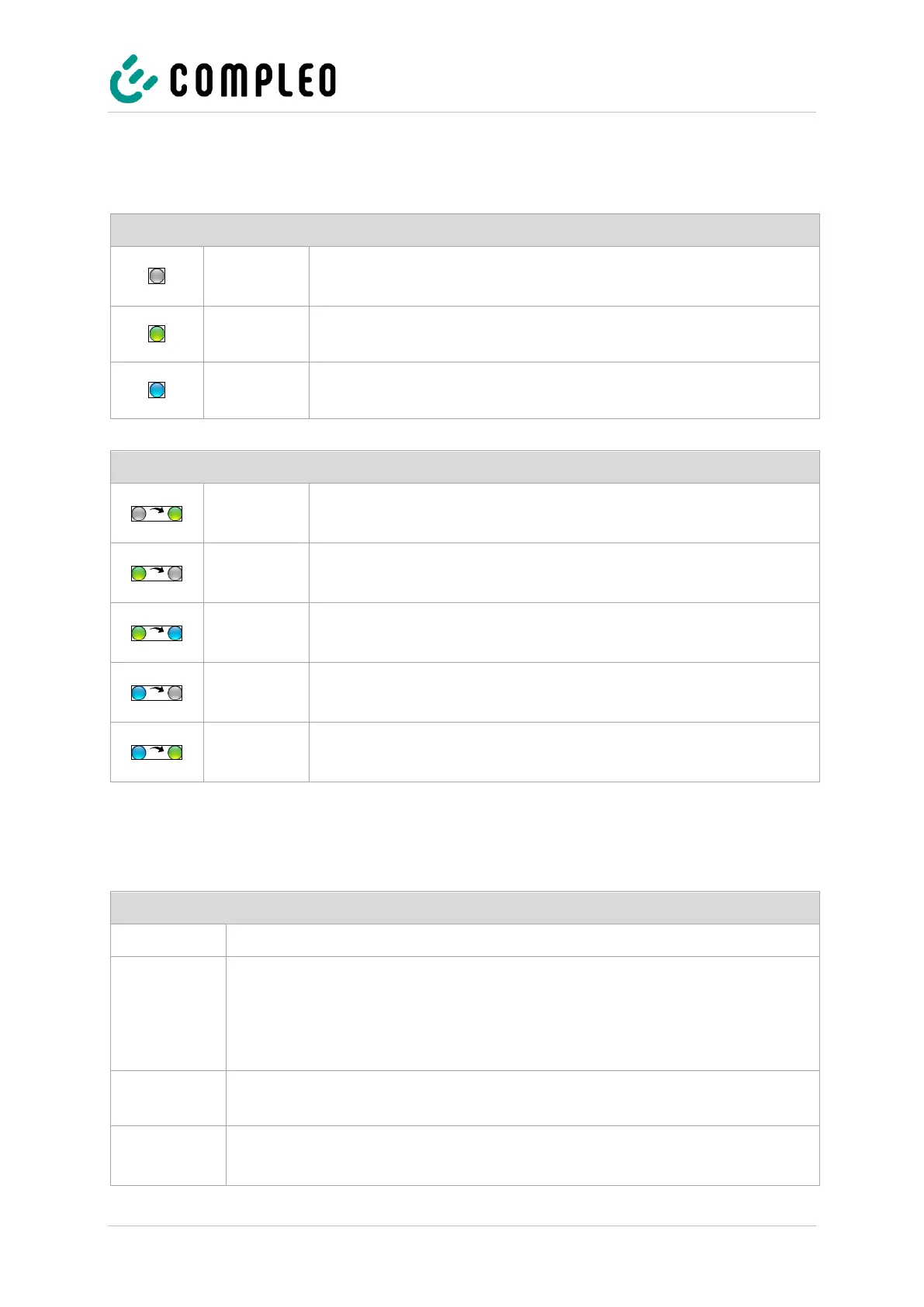
The following charging state display explains the colour states and the possible colour changes of a
charging system with status LEDs:
Charging state display: LED colour state
The charging system indicates the standby state.
• Authorisation can be carried out.
The charging system indicates readiness for operation.
• A charging process can be started.
The charging system indicates a charging process.
• The charging process can be maintained or finished.
Charging state display: LED colour change
The charging system indicates an authorisation process.
The charging system indicates an unsuccessful authorisation.
The charging system indicates the start of a charging process.
The charging system indicates a voltage drop after starting a
charging process.
The charging system indicates an unsuccessful authorisation.
7.2.3 Acoustic signals
In the following table the possible acoustic signals are listed and explained:
Sounds when the RFID card is presented and indicates "Card read".
This signal requires user interaction:
• - Present card for authorisation
or
• Plug the charging cable into the charging system and car
Authorisation timeout: Sounds if user interaction has not occurred within a certain
time.
The charging system is in an error state.
• - If there is a display, note the error message.


 To Next Page