Installation
54 D111XXXXXX | 05 2023-05
5.7.1 RJ45 connector
If a connection to a network by means of an internally installed switch is required (depending on the
equipment), this is to be realised using an RJ45 connector. The connector is enclosed and must be
connected during electrical installation. The connector must be prepared according to the following
illustrations.
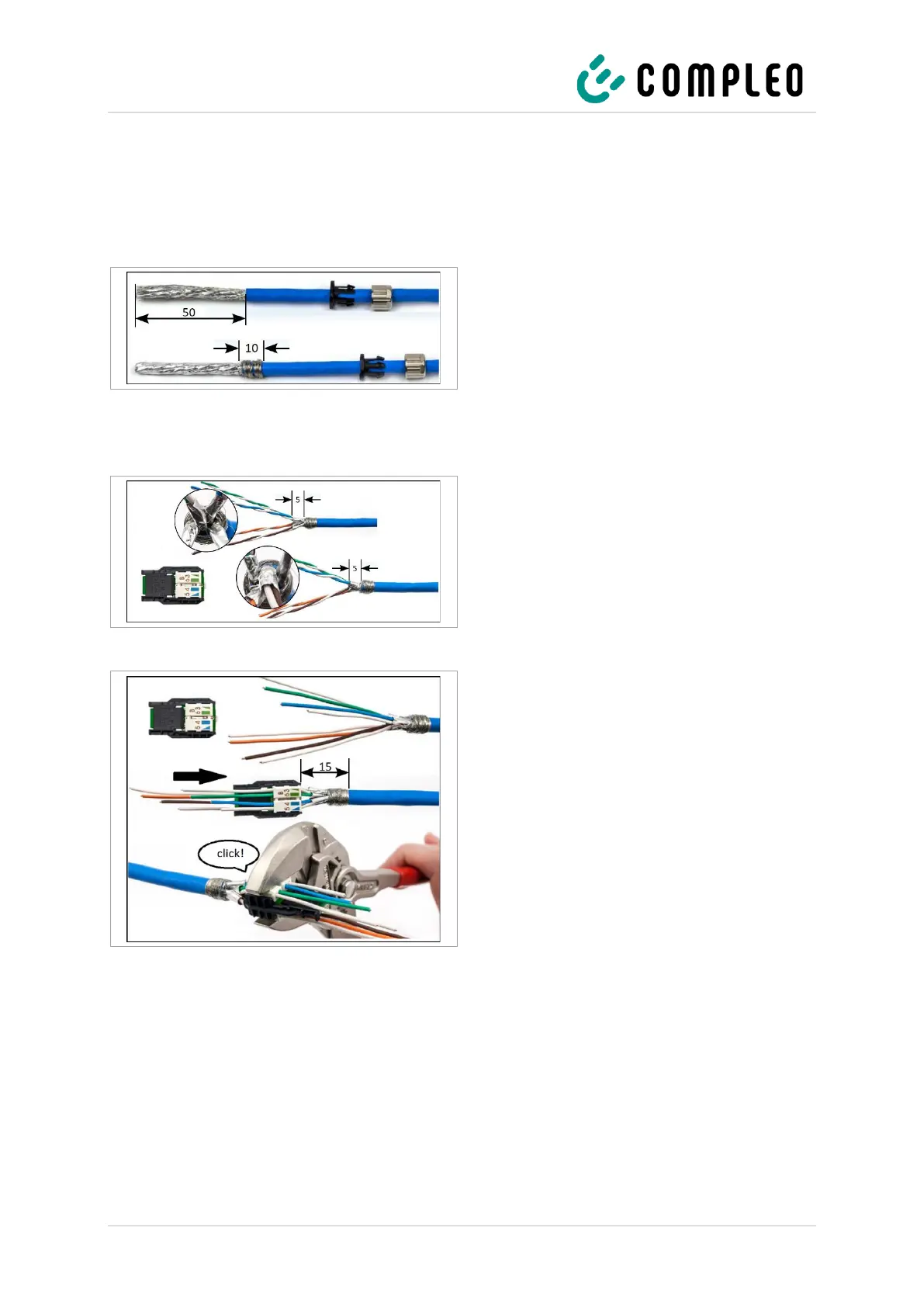
1. Strip 50 mm of insulation from the cable as
shown in the adjacent figure.
2. Push the cable gland over the stripped part
onto the cable.
3. Wrap the braided shield evenly around the
foil shield at the end of the jacket over a
width of 10 mm.
Fig. 28: Stripping the cable
4. Remove the foil shield so that it only
protrudes 5 mm from the jacket.
5. Pre-sort wire pairs so that the colours of
the manager and the wires match.
This can result in the two versions shown,
depending on which end of the network
cable is present.
Fig. 29: Sliding on the connecting piece
6. Untwist the wires and insert them into the
wire manager according to the colour
assignment.
7. Secure all wires in the wire manager with a
pliers wrench. A click must be heard to
indicate successful fastening.


 To Next Page