DT-4500 Series C- and Ku-Band Down Converters MN/DT4500.IOM
Firmware Update Revision 2
5–6
• To use Windows Explorer, see Section 5.2.4.2.
• To use the Run and Browse windows, see Section 5.2.4.3.
• To use Windows Command-line or the Command Prompt, see Section
5.2.4.4.
1) These examples specify drive letter “c:”. You can use any valid,
writable drive letter.
2) Typical for many of the tasks that follow, type the command as
instructed and then press Enter.
After you make the temporary folder, proceed to Section 5.3 to download and
extract the firmware files.
5.2.4.1 Use Windows Desktop to Make a Folder
Do these steps:
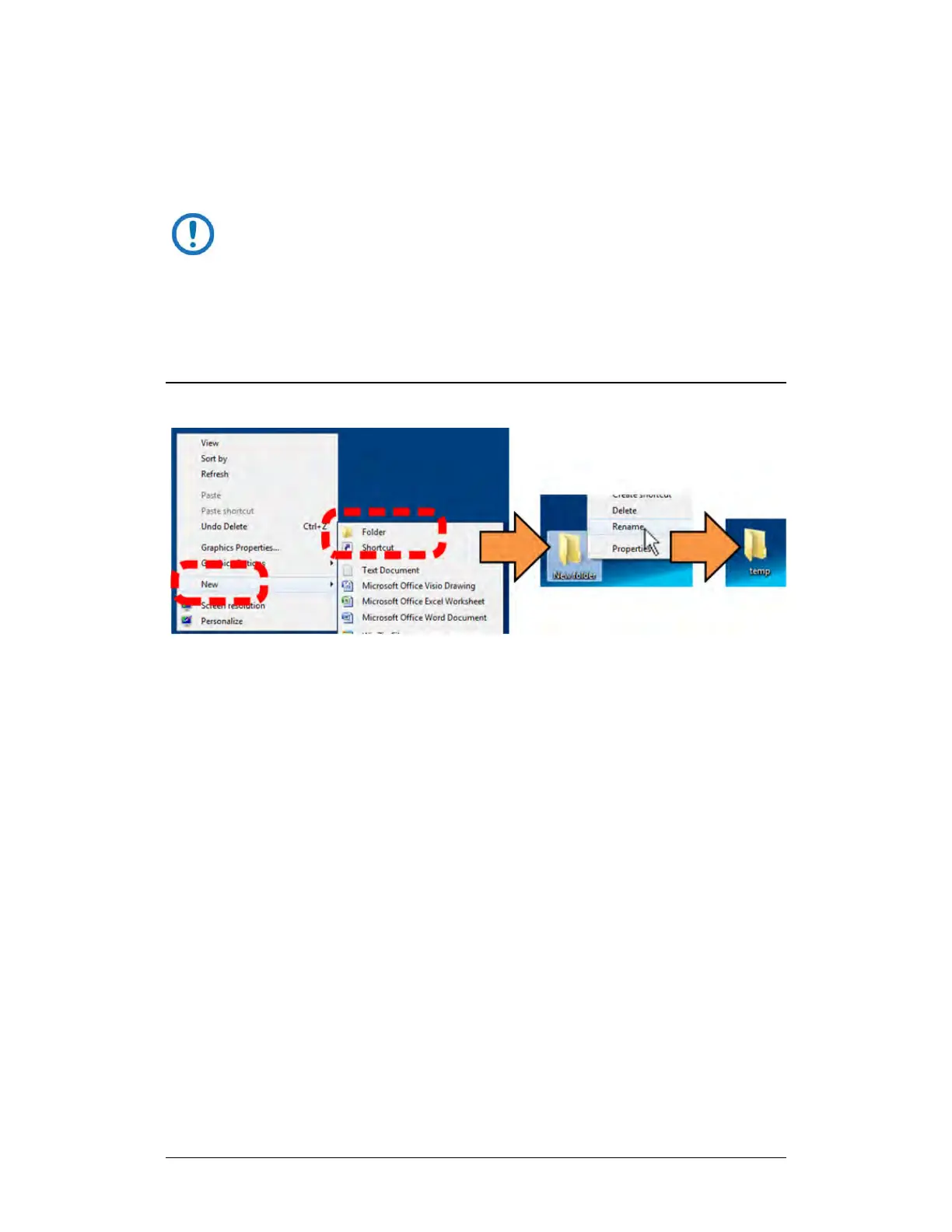
1. Right-click anywhere on the desktop to open the popup submenu.
2. Select New > Folder to make the new, temporary folder on the desktop.
3. Right-click on the new folder and then select Rename from the popup
submenu. Rename this folder to “temp” or some other convenient,
unused name.



 To Next Page