Using the scanner, how do I … Load? 4-3
4.2 Loading and Scanning Thick Media
You may need to digitize or copy images printed or pasted on thick media such as cardboard,
foamboards, gatorboards etc.
On Scanners: FLEX50i
Your flatbed scanner can accommodate originals up to 1,5” ( 38 mm,) thick while still allowing you to close
the cover. You can also scan very thick originals by placing the original on the scanner bed and leaving
the cover open.
On Scanners: HD4230i
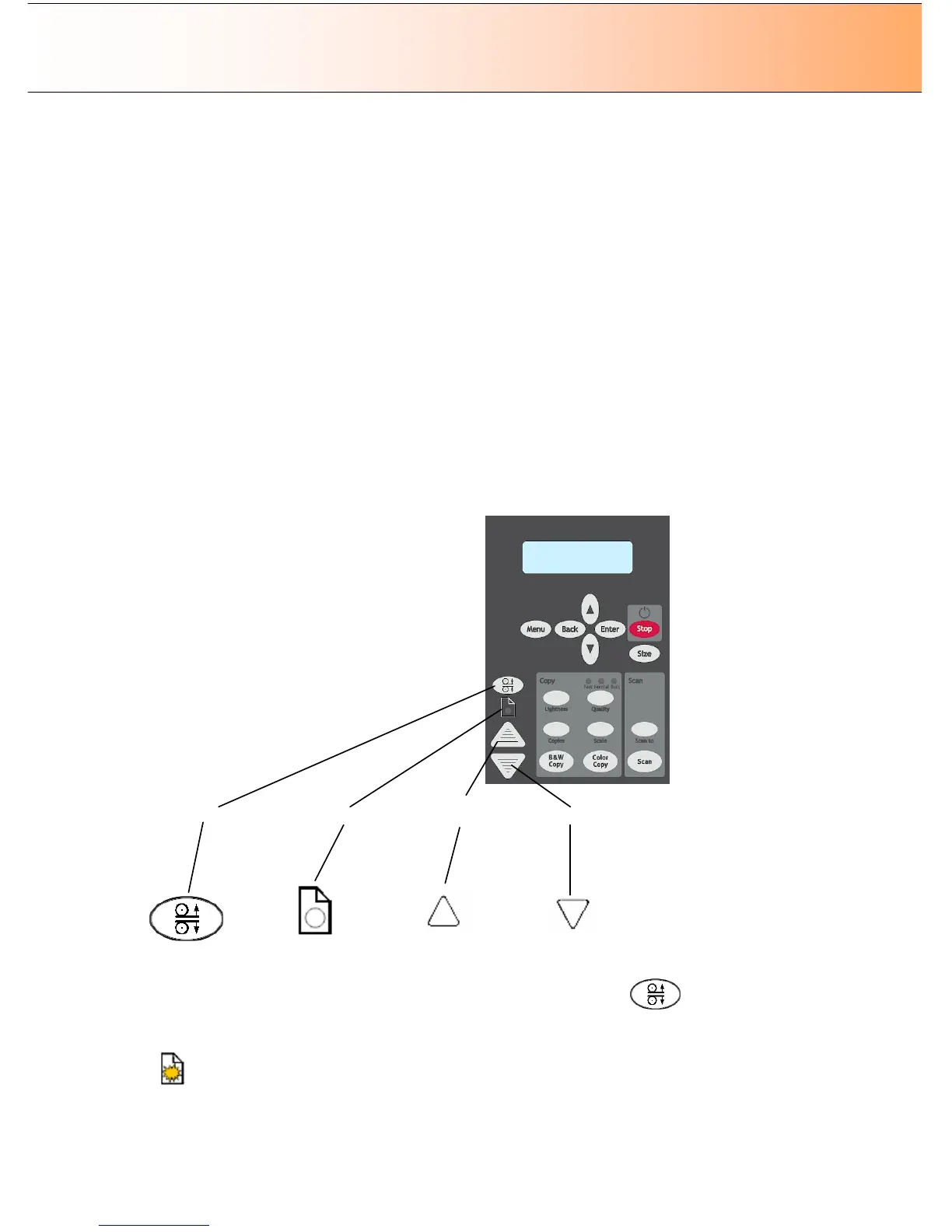
These scanners support Automatic Thickness Adjustment Control (ATAC). There is an ATAC key on the
iJET Panel. You use the key to raise and lower the pressure-platen. You can change the insertion slot
size (pressure-platen height) on your scanner from 2mm to 15 mm (up to 0.6”). Originals up to 2mm thick
should be scanned with the pressure platen all the way down (normal position). Thicker originals will
require you use the ATAC key to adjust for thick media.
Panel on Models
HD4230i
–
ATAC and paper feed buttons
Adjusting the insertion slot for thick media with ATAC:
1. Press the ATAC key on your iJET Panel to set the scanner in ATAC mode.
2. The Paper Ready Indicator blinks yellow indicating the scanner is in ATAC mode but not yet ready,
i.e., the pressure-platen is not yet positioned on the thick original.



 To Next Page