Product Manual — Doc. 9349B Crestron Zūm® Wired Solutions • 127
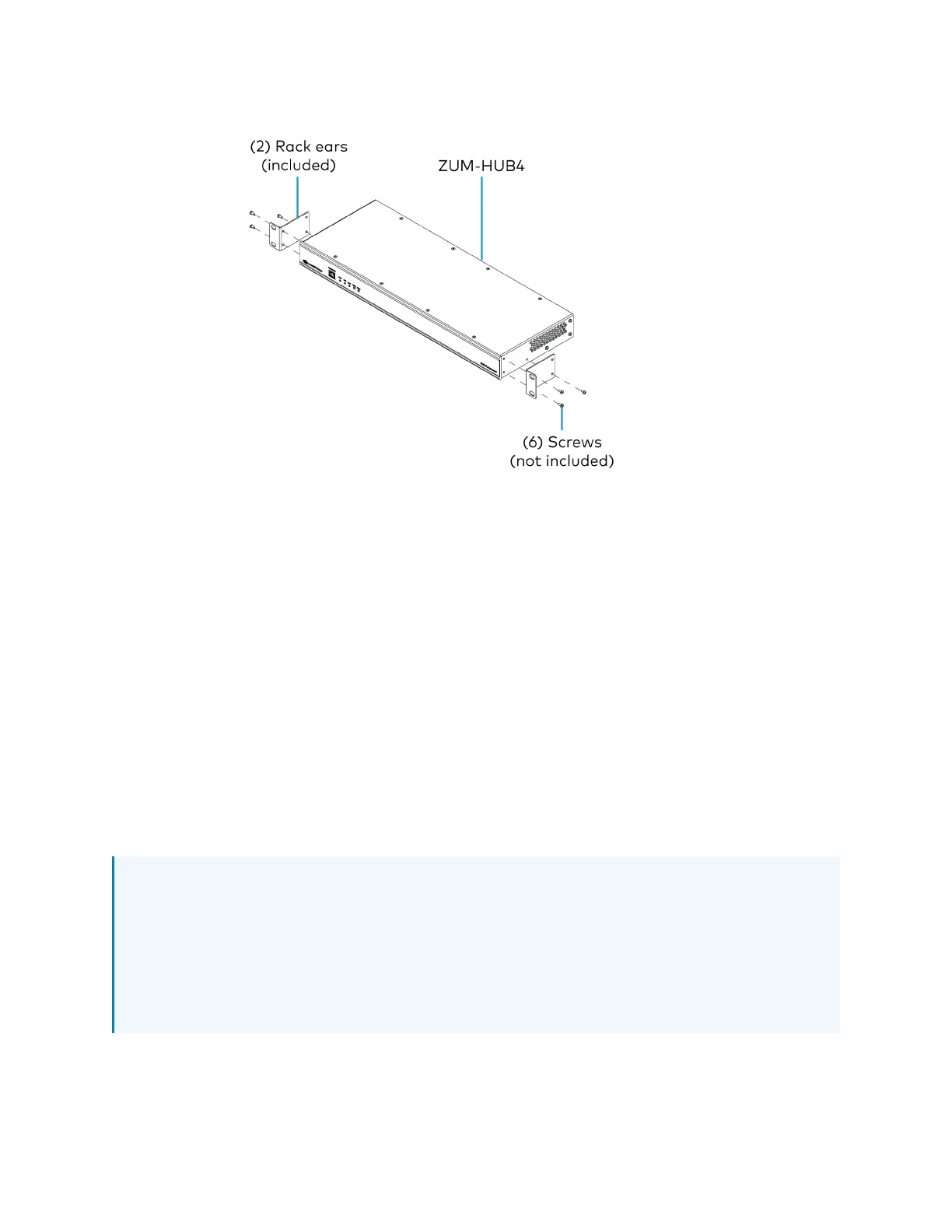
3. Mount the device into the rack using four mounting screws (notincluded).
Place onto a Flat Surface
When placing the device onto a flat surface or stacking it with other equipment, attach the
included rubber feet near the corners on the underside of the device.
Make Connections
The hub has a dedicated Control Subnet that is used for communication between the control
system and Crestron Ethernet devices. This subnet allows for dedicated communication between
the control system and Crestron Ethernet devices without interferences from other network
traffic on the LAN.
Make the connections, and note the following:
l
Use Crestron power supplies for Crestron equipment.
l
The included cable(s) cannot be extended.
l
Apply power after all connections have been made.
NOTES:
l
Ensure the unit is properly grounded by connecting the chassis ground lug to an earth
ground (building steel).
l
The hub can be powered with the (included) 24VDC power pack.
l
Do not connect the CONTROL SUBNET port to the LAN. The CONTROL SUBNET port
must be connected only to Crestron Ethernet devices.



 To Next Page