Product Manual — Doc. 9349B Crestron Zūm® Wired Solutions • 113
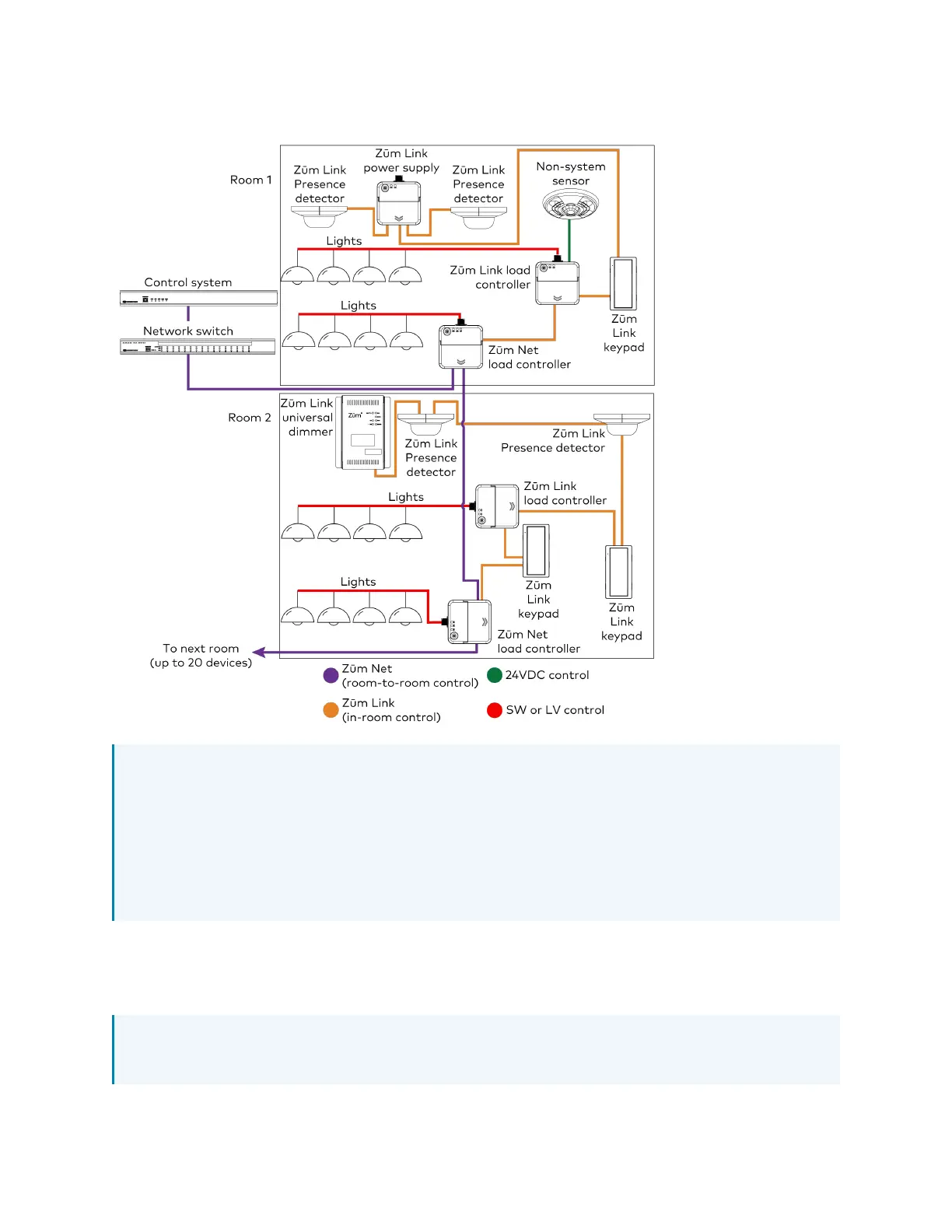
Zūm Wired System Diagram
NOTES:
l
Daisy-chain up to 20 Zūm Net devices (up to 328ft (100m) between Zūm Net devices)
with purple CBL-CAT5E-ZUMNET-P RJ-45 cables (sold separately).
l
Do not exceed three network switches between a ZUM-HUB4 and a Zūm Net device.
l
System sensors communicate digitally via Zūm Link. Non-system sensors
communicate via an analog connection on a Zūm Wired load controller.
Mount the Keypad
The ZUMLINK-KP mounts to into a standard 1-gang electrical box.
NOTE: Turn the system power off before making connections. Do not turn the system power
on until the device is fully installed in the mounting surface.



 To Next Page