232 • Crestron Zūm® Wired Solutions Product Manual — Doc. 9349B
Configure the Demand Response Mode and Level
The Demand Response Level is used in emergency situations to override the current load settings
in the room. The load levels reduce when a demand response command is received from the
utility company. Demand Response Mode can be manually controlled by accessing the Actions
Menu. Demand Response Levels can be set for all discovered devices, all devices in a Room
Category, all devices on a Floor, or all devices in a Room.
NOTE: Once a Demand Response Level is set for a device, it remains until manually changed.
For example, if a device moves to a different room or floor, the Demand Respond Level does
not automatically inherit the level set for the new location. The device keeps the level
previously set.
This section provides the following information:
l
Configure Demand Response Mode on page 232
l
Set the Demand Response Level for All Discovered Devices on page 233
l
Set the Demand Response Level for a Room Category on page 233
l
Set the Demand Response Level for a Room on page 234
l
Set the Demand Response Level for a Floor on page 235
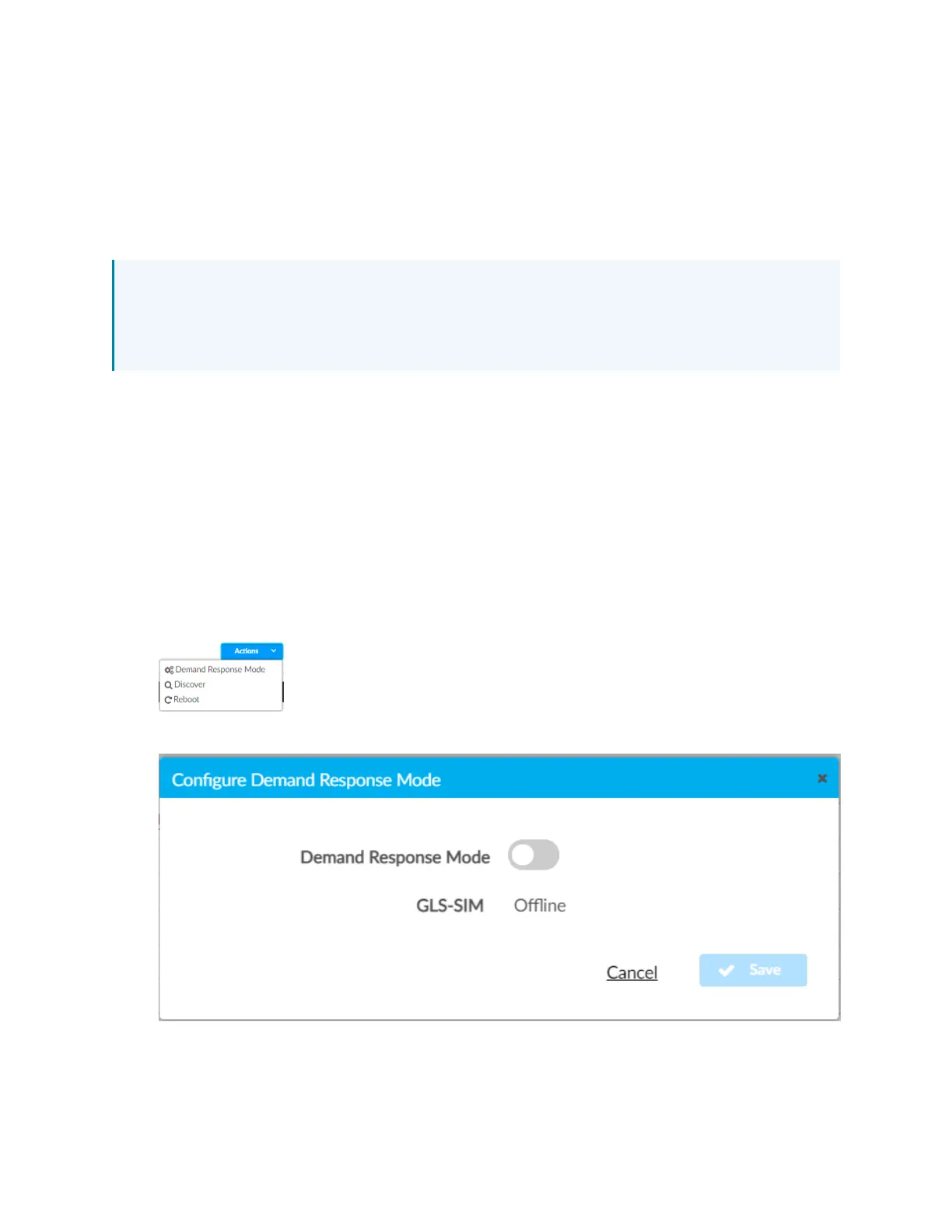
Configure Demand Response Mode
To manually turn Demand Response Mode on or off:
1. Click the Actions menu.
2. Click Demand Response Mode. The Configure Demand Response Mode window opens.



 To Next Page