Configuring VLANs
Defining VLAN Interface Settings
Page 111
• Exclude (Gray) — Excludes the interface from the VLAN. However, the interface can be added to the VLAN
through GARP.
• Forbidden (Red) — Denies the interface VLAN membership, even if GARP indicates the port is to be added.
Defining VLAN Interface Settings
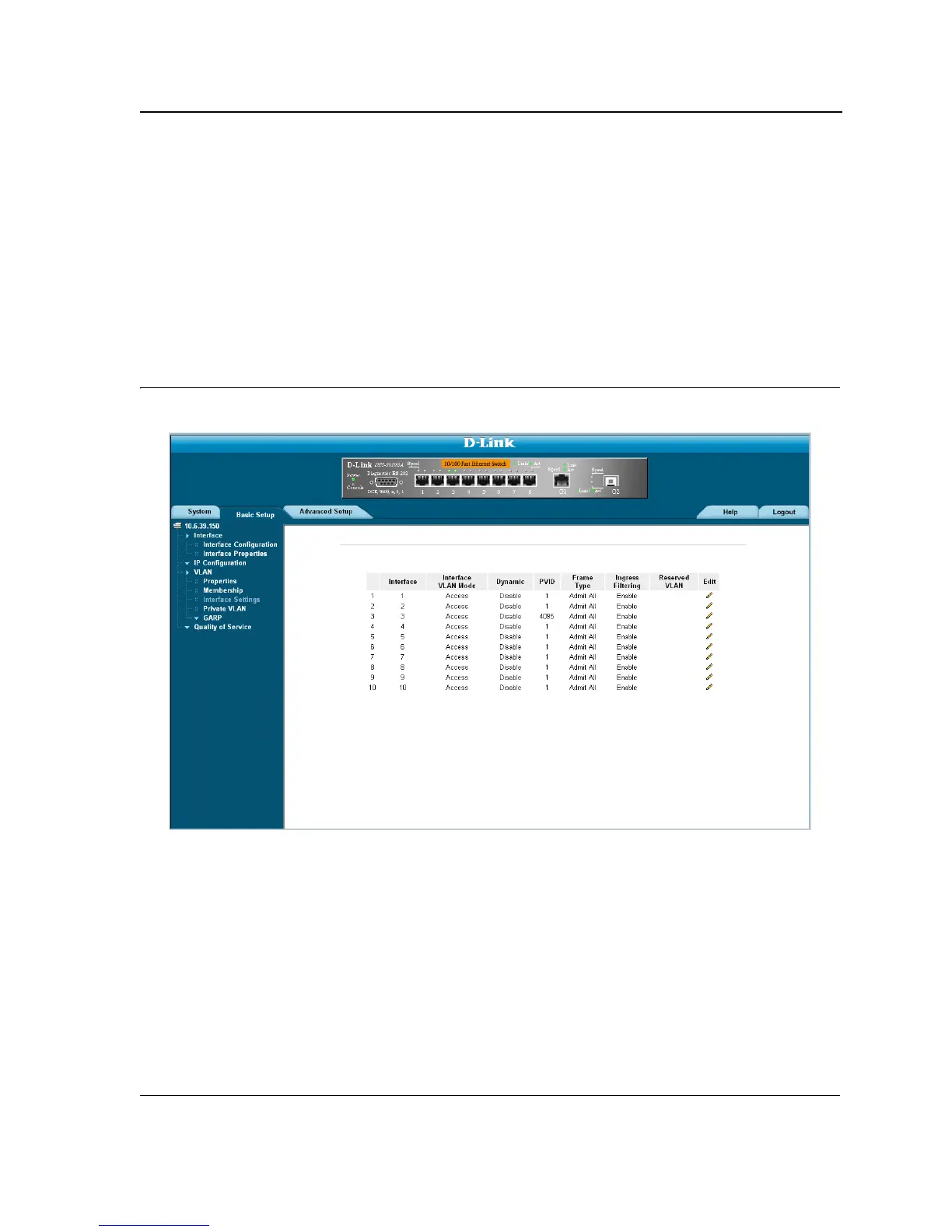
The VLAN Interface Settings Page contains fields for managing ports that are part of a VLAN. The port default
VLAN ID (PVID) is configured on the VLAN Interface Settings Page. All untagged packets arriving at the device
are tagged with the port PVID. To define VLAN interfaces:
1. Click Basic Setup > VLAN > Membership > Interface Settings. The VLAN Interface Settings Page opens.
Figure 62: VLAN Interface Settings Page
The VLAN Interface Settings Page contains the following fields:
• Interface — Displays the port number included in the VLAN.
• Interface VLAN Mode — Displays the port mode. The possible values are:
– General — Indicates the port belongs to VLANs, and each VLAN is user-defined as tagged or untagged
(full IEEE802.1q mode).
– Access — Indicates a port belongs to a single untagged VLAN. When a port is in Access mode, the
packet types which are accepted on the port cannot be designated. Ingress filtering cannot be enabled or
disabled on an access port.
– Trunk — Indicates the port belongs to VLANs in which all ports are tagged, except for one port that can
be untagged.













 To Next Page