Configuring IP Information
Configuring IP Interfaces
Page 127
Configuring ARP
The Address Resolution Protocol (ARP) converts IP addresses into physical addresses, and maps the IP address
to a MAC address. ARP allows a host to communicate with other hosts only when the IP address of its neighbors
is known. To define ARP information:
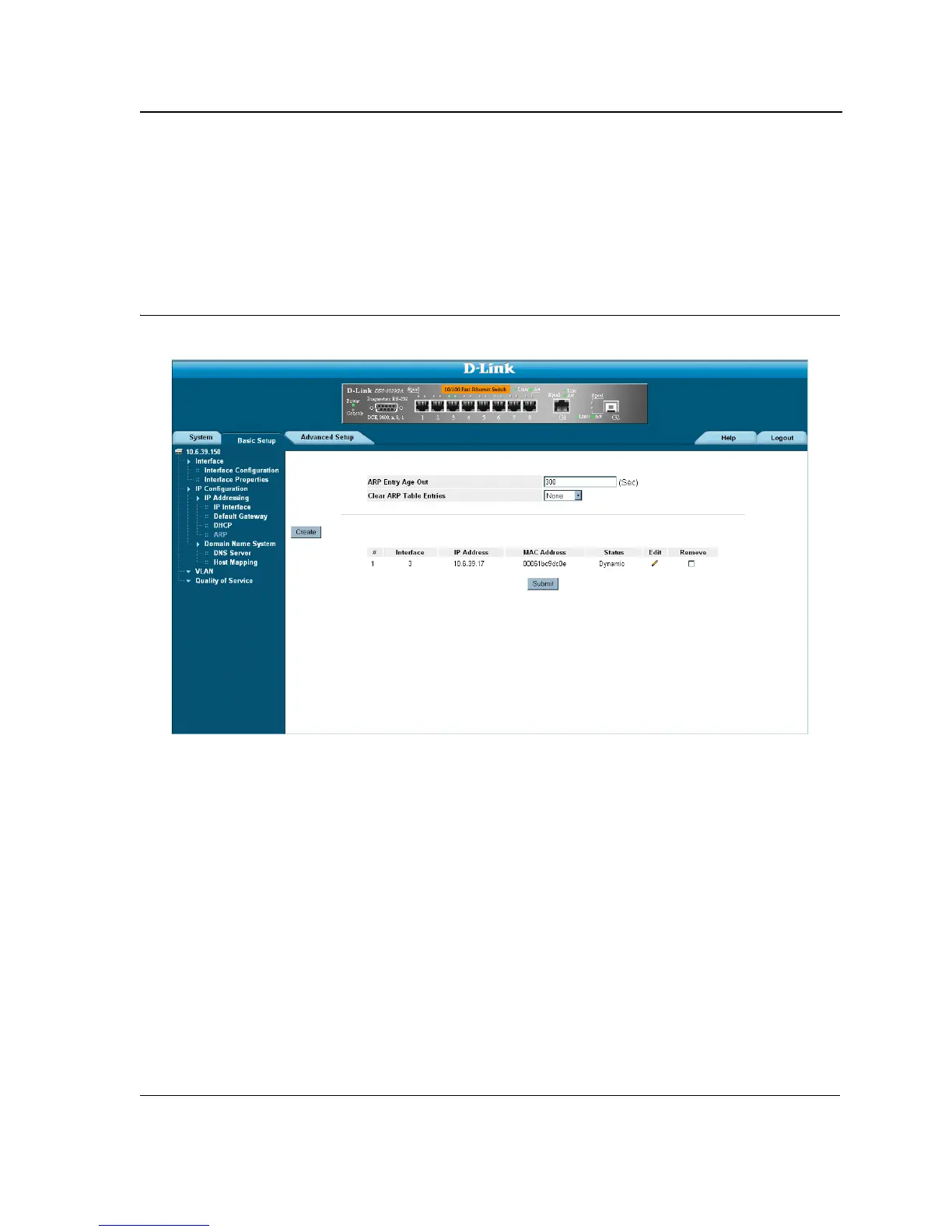
1. Click Basic Setup > IP Configuration > IP Addressing > ARP. The ARP Page opens:
Figure 76: ARP Page
The ARP Page contains the following fields:
• ARP Entry Age Out — Specifies the amount of time (in seconds) that passes between ARP Table entry.
requests. Following the ARP Entry Age period, the entry is deleted from the table. The range is 1 - 40000000.
The default value is 60000 seconds.
• Clear ARP Table Entries — Specifies the types of ARP entries that are cleared. The possible values are:
– None — Does not clear ARP entries.
– All — Clears all ARP entries.
– Dynamic — Clears only dynamic ARP entries.
– Static — Clears only static ARP entries.
• Interface — Displays the interface type for which ARP parameters are displayed. The possible field values
are:
– Port — The port for which ARP parameters are defined.
– LAG — The LAG for which ARP parameters are defined.
– VLAN — The VLAN for which ARP parameters are defined.













 To Next Page