Configuring Device Security
Configuring Management Security
Page 73
Mapping Authentication Methods
After authentication profiles are defined, they can be applied to management access methods. For example, con-
sole users can be authenticated by Authentication Profile List 1, while Telnet users are authenticated by Authenti-
cation Method List 2.
Authentication methods are selected using arrows. The order in which the methods are selected is the order by
which the authentication methods are used.
To map authentication methods:
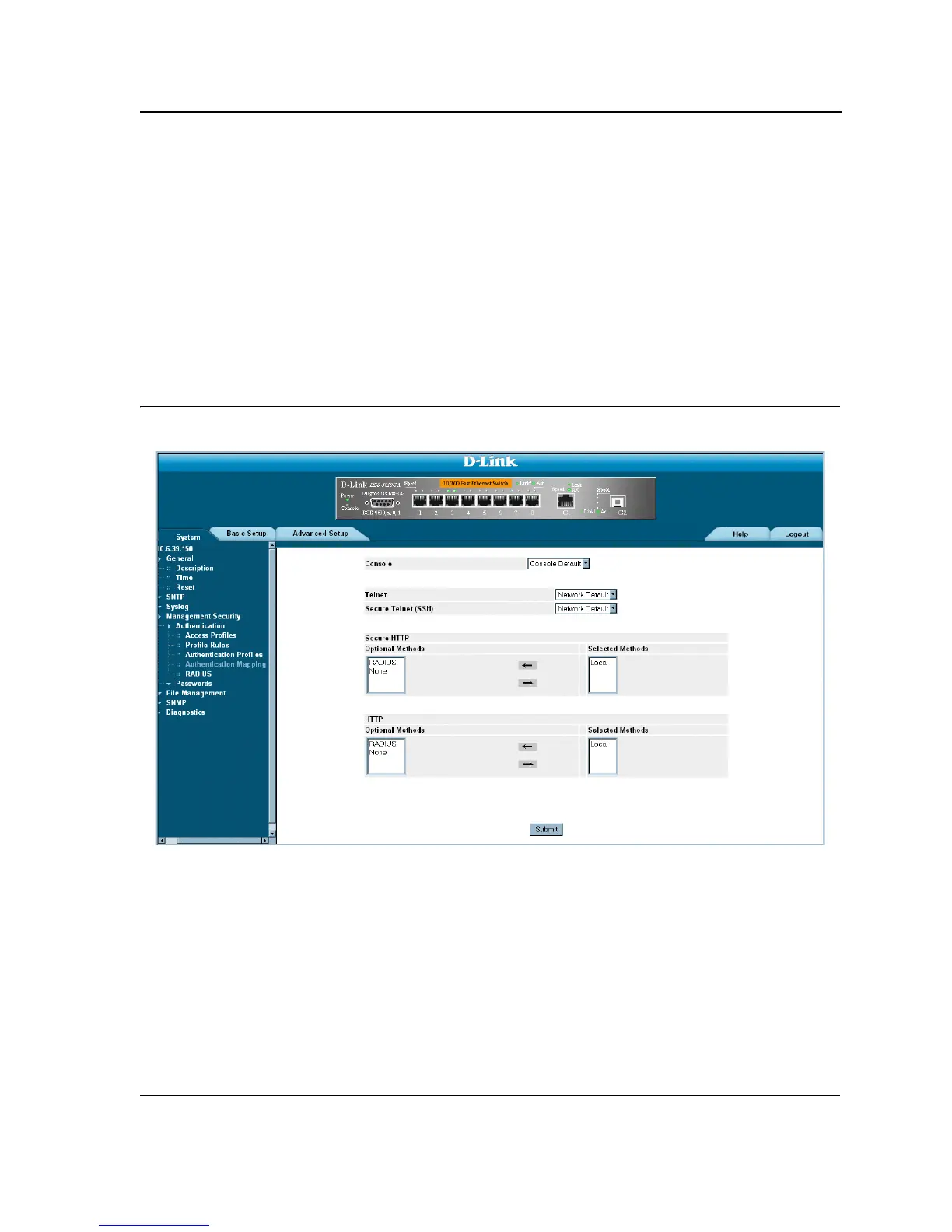
1. Click System > Management Security > Authentication > Authentication Mapping. The Authentication
Mapping Page opens.
Figure 33: Authentication Mapping Page
The Authentication Mapping Page contains the following fields:
• Console — Authentication profiles used to authenticate console users.
• Telnet — Authentication profiles used to authenticate Telnet users.
• Secure Telnet (SSH) — Authentication profiles used to authenticate Secure Shell (SSH) users. SSH pro-
vides clients secure and encrypted remote connections to a device.
• Secure HTTP — Authentication methods used for Secure HTTP access. Possible field values are:
– None — No authentication method is used for access.
– Local — Authentication occurs locally.
– RADIUS — Authentication occurs at the RADIUS server.













 To Next Page