Configuring SNMP
Configuring SNMP Security
Page 173
– SNMP Admin — User has access to all device configuration options, as well as permissions to modify
the community.
• View Name — Contains a list of user-defined SNMP views
• Remove — Removes a community. The possible field values are:
– Checked — Removes the selected SNMP community.
– Unchecked — Maintains the SNMP communities.
SNMP Communities Advanced Tables
The SNMP Communities Advanced Tables contains the following fields:
• Management Station — Displays the management station IP address for which the advanced SNMP com-
munity is defined.
• Community String — Defines the password used to authenticate the management station to the device.
• Group Name — Defines advanced SNMP community group names.
• Remove — Removes a community. The possible field values are:
– Checked — Removes the selected SNMP communities.
– Unchecked — Maintains the SNMP communities.
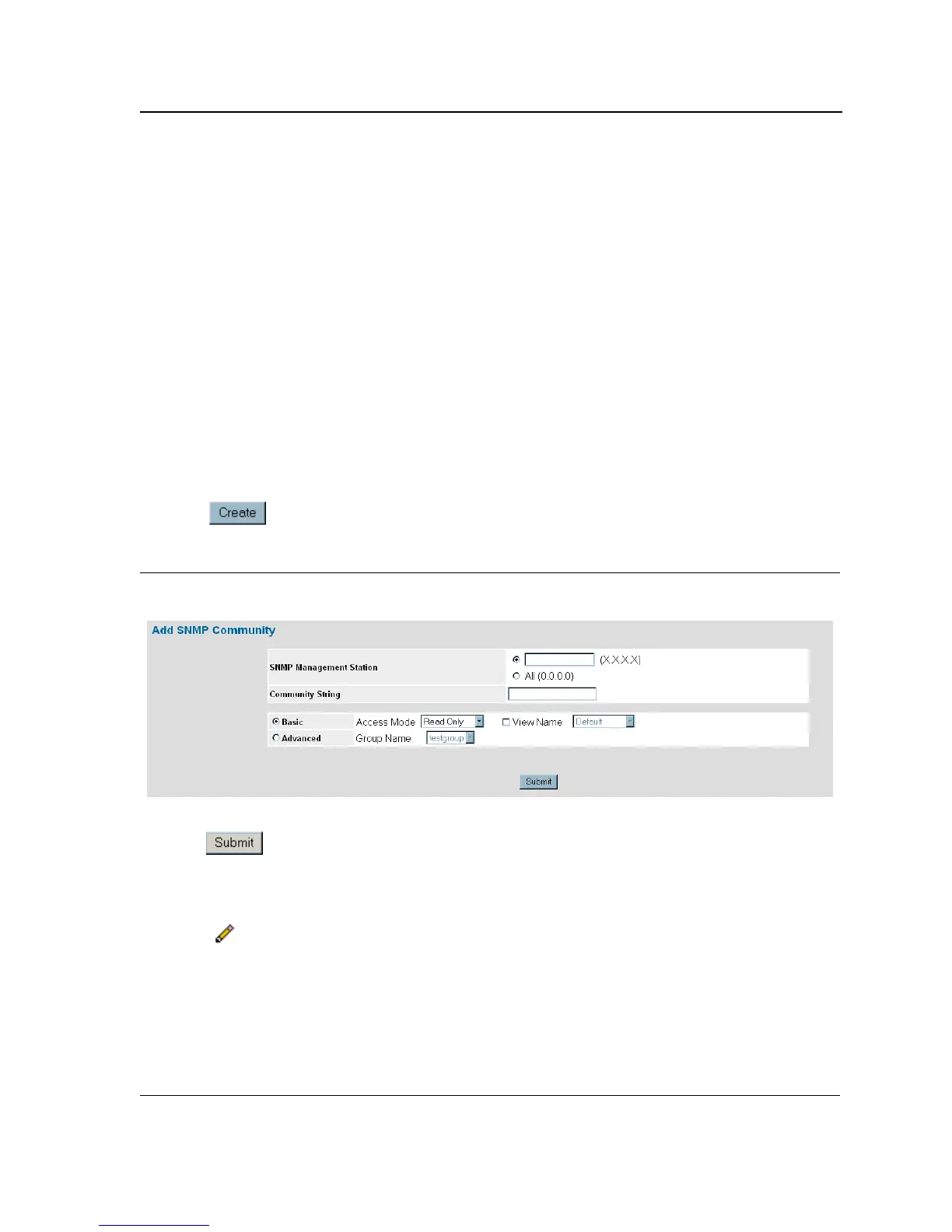
2. Click . The Add SNMP Community Page opens:
Figure 110:Add SNMP Community Page
3. Define the SNMP Management Station, Community String, and Basic or Advanced fields.
4. Click . The SNMP community is added, and the device is updated.
To modify SNMP Group Membership Settings:
1. Click System > SNMP > Security > Communities. The SNMP Communities Page opens.
2. Click . The SNMP Community Settings Page opens:













 To Next Page