User's Manual
80
Table 4-45 Auto maintain parameter description
Parameter Description
Auto Reboot
●
Select, and set restart period, and time.
●
The system will automatically restart within the defined period, and
time.
Auto Delete Old Files Customize time, and delete all the old files before the time.
Manual Reboot Manually restart the Camera.
Step 3 Click
Confirm
.
4.5.6.7 System Upgrade
Upgrade system of the Camera to keep the camera functions always working. You can upgrade the
system by using upgrade file or through online upgrade.
●
Upgrading the wrong program might result in the Camera not working properly.
●
During upgrading, make sure that the Camera is not disconnected from power, and network, and
restart or shut down the web.
●
Online upgrade is not supported in the current version. Do not select
Online Upgrade
on the
web page.
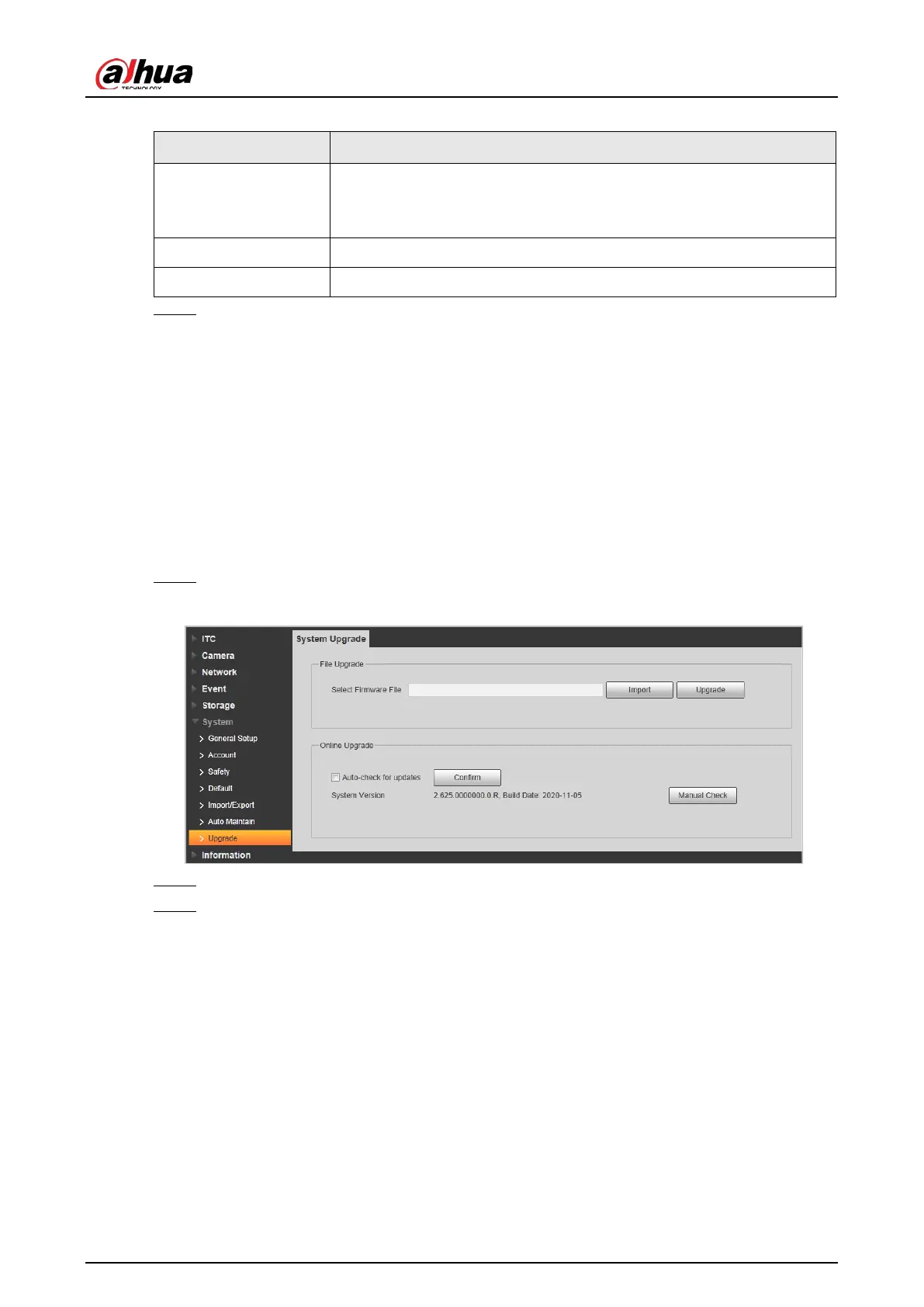
Step 1 Select
Setting
>
System
>
Upgrade
.
Figure 4-98 System upgrade
Step 2 Click
Import
, and import upgrade file (.bin).
Step 3 Click
Upgrade
.
The system starts to upgrade firmware.
4.5.7 Information
The system supports viewing version, user, and log, and more.
4.5.7.1 Version
You can view the version information of the Camera.
Select
Setting
>
Information
>
Version
.


 To Next Page
 Loading...