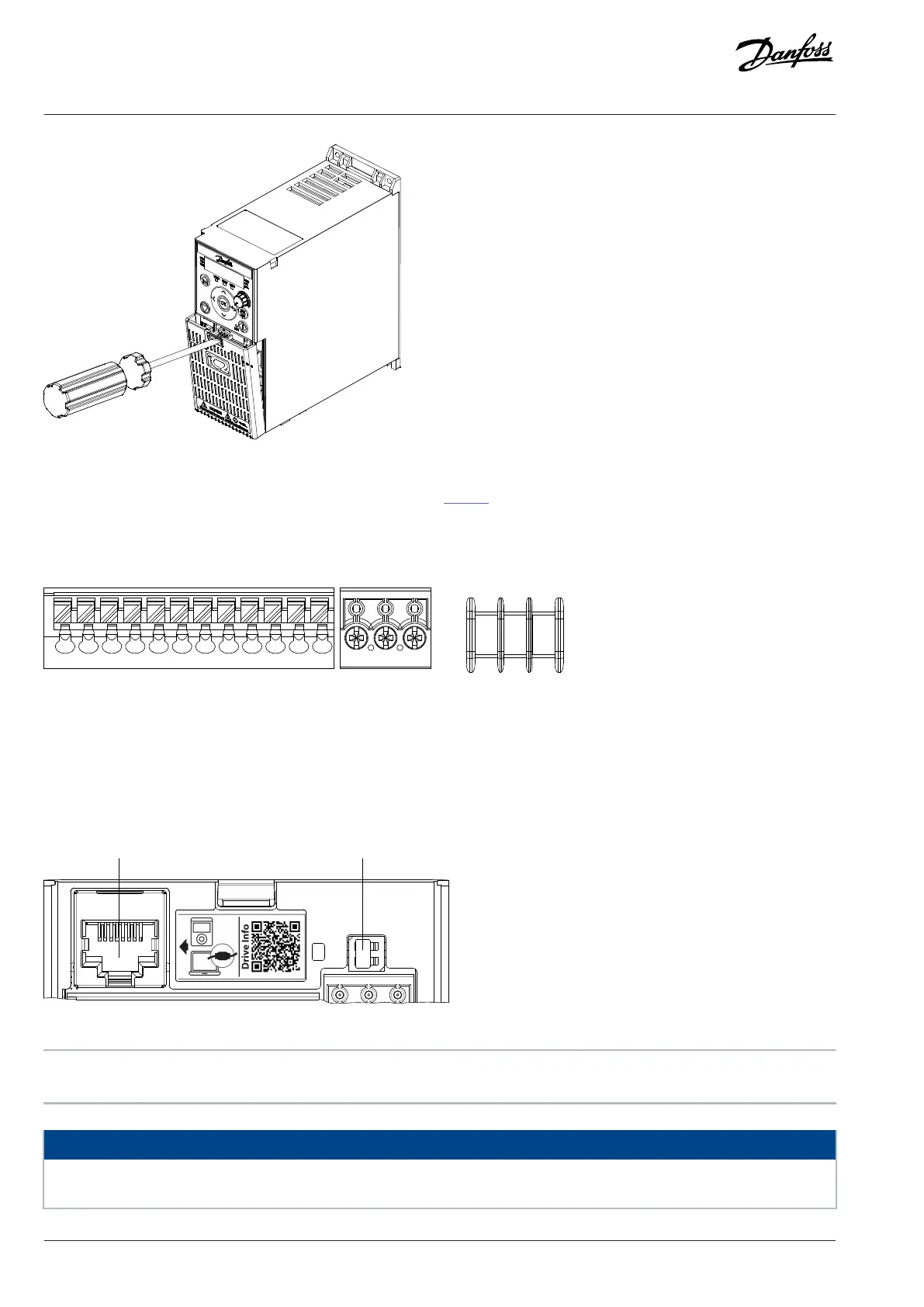
Figure 4: Removing Terminal Cover
All control terminals of iC2-Micro Frequency Converters are shown in Figure 5.
DI3
DI4
AO1
AI1
AI2
COM RS 485
P RS 485
N RS 485
GND
GND
15 17 18 20 31 32 33 34 35 61 68 69
Figure 5: Overview of Control Terminals
3.5.2 RJ45 Port and RS485 Termination Switch
The drive has an RJ45 port which complies with Modbus 485 protocol. The RJ45 port is used for connecting:
l External control panel (Control Panel 2.0 OP2)
l PC tool (MyDrive® Insight) via Quick Adapter USB-C/RJ45 OAX00
Figure 6: RJ45 Port and RS485 Termination Switch
1 RJ45 port 2 RS485 termination switch (ON=RS485 terminated,
OFF=Open)
NOTICE
The RJ45 port supports up to 3m (9.8ft) of shielded CAT5e cable which is NOT used to directly connect the drive to a PC. Failure
to follow this notice causes damage to the PC.
20 | Danfoss A/S © 2024.08 AJ402315027937en-000401 / 130R1239
Design Guide | iC2-Micro Frequency Converters iC2-Micro Frequency Converters


 To Next Page