EasyManua.ls Logo

Datalogic DM3610 - Page 77

Datalogic DM3610
157 pages
Print Icon
To Next Page IconTo Next Page
To Previous Page IconTo Previous Page
Loading...
DC3000 USER INTERFACE
67
4
Field Name
Action/Definition
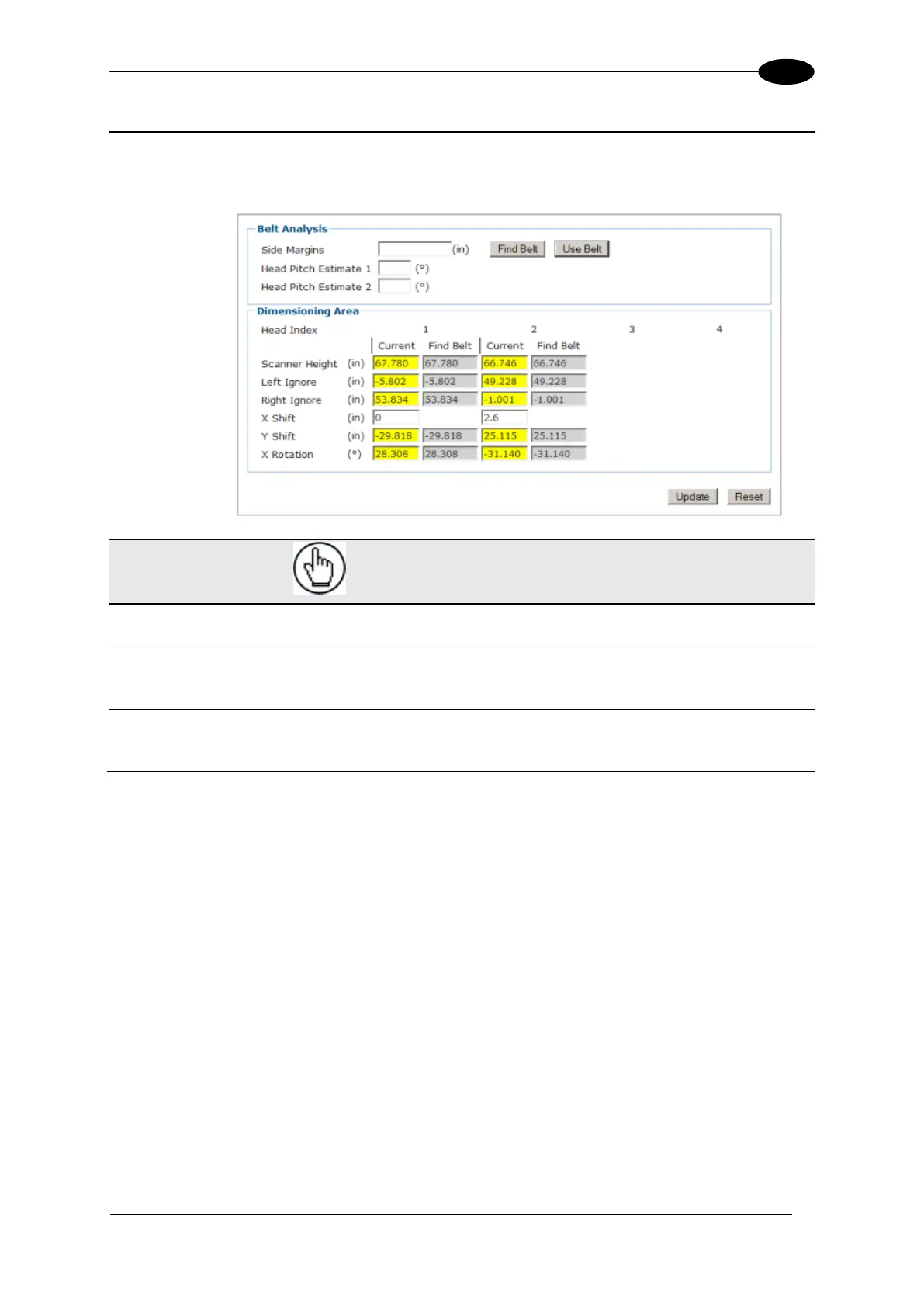
Use Belt
Click Use Belt to transfer the "found" or calculated dimensions to the
Dimensioning Area fields. The values are highlighted in yellow until the
page has been updated.
Dimensioning
Area
NOTE: All these values, except for the X Shift,
are automatically populated by the Find
Belt/Use Belt commands
Scanner
Height
This indicates the distance from the scanner to conveyor belt surface.
Left Ignore
This indicates the distance from the center of the scan line to the left edge of
the belt. Scan points beyond this distance will be ignored.
Right Ignore
This indicates the distance from the center of the scan line to the right edge
of the belt. Scan points beyond this distance will be ignored.

Table of Contents