b Tighten the second screw completely.
c Return to the rst screw and tighten it completely.
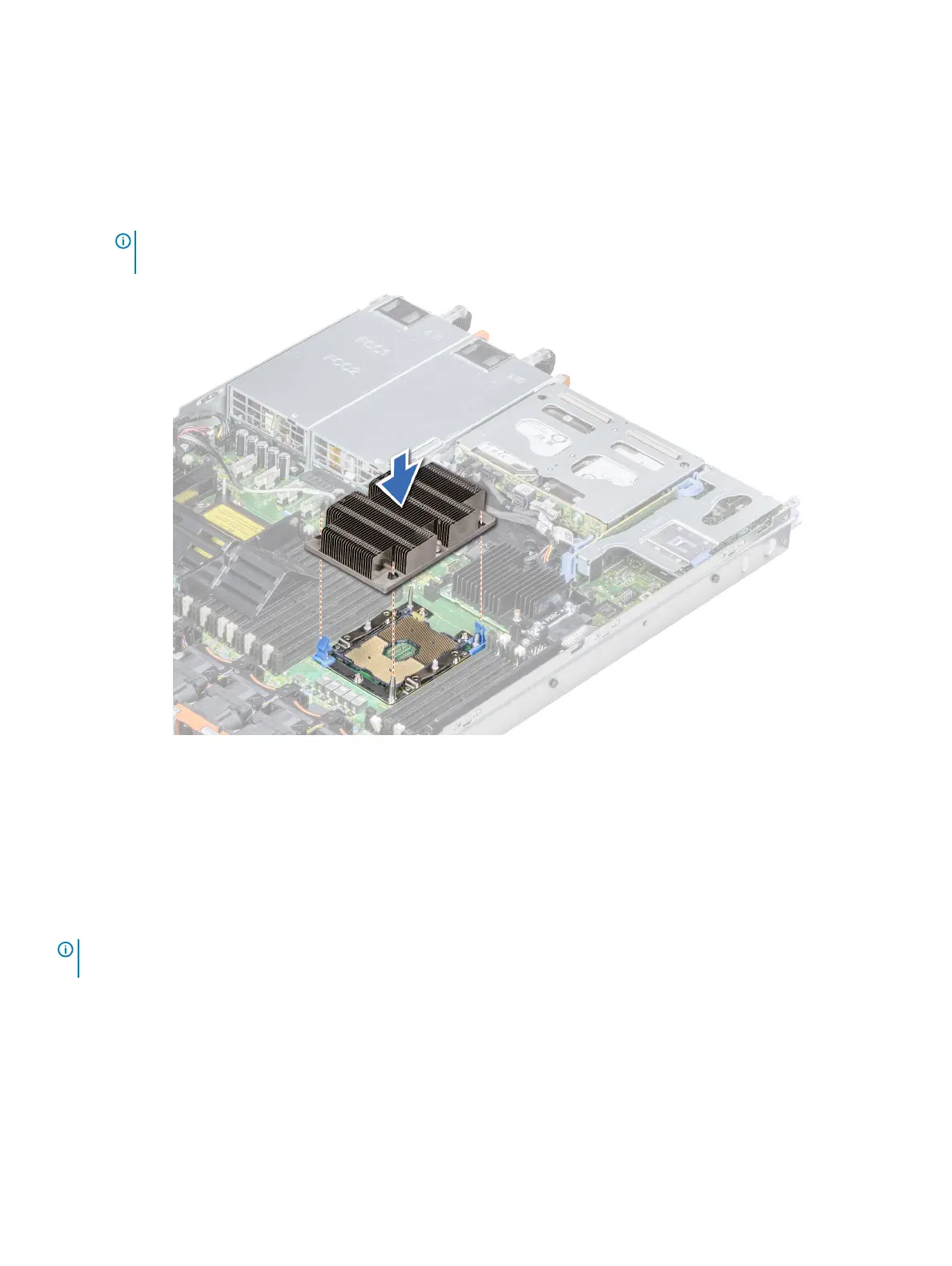
If the PHM slips o the blue retention clips when the screws are partially tightened, follow these steps to secure the PHM:
a Loosen both the heat sink screws completely.
b Lower the PHM on to the blue retention clips, following the procedure described in step 2.
c Secure the PHM to the system board, following the replacement instructions listed in this step above. 4.
NOTE: The processor and heat sink module retention screws should not be tightened to more than 0.13 kgf-m (1.35 N.m
or 12 in-lbf).
Figure 45. Installing a processor and heat sink module
Next step
1 Follow the procedure listed in After working inside your system.
Expansion cards and expansion card risers
NOTE
: A System Event Log (SEL) event is logged if an expansion card riser is not supported or missing. It does not prevent your
system from turning on. However, if a F1/F2 pause occurs and an error message is displayed.
Expansion bus specications
The PowerEdge R640 system supports PCI express (PCIe) generation 3 expansion cards, which are installed on the system, using
expansion card risers. This system supports 1A, 2A, 1B, and 2B expansion card risers.
100
Installing and removing system components















 To Next Page