The key is needed only if your system includes a bezel.
• Phillips #1 screwdriver
• Phillips #2 screwdriver
• 1/4 inch at head screwdriver
• Torx #T30 screwdriver
• Wrist grounding strap
You need the following tools to assemble the cables for a DC power supply unit.
• AMP 90871-1 hand-crimping tool or equivalent
• Tyco Electronics 58433-3 or equivalent
• Wire-stripper pliers to remove insulation from size 10 AWG solid or stranded, insulated copper wire
NOTE: Use alpha wire part number 3080 or equivalent (65/30 stranding).
Optional front bezel
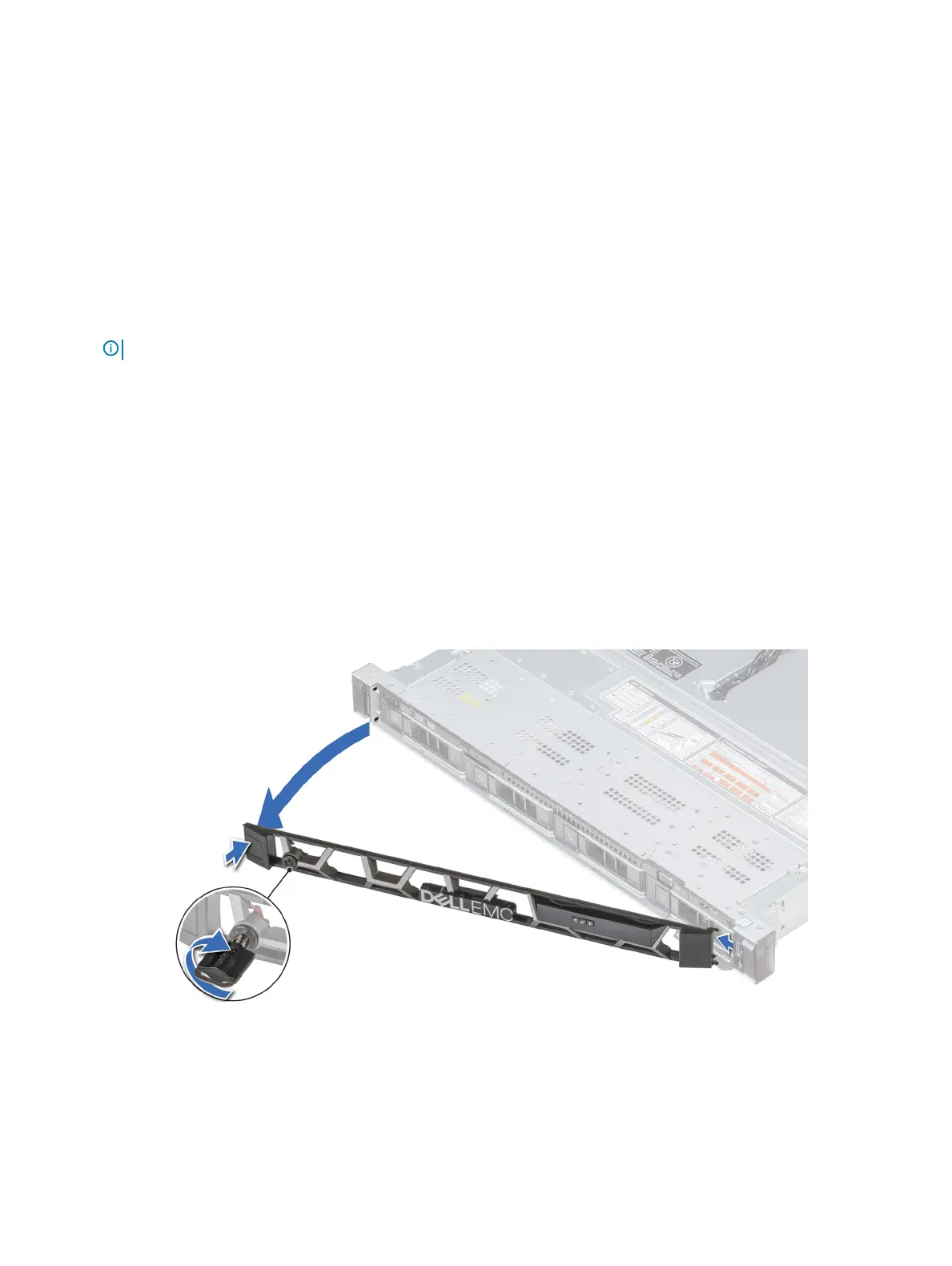
Removing the front bezel
The procedure to remove the front bezel with and without the LCD panel is the same.
Prerequisite
Follow the safety guidelines listed in Safety instructions.
Steps
1 Unlock the bezel by using the bezel key.
2 Press the release button, and pull the left end of the bezel.
3 Unhook the right end, and remove the bezel.
Figure 20. Removing the optional front bezel with the LCD panel
Installing and removing system components
71















 To Next Page