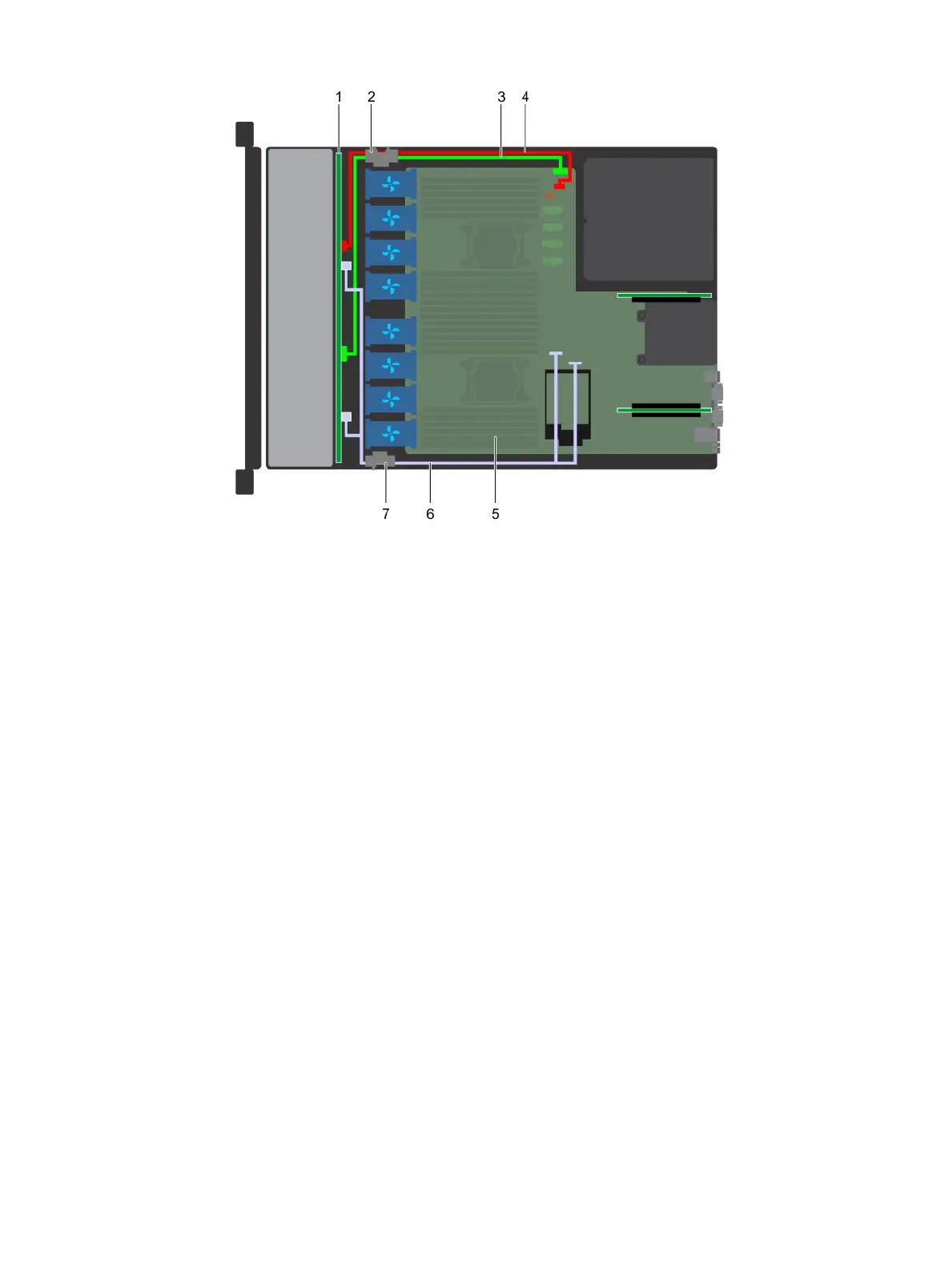
Figure 92. Cable routing - 8 x 2.5 drive backplane with onboard SATA
1
drive backplane 2 cable routing clip
3 backplane signal cable(BP: J_BP_SIG to MB: J_BP_SIG1) 4 backplane power cable(BP: J_BP_PWR_A1 to MB: J_BP1)
5 system board 6 SATA cable(BP: J_SAS_A0, J_SAS_B0 to MB: SATA_A,
SATA_B)
7 cable routing clip
SAS expander card
Removing the SAS expander card
Prerequisites
1 Follow the safety guidelines listed in Safety instructions.
2 Follow the procedure listed in Before working inside your system.
3 Remove the cooling shroud.
4 Remove the cooling fan assembly.
5 Remove the backplane cover.
6 Disconnect the SAS cables from the SAS expander card.
Steps
1 Using Philips #2 screwdriver, loosen the screws that secure the SAS expander card to the expander card tray.
2 Pull the SAS expander card to disengage the connectors on SAS expander from the SAS connectors on backplane.
Installing and removing system components
141















 To Next Page