Steps
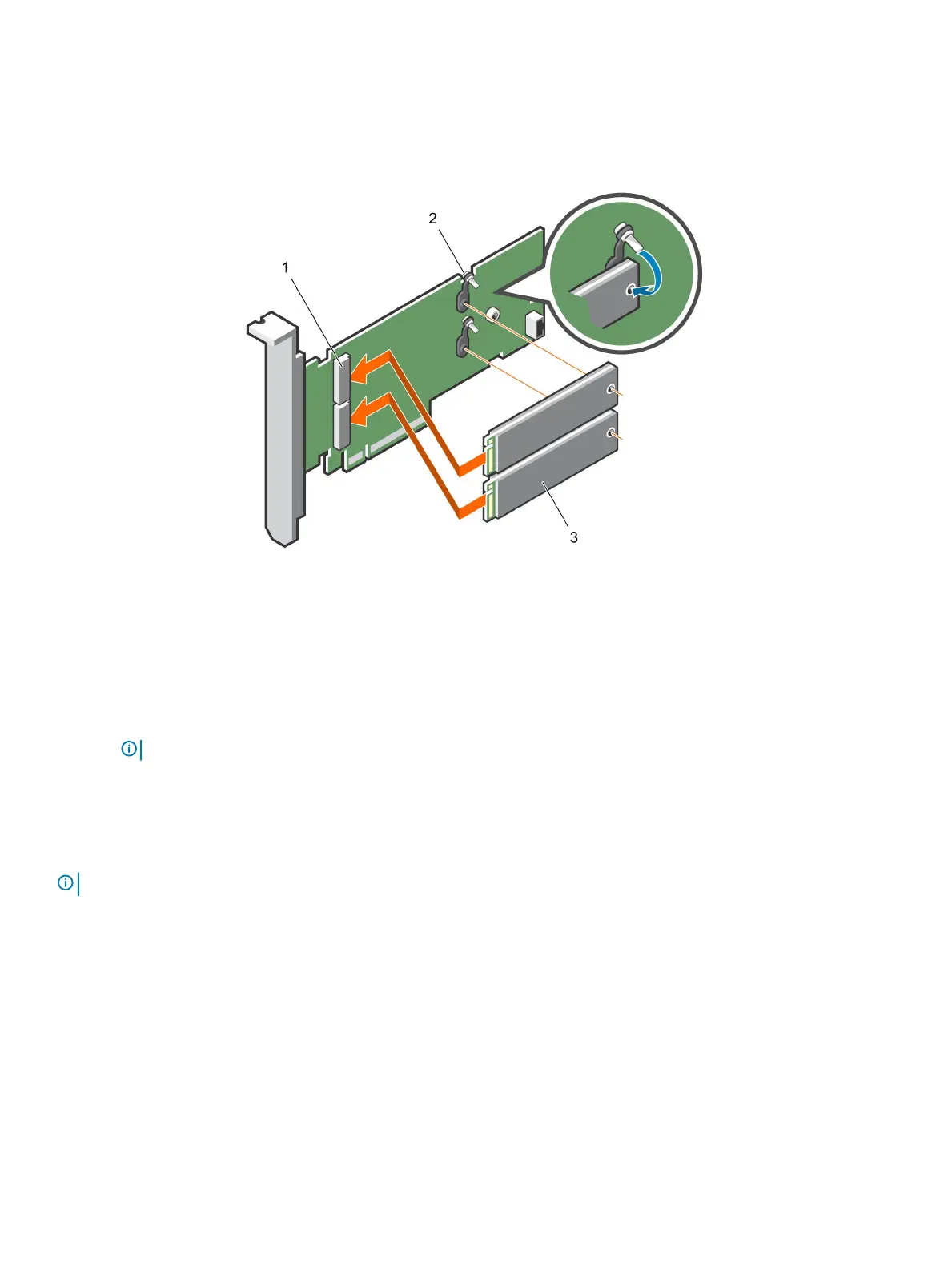
1 Align the M.2 SSD module connectors with the connectors on the BOSS card.
2 Push the M.2 SSD module until the module is seated rmly on the BOSS card.
3 Secure the M.2 SSD module on the BOSS card with the retention straps and screws.
Figure 64. Installing the M.2 SSD module
1
module connector (2) 2 screws (2)
3 modules (2)
Next steps
1 Install the BOSS card.
NOTE
: Installing the BOSS card is similar to installing the expansion card riser.
2 Install the air shroud.
3 Follow the procedure listed in After working inside your system.
Optional IDSDM or vFlash module
NOTE
: The write-protect switch is on the IDSDM or vFlash module.
Removing the MicroSD card
Prerequisites
1 Follow the safety guidelines listed in Safety instructions.
2 Follow the procedure listed in Before working inside your system.
Steps
1 Locate the MicroSD card slot on the vFlash/IDSDM module, and press the card to partially release it from the slot. To locate IDSDM/
vFlash module, see the System board jumpers and connectors section.
2 Hold the MicroSD card and remove it from the slot.
Installing and removing system components
117















 To Next Page