VPanel Window and Functions
8
Chapter 1 Operation Screen
No. Display Explanation
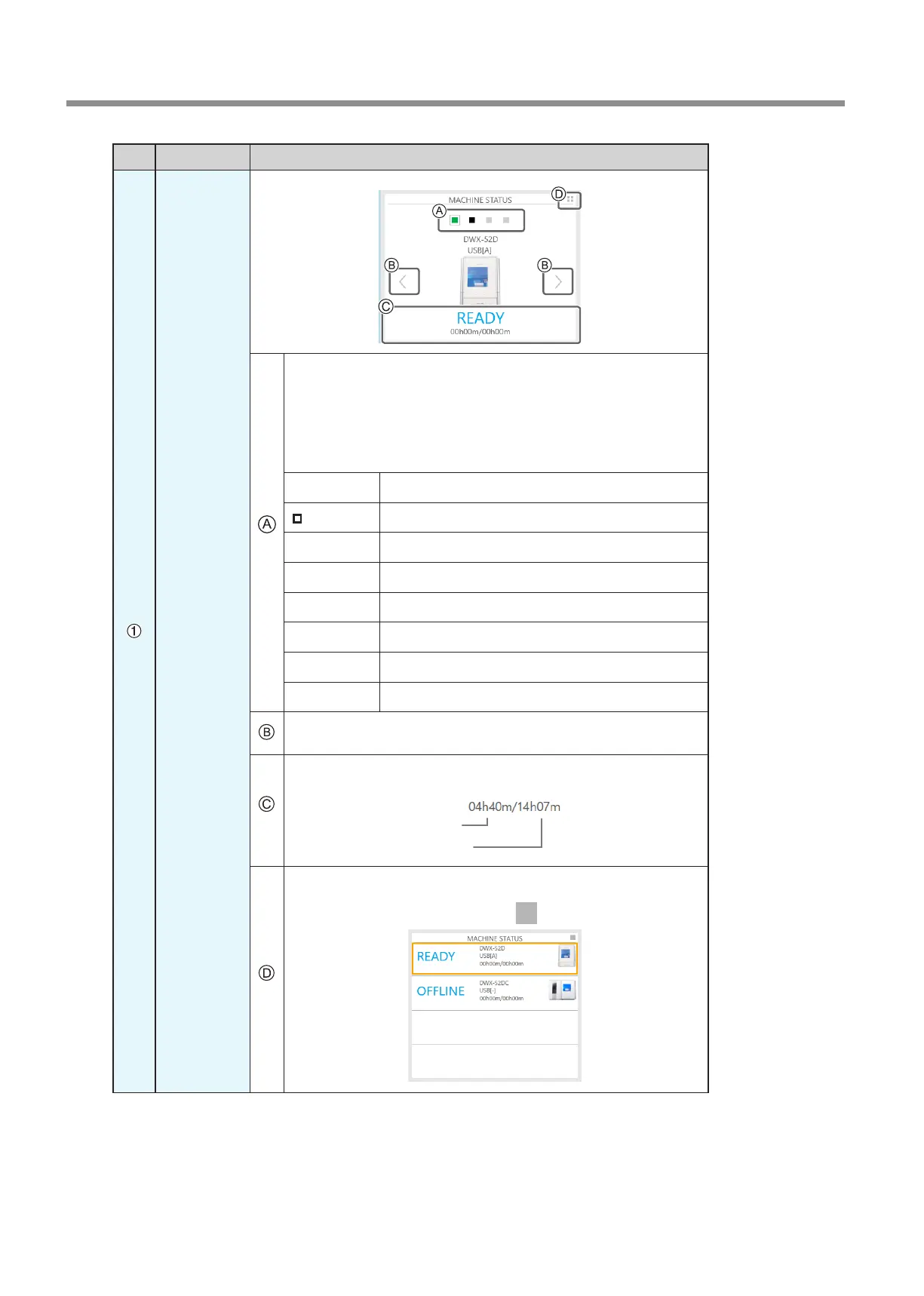
MACHINE
STATUS
The connected machines are displayed with square icons (). (In the above
gure, four machines are connected.) Click a icon to display the machine's
ID and name below the icon. The IDs of machines whose power is turned o
are shown with [-]. When you have connected multiple machines, you can
switch to a dierent machine to operate by clicking its icon. If you click the
icon of a connected milling machine, the status light of the milling machine
will ash.
(READY)
Milling data can be received.
(BUSY)
Operation is in progress.
(ERROR)
An error has occurred.
(PAUSE)
Operation is paused.
(COVER)
The front cover is open.
(FINISH)
Milling is complete.
(OFFLINE)
No milling machines are connected.
(OFFLINE)
The power of the milling machine is o.
When you have connected multiple machines, you can switch to a dierent
machine to operate by clicking its icon.
Displays the machine's operation status. A progress bar, the elapsed milling
time, and the estimated milling time are all displayed.
Estimated milling time
Elapsed milling time
Click this to display the operating status of all the connected machines in a
list. You can also select the machine to operate by clicking it in the displayed
list. To return to the previous display, click
.



 To Next Page