Responding to Error Messages
83
Chapter 4 Troubleshooting
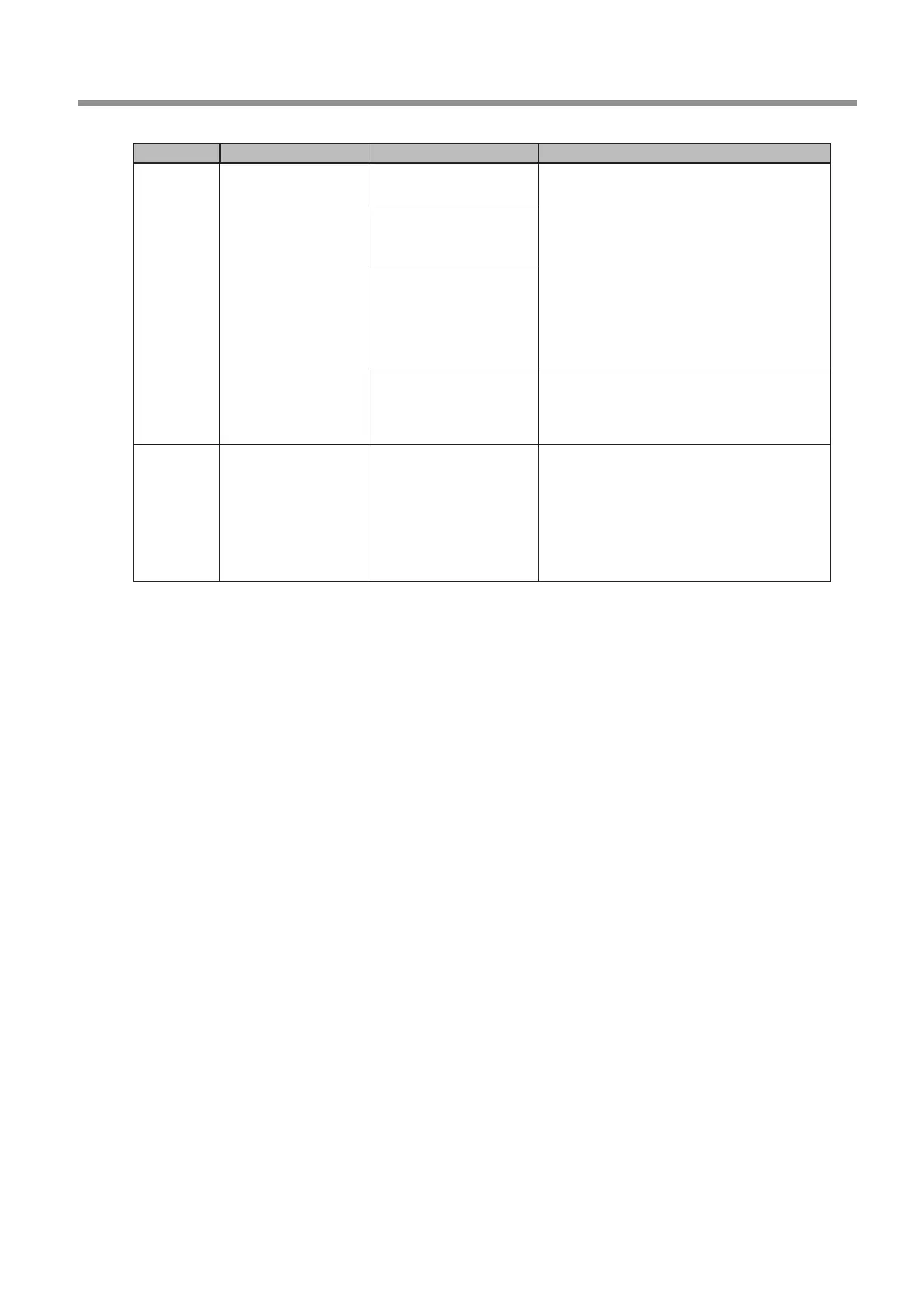
Error number Message Situation/Error Cause Action
103B‑0000
The automatic
correction is not yet
nished.
Automatic correction may
not have been performed.
1. Press and hold the operation button on the built-
in panel. This will clear the error.
2. Perform automatic correction.
"
P. 53 "Correcting the Milling Machine"
Automatic correction may
have been cancelled before
it could nish.
Automatic correction may
not have been performed
after updating the rmware
to a version that required
automatic correction to be
performed again.
The versions of VPanel and
the machine's rmware may
not match.
Download the latest versions of VPanel and the
machine's rmware from the DGSHAPE Corporation
website (http://www.dgshape.com/), and then
install these versions.
103D‑0000
Milling data error.
The milling bur
cannot reach the
milling position.
If the milling bur is too
short, or if the angle of the A
axis and B axis are too large,
the milling bur may not
reach the milling position in
the Z direction.
1. Press and hold the operation button on the built-
in panel. This will clear the error.
2. Review the milling bur length and the position of
the milling bur holder.
"
P. 36 "STEP 3: Loading the Milling Bur"
3. Review the CAM settings and decrease the angles of
the A axis and the B axis.



 To Next Page