MTG2000 Trunk Gateway User Manual V| Dinstar
43
The No. of the start E1/T1 port
The No. of the end E1/T1 port
When the start E1/T1 port is also the end E1/T1 port, it’s
required to set the start channel, and the channels starting from
the set channel to the No.31 channel of the E1/T1 port will be
used by the SS7 trunk.
CIC: Circuit Identification Code
The CIC No. of the start channel, which is generally 0, 32, 64,
96, 128, 160, 192, 224, 256, 288, 320, 352, 384, 416, 448…
The total number of the channels used by the SS7 trunk
Step3: Click OK. And then you can see the following data on the SS7 CIC interface.
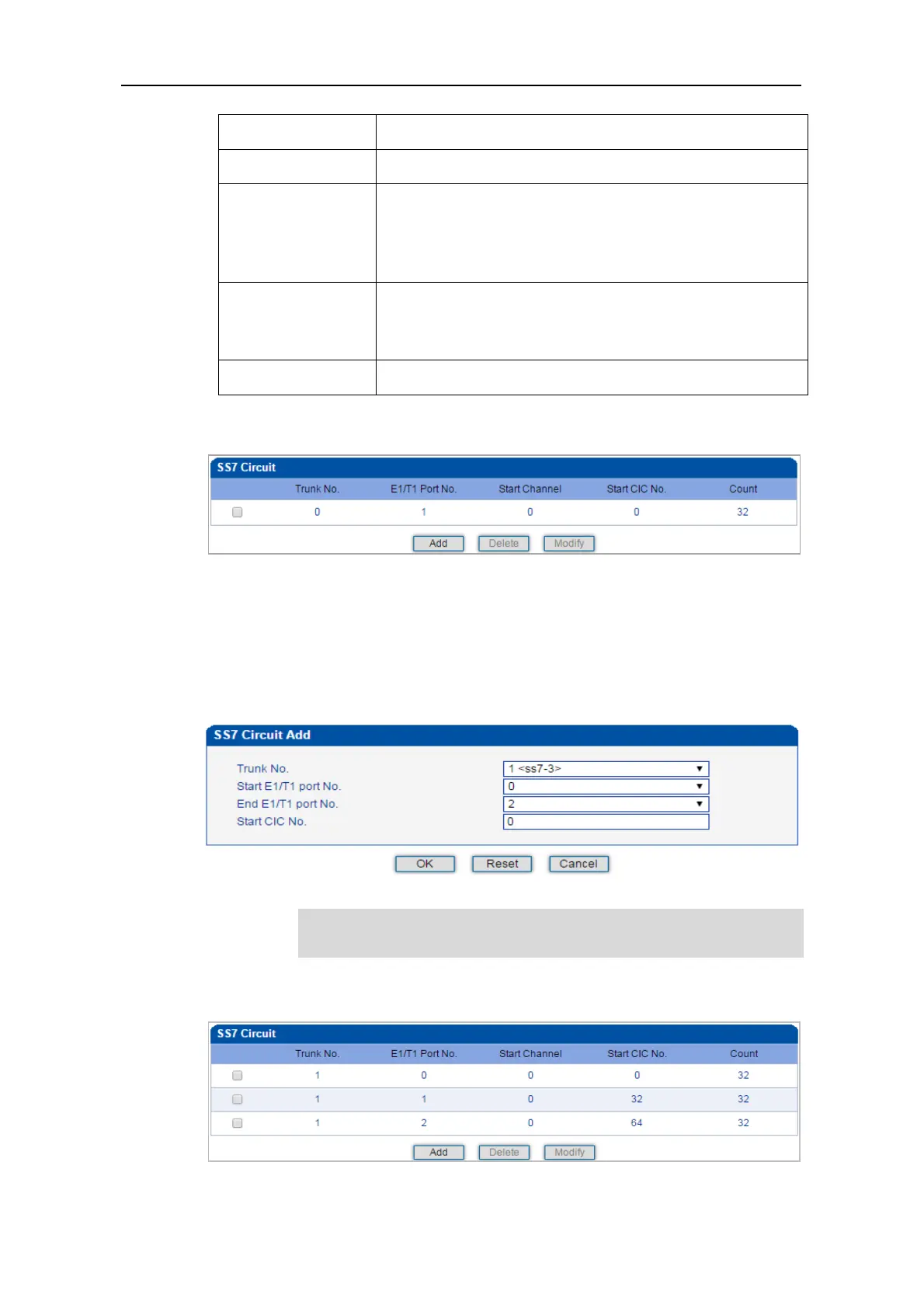
➢ Procedures for adding SS7circuit that involves multiple E1/T1 ports:
Step 1: Click Add on the SS7 CIC interface.
Step 2: Select a trunk and E1/T1 ports. (Trunk 1, Port 0, Port1 and Port 2 are taken as
example in the following figure.
If multiple E1/T1 ports are involved, it defaults that all the 32 channels of
each E1/T1 port involved are used by the SS7 trunk.
Step3: Click OK. And then you can see the following data on the SS7 CIC interface.



 To Next Page