CHASSIS ELECTRICAL
-
Wiper and Washer System
8-355
m
16FO195
Inspection
of
Operation
Low-speed High-speed
operation
operation
Inspection
of
Stop
Position
16N0025
16FO200
SERVICE POINTS OF REMOVAL
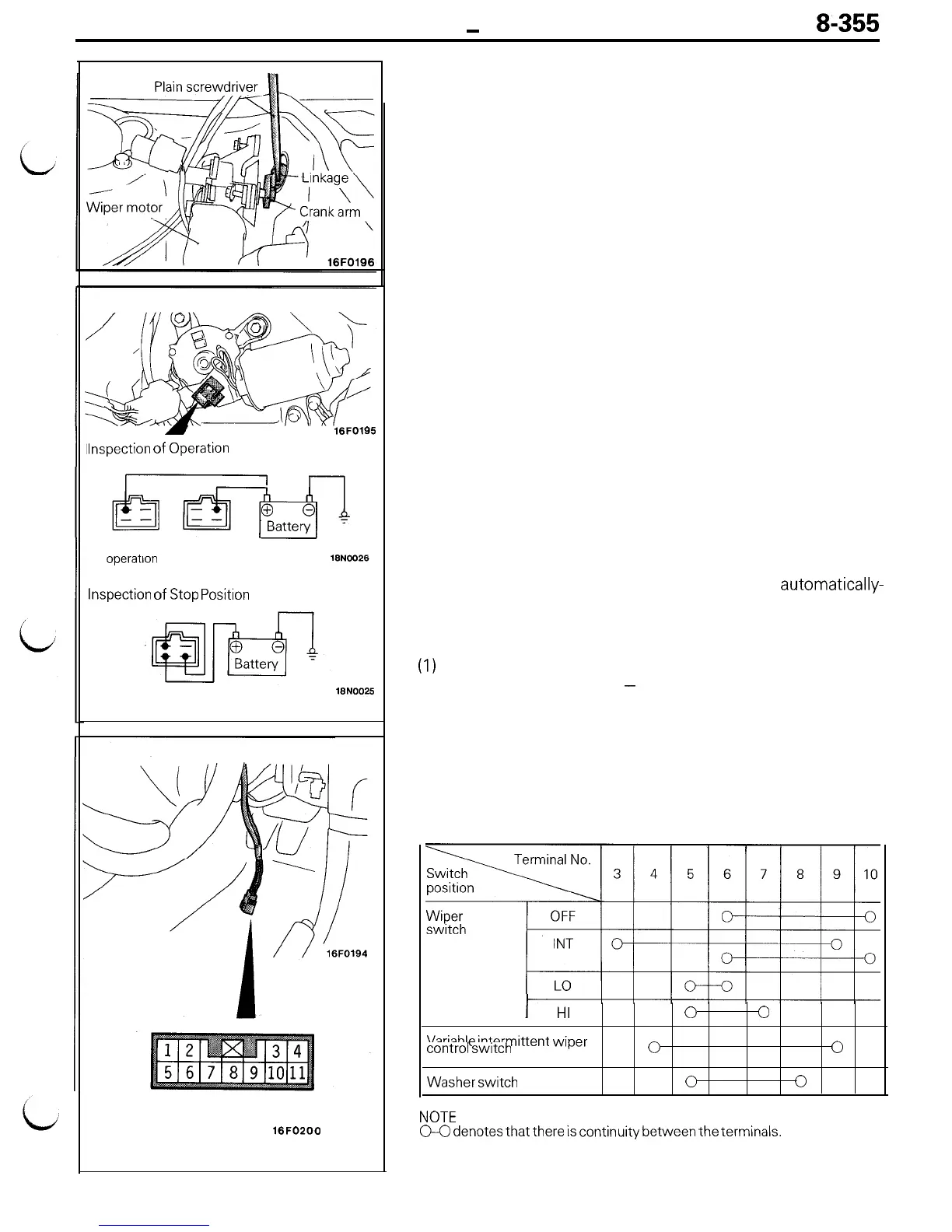
6. REMOVAL OF WIPER MOTOR
(1) Remove the wiper motor mounting bolts.
(2) Using a plain screwdriver, detach the crank arm of the
wiper motor from the linkage to remove the wiper
motor.
Caution
Do not remove the crank arm from the wiper motor
except when necessary, as the auto stop angle has
been preset. When the crank arm is to be removed,
make a mark on both of them before removal.
INSPECTION
INSPECTION OF WIPER MOTOR
Inspect the wiper motor mounted on the vehicle with its
connector disconnected.
Inspection of Wiper Motor Operation at LOW and HIGH
Speeds
Connect the battery to the wiper motor as shown, and check its
operation at LOW and HIGH speeds.
Inspection of Wiper Motor STOP Position
(1) Operate the wiper motor at LOW speed and intermediately
disconnect the battery to let the wiper motor stop.
(2) Connect the terminals as well as the battery, as shown, and
check that the wiper motor stops at the
automatically-
stopped position following LOW-speed operation.
INSPECTION OF COLUMN SWITCH
(1)
Remove the knee protector.
(Refer to GROUP 23A
-
Instrument Panel.)
(2) Remove the column cover.
(3) Remove the column switch right coupling connector (11
terminals).
Inspection of Wiper and Washer Switch
Operate the switch to check for continuity between the
terminals.
I
HI
0 0
Variable
intermittent wiper
control
switch
0
0
Washer
switch
0
0
NOTE
GO
denotes
that there
is
continuity between the terminals.











 To Next Page