Rev 00
Dr.coffee Product Maintenance Manual 21
6 INTERFACE DESCRIPTION
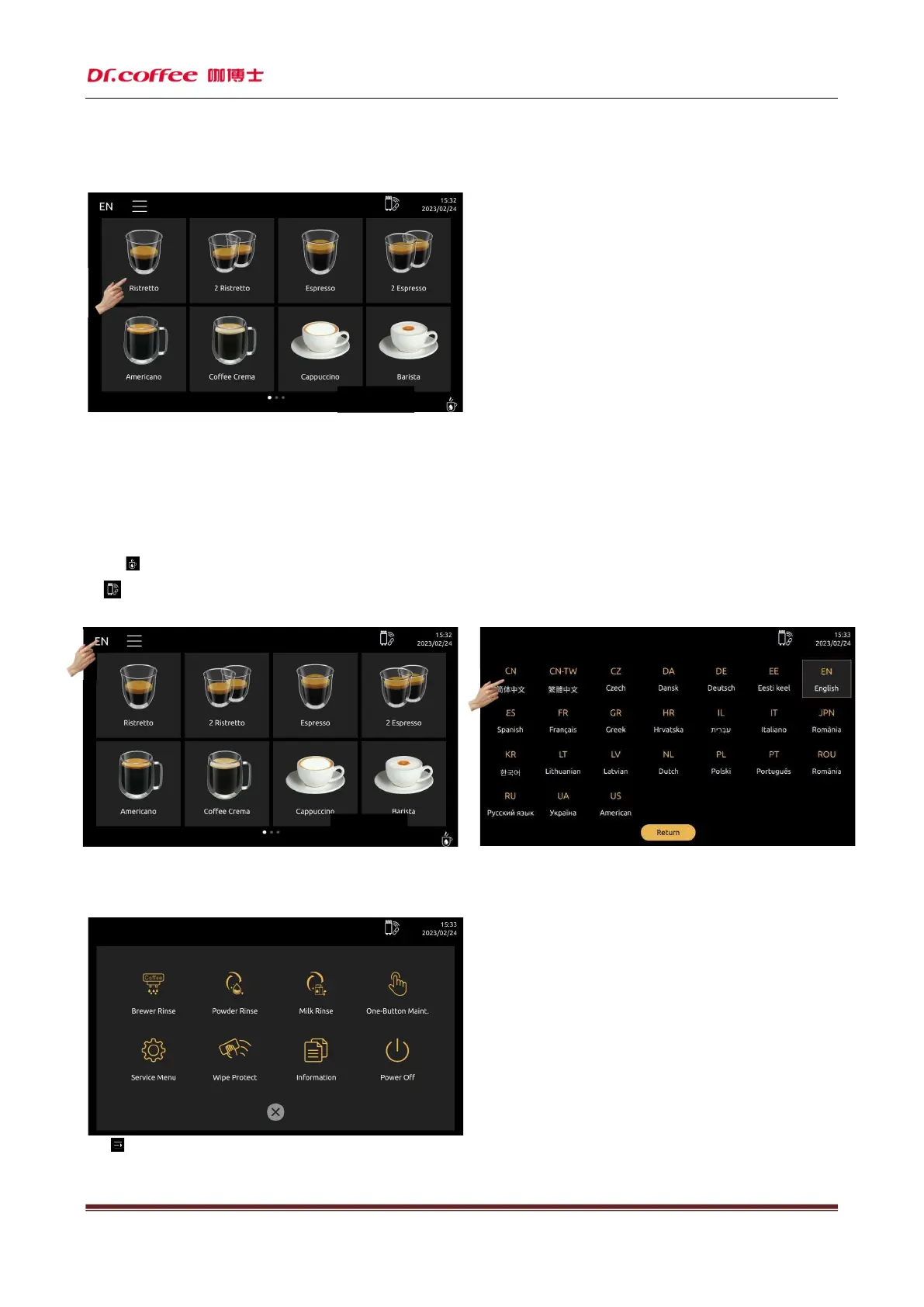
6.1 DRINKS INTERFACE
1、Click any drinks picture can start to make.(For detail steps please refer to the
instruction manual)
2、Select different drinks type in the bottom of display.(For detail steps please refer to the instruction manual)
3、Network signal icon, represent the strength of 4G network or WiFi signal in real time.(Only for machines with IOT function, equip with 4G model or WiFi model)
4、Time and date are displayed in real time, can be modified in the service manual.
5、The real time price will show in the button of drinks。(Only for machines with IOT function, equip with 4G model or WiFi model)
6、Click“ ”,will start to make hot water.
7、 :Icon for F20 and P30 connection. Without this icon, means doesn’t connect well.
6.2 LANGUAGE
Click the language icon, different languages are available.
6.3 SHORTCUT MENU
Click“ ”icon,will show shortcut menu;



 To Next Page