Rev 00
Dr.coffee Product Maintenance Manual 51
7.4.11 Payment Setting
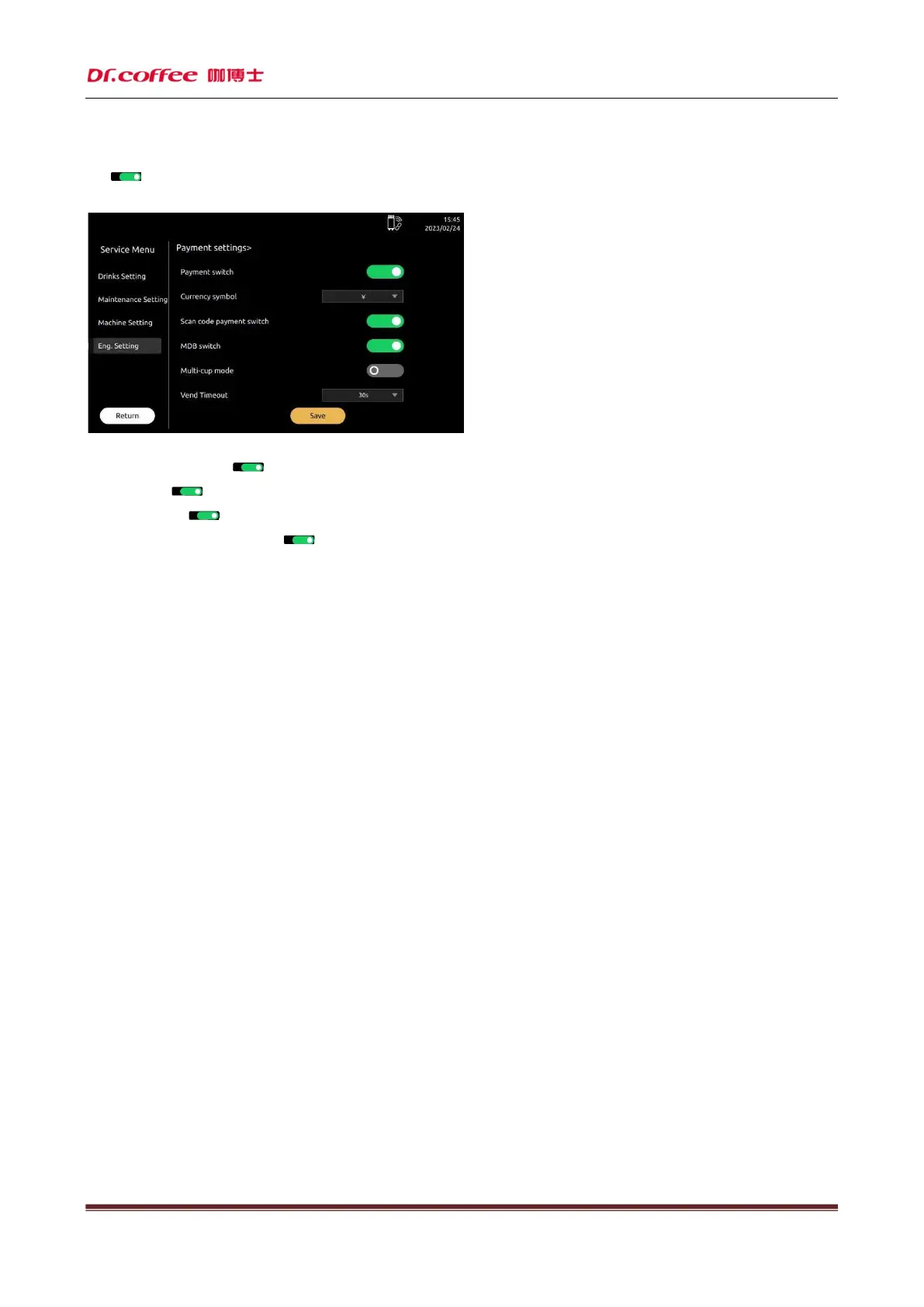
Payment Switch:Turn on or turn off the payment setting. Need to turn on the network switch in the machine setting.
Click“ ”icon, turn on or turn off this function.(Green means turn on, dark means turn off)
After turning on, price will be shown below the drinks name.(Only for IOT or MDB function)
Currency Symbol: Set different currency symbol.
Scan Code Payment Switch:Click“ ”icon, turn on or turn off this function.(Green means turn on, dark means turn off)
MDB Switch:Click“ ”icon, turn on or turn off this function.(Green means turn on, dark means turn off)
Multi-cup Mode:Click“ ”icon, turn on or turn off this function.(Green means turn on, dark means turn off)
Money Tube Remaining Coin Detection:Click“ ”icon, turn on or turn off this function.(Green means turn on, dark means turn off)
Remaining Coin Quantity:Set range: 1-20



 To Next Page