Rev 00
Dr.coffee Product Maintenance Manual 40
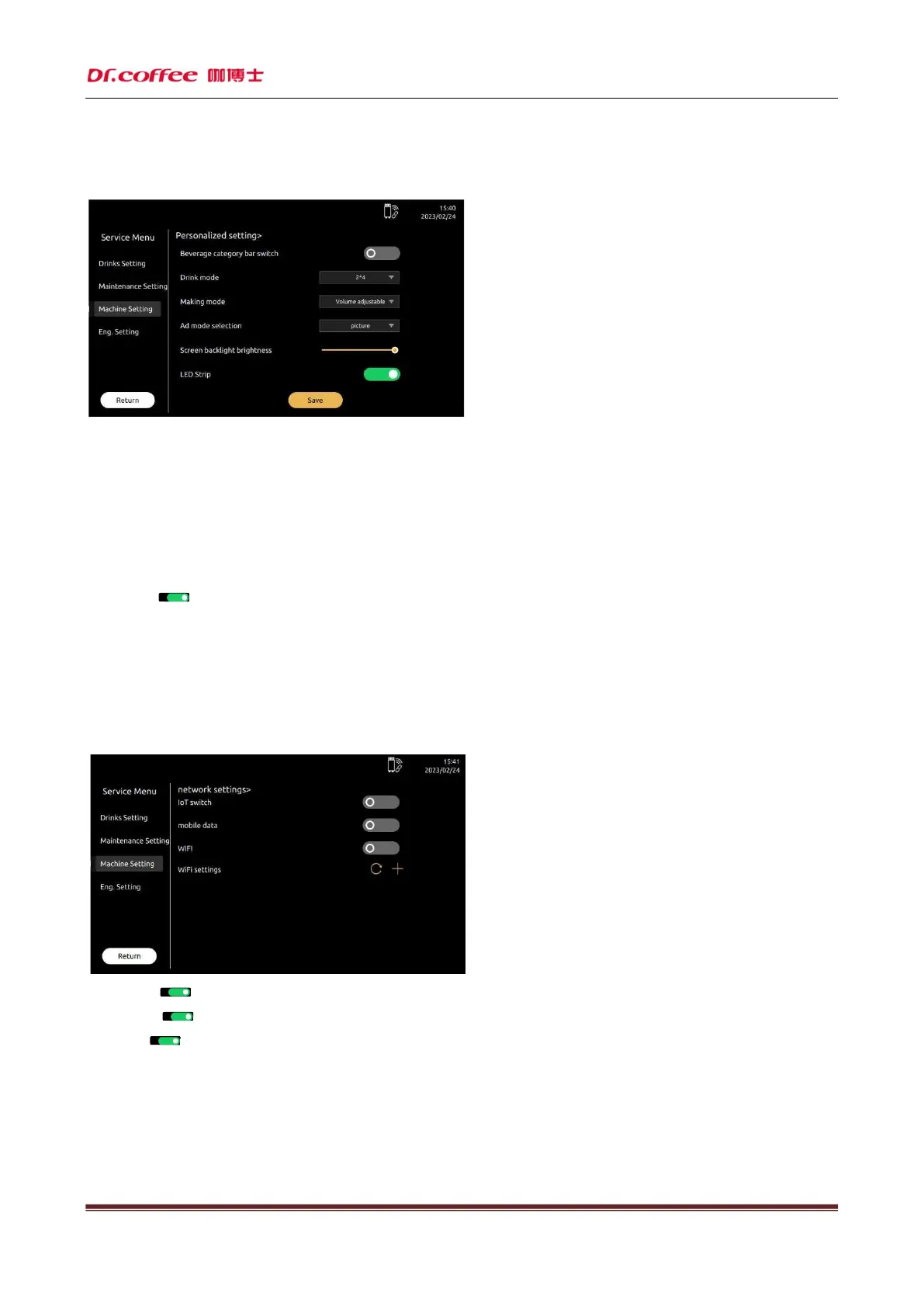
7.3.7 Personalized Setting
Personalized setting: Means can be set as your own preferences. Click“Save”to effect.
Drinks mode: Set the drinks interface, optional: Grid
Making mode: Set the mode of interface when making drinks. Option: Adjustable, Not adjustable
Not adjustable: When making drinks, drinks parameters can’t be adjustable.
Adjustable:When making drinks, drinks parameters can be adjustable.
Ad mode selection:Select the mode of advertise. Option: Pictures
Pictures: The display will auto-play pictures when making drinks.。
Screen Backlight Brightness:Slid the progress bar to adjust the brightness of screen backlight.
LED Strip:Click“ ”icon, turn on or turn off this function.(Green means turn on, dark means turn off)
RGB Color:Select the light color. Option: Blue, Green, Yellow, Cyan, Purple, Cycle.
Cycle interval (s): select the interval time for switching the light color, unit: second, the selection range is 1-120 seconds;
7.3.8 Network Setting
Network setting: Turn on or turn off this function.
IOT Switch: Click“ ”icon, turn on or turn off this function.(Green means turn on, dark means turn off)
Mobil Data: Click“ ”icon, turn on or turn off this function.(Green means turn on, dark means turn off)
WiFi: Click“ ”icon, turn on or turn off this function.(Green means turn on, dark means turn off)
Optional network:Indicates the WiFi machines connected, automatically sort according to the strength of the signal, the success or failure of the WiFi connection will be automatically
displayed on the interface.
Remark 1: WiFi function only for machines equip with WiFi model.
Remark 2:Mobile data and WiFi function can’t turn on at the same time.(If mobile date turn on, WiFi will turned off automatically; If WiFi function turn on, mobile data
will turned off automatically.)



 To Next Page