Rev 00
Dr.coffee Product Maintenance Manual 80
6.2.8 Removal of switching power supply
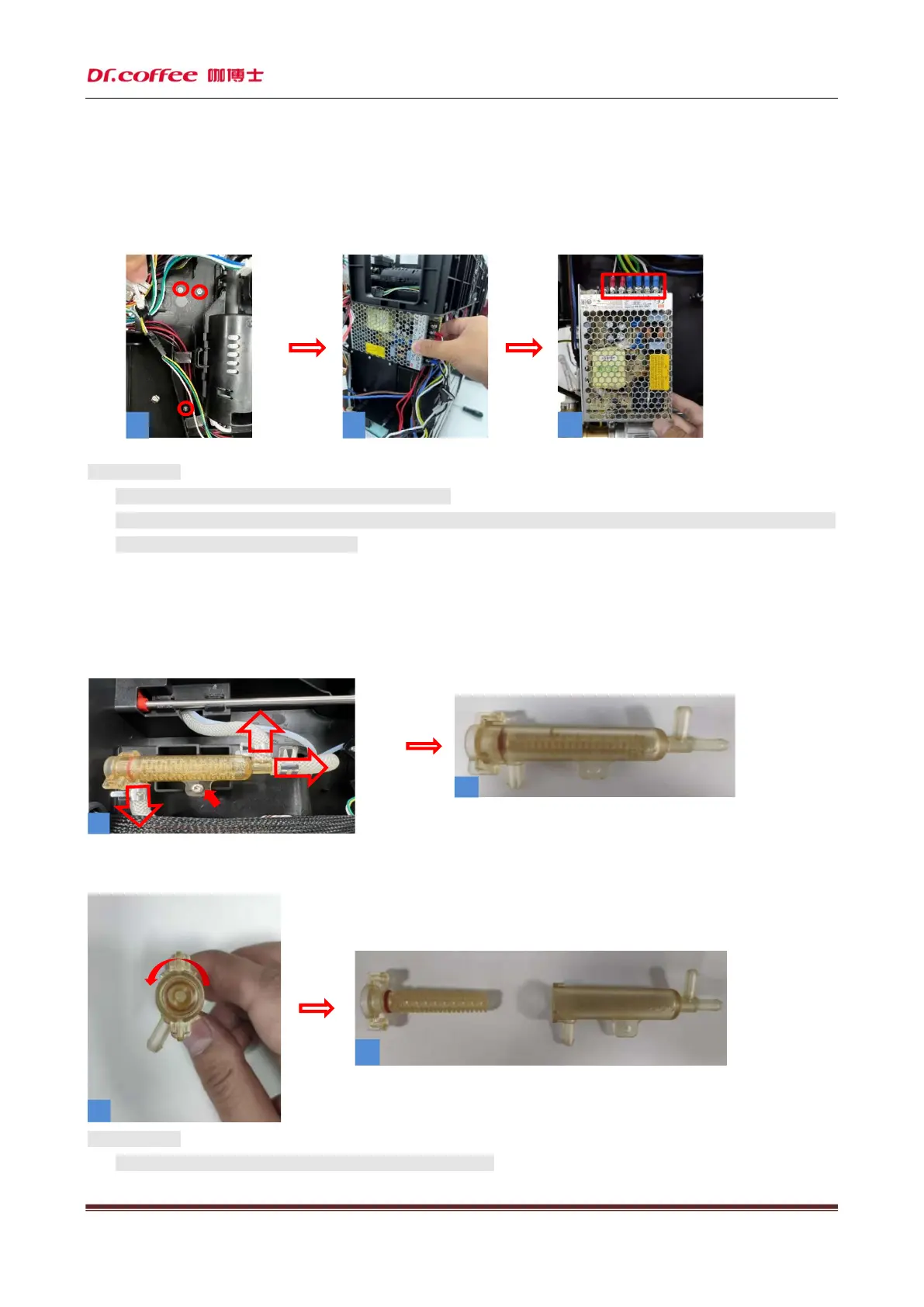
Step: First unscrew the three fixing screws (as shown in Figure 1), (as shown in Figure 2) pull out the switch power supply board
outward, and finally remove the wiring terminal (as shown in Figure 3) to complete the removal of the switch power supply.
★ Precautions:
1. Please unplug the coffee machine before doing this!
2. Please keep in mind the corresponding position of the terminals, and do not connect them incorrectly, otherwise
the switch power supply may be damaged!
6.2.9 Dismantle the beater
Step: first remove a fixing screw at the position shown in Figure 1 and pull out the water pipe; Dismantling of the beater is
completed.
Note: (as shown in Figure 1) Turn the core of the beater counterclockwise and pull it out to clean the beater
★ Precautions:
1. Be careful during disassembly to avoid scratching fingers!
1
2
1
2
3



 To Next Page