Rev 00
Dr.coffee Product Maintenance Manual 26
7 SERVICE MENU
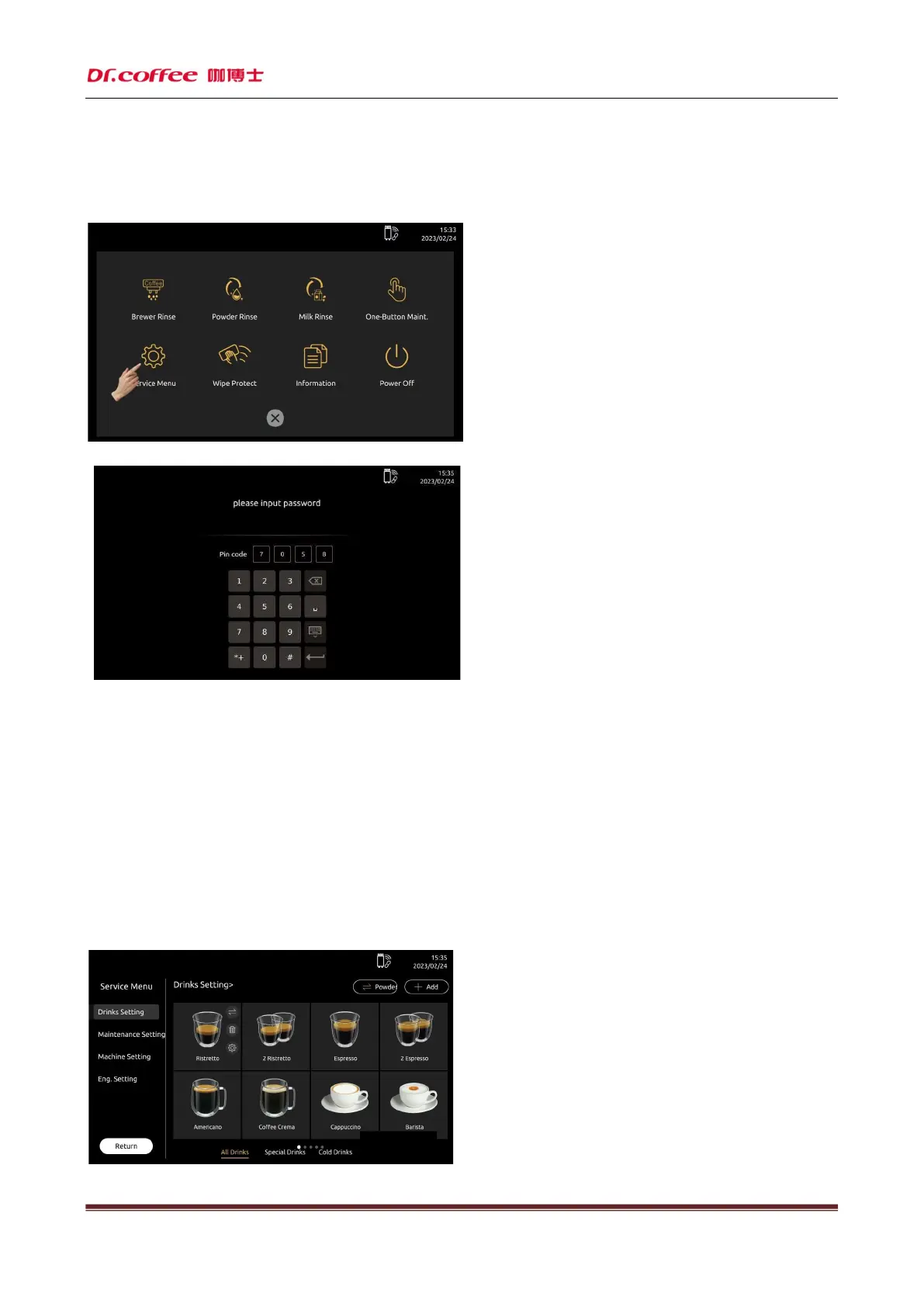
Method of Entry
Step 1: Click “Service Menu” for entry (as picture below)
Step 2: Input correct password;
Service menu introduction:Digital password and PIN code(PIN code has the same authority as the primary password)
Password Level:
Primary Password: The highest level, all access to Service Menu (Including Drinks Setting, Maintenance, Machines Setting, Eng. Setting; default password is 1809)
Secondary Password: Secondary level, limited access to Service Menu (Including Drinks Setting, Maintenance, Machines Setting, default password is 1709)
Tertiary Password: Tertiary level, limited access to Service (Drinks Setting only default password is 1609)
PIN code:The password is a 4 digital password obtained by calculating the random 4-digit PIN displayed by the machine, for example, PIN code is 3319,the password should be:
The first number is the last digital of the sum of the first and last PIN code(3+9=12) so the first number is 2
The second and the third number is same with the second and the third PIN code, so the second and the third number is 3 and 1.
The forth number is the last digital of the sum of the second and the third PIN code(3+1=04)so the forth number is 4
Above, password is 2314
Step 3: Service Menu Interface



 To Next Page