EasyManua.ls Logo

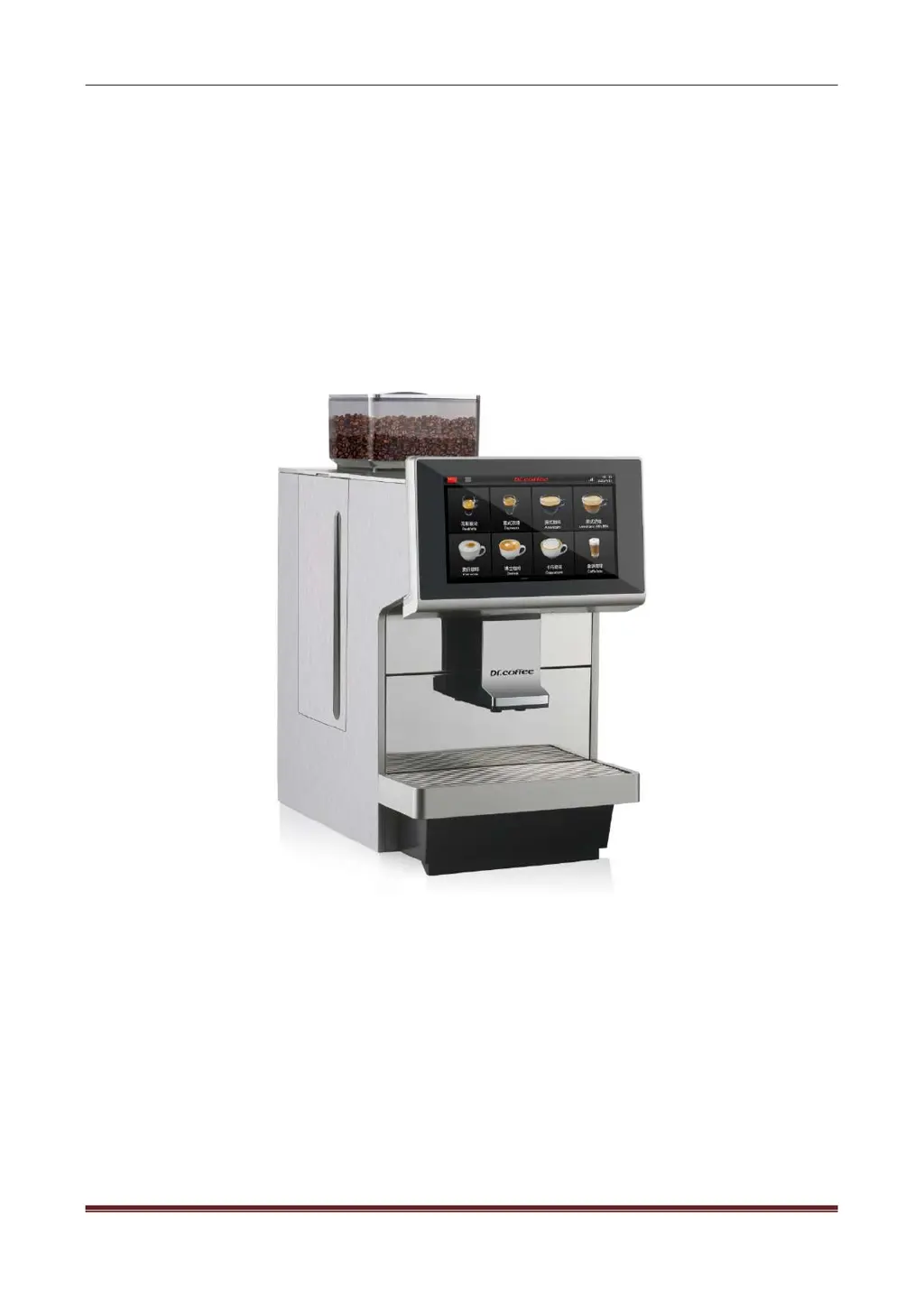
Dr.coffee M12 - User Manual

Dr.coffee M12
75 pages
Print Icon
To Next Page IconTo Next Page
Loading...
Dr.coffee Service Manual
Dr.coffee M12 Service Manual
VersionV01
Applied Model
M12 Series
Due to product upgrades, there may be differences between the pictures and the actual products please refer to
real object.

Table of Contents

Questions and Answers

  • R
    Richard WhiteSep 12, 2025
    What to do if Dr.coffee M12 shows HMI Communication Error?
    • N
      Nicole WilliamsSep 12, 2025
      If your Dr.coffee Coffee Maker is showing a 'HMI Communication Error', it could be due to a loose or damaged connection between the main board and display board, a mismatch between the control software and the HMI software, damage to the HMI PCB, or damage to the main board. To resolve this, check the plugs on the HMI PCB and reconnect them. If that doesn't work, update the control software and HMI software. If the problem persists, replace the HMI PCB or the main board.
  • A
    Alexandra SheltonSep 13, 2025
    What causes Coffee Thermo Block NTC Error in Dr.coffee M12?
    • C
      chenbenjaminSep 13, 2025
      If your Dr.coffee Coffee Maker displays a 'Coffee Thermo Block NTC Error', it could be due to a damaged or disconnected connection between the sensor and mainboard, a damaged NTC, or the temperature being over 180?. Check the connection and reconnect or replace the wire. If that doesn't work, replace the NTC. If the temperature is too high, switch off the machine and restart it after 30 minutes to allow it to cool down. If the problem persists, replace the Coffee Thermo Block.
  • S
    Sue YoungSep 15, 2025
    What causes Steam Thermo Block NTC Error in Dr.coffee Coffee Maker?
    • T
      tiffany29Sep 15, 2025
      If your Dr.coffee Coffee Maker displays a 'Steam Thermo Block NTC Error', it could be due to a damaged or disconnected connection between the sensor and mainboard, a damaged NTC, or the temperature being over 180?. Check the connection and reconnect or replace the wire. If that doesn't work, replace the NTC. If the temperature is too high, switch off the machine and restart it after 30 minutes to allow it to cool down. If the problem persists, replace the Steam Thermo Block.

Summary

Safety Instructions

Safety Tips

Safety guidelines for machine operation, handling, and risks.

Structure Introduction

Overview

Front and back views of the M12 coffee machine with labeled parts.

Internal Components Overview

Detailed identification of key internal components and their locations within the machine.

Schematic Circuit

M12 Main Control Board Circuit

Diagram and pinout of the M12 main control board and its connections.

M12 Power Board Circuit

Diagram and connections for the M12 power board.

Technical Data

Capacity and Specifications

Details on hourly output, capacities, voltage, power, and dimensions.

Screenshot Description

User Interface Navigation

Explains navigation of the drinks home screen and access to the main menu.

Menu Functions

Details on Brewer Rinse, Milk Rinse, and One-Button Maintenance functions.

Service Menu

Drinks Configuration

How to modify drink parameters, names, pictures, and cup types.

Maintenance Procedures

Procedures for Brewer Deep Clean, Milk Deep Clean, Descaling, and Water Draining.

Machine Settings

Configuration of maintenance intervals, time/date, units, and passwords.

Engineering Settings

Calibration of grinder, water supply, factory reset, and business settings.

Warning

Screen-Based Warnings

Troubleshooting common errors like empty water tank, full grounds container, and empty bean hopper.

Thermo Block Temperature Warnings

Explains causes and solutions for overheating and low temperature thermo block issues.

Trouble Shooting

Error Messages and Solutions

Detailed troubleshooting for errors like water supply, grinder, and brewer system errors.

Communication and Sensor Errors

Operational and System Errors

Software and Leakage Errors

Disassembly & Assembly

Required Tools

List of tools required for disassembly and assembly procedures.

Exterior Panel Disassembly

Step-by-step guide to removing external panels like the upper, rear, and side covers.

Internal Component Disassembly

Electrical Component Disassembly

Valve and Pump Assemblies Disassembly

Flow Meter and Water Inlet Valve Disassembly

Grinder and Thermo Block Disassembly

PCB and Panel Disassembly

Maintenance

Milk Frother Maintenance

Procedures for cleaning and installing the milk frother.

Milk Pipe Maintenance

Steps for disassembling, cleaning, and connecting the milk pipe.

Daily Use and Maintenance Considerations

Daily Operation Guidelines

Best practices for daily operation, cleaning, and maintenance of the coffee machine.

Dr.coffee M12 Specifications

General IconGeneral
TypeAutomatic Coffee Machine
Water Tank Capacity1.8 liters
Bean Hopper Capacity250 grams
Pump Pressure19 bar
Voltage220-240 V
Frequency50/60 Hz
ColorBlack
MaterialPlastic
FeaturesAdjustable coffee strength, Adjustable coffee volume

Related product manuals