Home
Dräger
Medical Equipment
Infinity Acute Care System
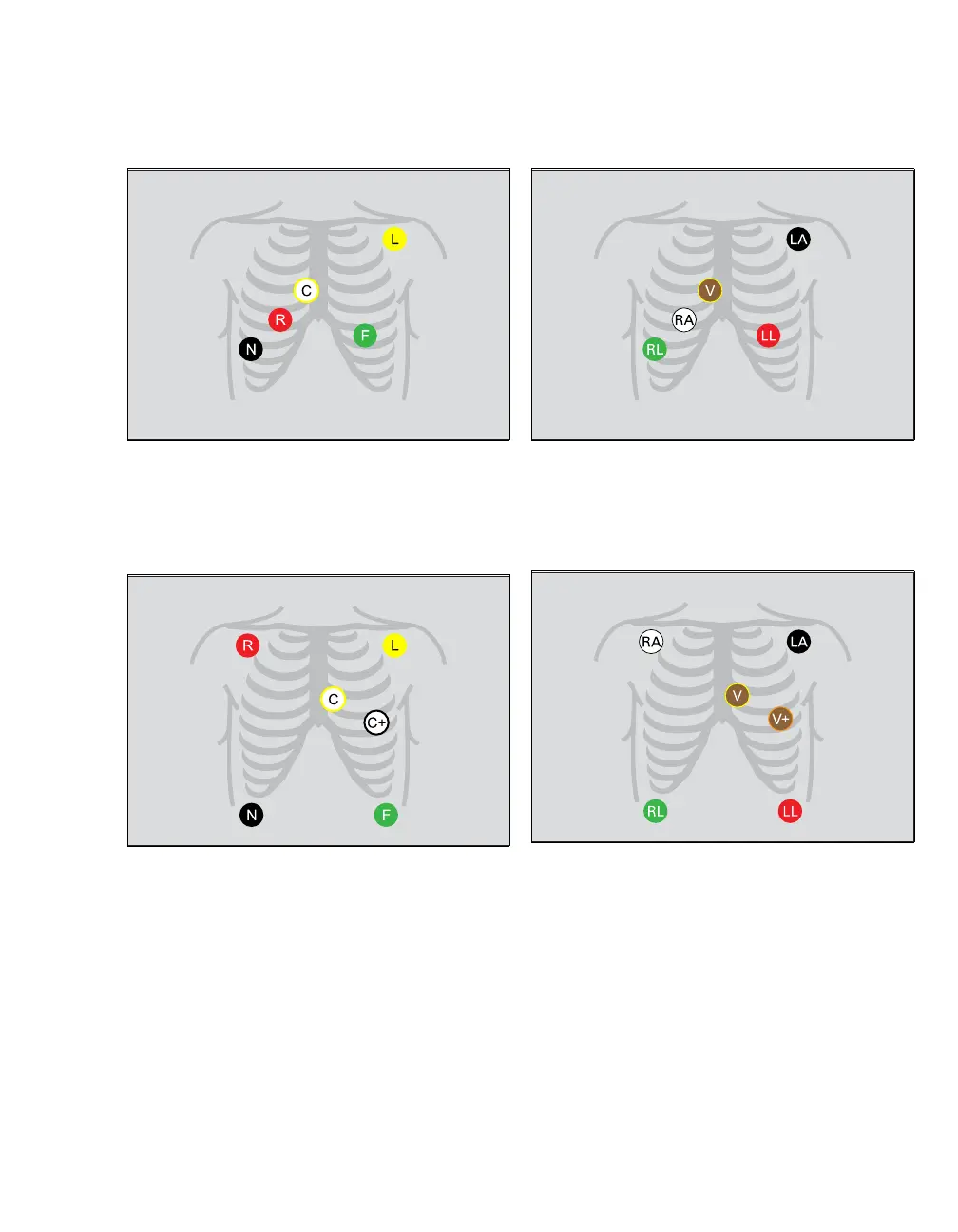
Page 147 (Pacer Configuration, Five Electrodes (IEC;AHA))
Dräger Infinity Acute Care System - Pacer Configuration, Five Electrodes (IEC;AHA); Standard Configuration, Six Electrodes
380 pages
Manual
Save Page as PDF
To Next Page
To Next Page
To Previous Page
To Previous Page
Loading...
Instructions for Use Infinity Acute Care System -
Monitoring Applications SW VG1
14
7
ECG
, Arrhythmia, and ST Segment
Pacer Configuration, Five Electrodes (IEC/AHA)
St
andard Configuration, Six Electrodes (IEC/AHA)
318
319
320
321
146
148
Table of Contents
Main Page
Definitions
3
Abbreviations and Symbols
3
Table of Contents
5
For Your Safety and that of Your Patients
9
Strictly Follow These Instructions for Use
10
Maintenance
10
Accessories
10
Safe Connection with Other Electrical
10
Equipment
10
Electrical Safety
11
Networking
11
Patient Safety
11
General Warnings and Cautions
12
EU Directive 2002/96/EC (WEEE)
12
Note on EMC/ESD Risk for the Device Function
12
Site of Operation
13
Defibrillator Precautions
13
Electrosurgery
14
Virus Protection
14
Intended Use
15
Infinity Acute Care System
16
System Overview
17
Overview
18
Infinity ® Medical Cockpit TM (Cockpit)
18
Infinity ® PS250 Comm Hub (PS250)
19
Infinity ® M540 Patient Monitor (M540)
19
Infinity ® M500 Docking Station (M500)
20
M500 Front Panel
20
M500 Back Panel
20
Additional Hardware
21
Device Symbols
22
Abbreviations
25
Operating Concept
29
Operating Concept Overview
30
The IACS Components
31
M540-And-Cockpit Communication
32
M540 and Cockpit Communication
32
Docking the M540
32
Communicating with the Infinity ® Network
33
Undocking the M540
33
Communicating with the Infinity
34
Supported Banners
34
Loss of Power
35
Network Data Transfer
35
Communication Management
36
Remote Control and Remote View
38
Remote View
38
Using Remote View Functions
39
Remote Control from the ICS (Infinity Centralstation)
39
IT Applications
39
Secondary Display
40
User Interface
40
Header Bar
41
Monitoring Area
42
Parameter Boxes
42
Waveforms
43
Freezing/Stopping Waveforms
43
Dialogue Windows and Setup Pages
44
Main-Menu Bar and Quick-Access Toolbar
45
Main-Menu Bar
45
Quick-Access Toolbar
46
Filtering the Parameter Content
47
Auto Vs. Manual Display Modes
47
Auto View Mode
47
Manual View Mode
47
Auto-View Setup Toolbar
48
Customising the Display
48
Touchscreen Versus Mouse
48
Screen Brightness
48
Calibrating the Touchscreen
48
Cockpit Screen in Split Screen Mode
49
Cockpit Screen with Mini-Trends
50
Cockpit Screen with IT Tabs
51
Parameter Priority
52
Configuring the Parameter Priority and Display
52
Parameter Priority List
52
Views
53
Selecting a View
53
The View Editor
53
Profiles
54
Managing Profiles and Views
54
Transferring Profiles
54
Standby Mode
55
Privacy Mode
56
Assembly
57
Assembly Overview
58
Commercially Available Mounting Solutions
58
Docking/Undocking the M540
59
Front View
59
Side View
59
Locking/Unlocking the M540
60
Connecting the System Cables
61
Getting Started
63
Overview of Monitoring a Patient
64
Turning the IACS On/Off
64
The Demographics Page
65
Admitting a Patient
66
Discharging a Patient
67
Admitting a Patient Using Get HIS
67
Patient Categories
68
Selecting the Patient Category
68
Alarms
71
Overview of Alarms
72
Alarm Priorities
73
Alarm Processing
73
High-Priority Alarm Conditions
73
Medium-Priority Alarm Conditions
73
Low-Priority Alarm Conditions
73
Latching and Non-Latching Alarm Behaviour
74
Multiple Alarm Conditions
74
Enabling or Disabling Alarm Validation
75
Visual Alarm Signals
76
Alarm Bar
77
Audible Alarm Signals
78
Testing Visual and Audible Alarm Signals
79
Adjusting the Alarm Tone
79
Viewing Current Alarm Messages
80
Special Alarm Behaviour
80
ASY/VF Alarms
80
Spo 2 Desaturation Alarms
80
Nibp/Spo 2 Interlock Alarms
81
Privacy Mode
81
Standby Mode
81
Cardiac Bypass Mode
81
Pre-Silencing Alarms
82
OR Mode
82
French NFC Mode
82
Pausing Active Alarm Tones
83
Enabling or Disabling Audible Alarm Signals
84
Pausing Alarm Monitoring Temporarily
84
Enabling or Disabling Alarm Monitoring Permanently
85
Configuring a Patient's Alarm Settings
85
Enabling/Disabling Alarms
86
Upper and Lower Alarm Limits
86
Archive Function
86
Alarm Setup for an Individual Parameter
87
Changing Alarm Settings for a Single Parameter
88
Alarm Setup for Multiple Parameters
89
Changing General Alarm Settings
90
Alarm Setup for Arrhythmia
91
Configuring ARR Alarm Settings
91
Alarm Setup for ST
93
Configuring ST Alarm Settings
94
Auto-Setting All Alarm Limits
95
Alarm History and Stored Events
96
The Alarm History
97
Viewing a Snapshot of a Single Event
98
Remote Alarm Control
99
Alarm Groups
99
Infinity ® Mcable-Nurse Call
99
External Device Disconnection Alarm
100
The Code Button
100
Alarm Ranges and Defaults
101
Arrhythmia Ranges and Defaults
106
Trends/Data Dialogue Windows
109
Overview
110
Trends
110
Trending Behaviour
111
Special Characters and Symbols
111
Trend Graphs
112
The Trends Graph Page
112
Accessing the Trends Graph Page
112
Available Functions on the Trends Graph
113
Displaying the Trend Cursor
113
Changing Trend Scales
113
Configuring the Trends Graph Page
114
Navigating through the Trend Graphs
114
Printing a Graphical Trend Report
114
Trend Table
115
Accessing the Trends Table Page
115
Available Functions on the Trends Table
116
Configuring the Trends Table Page
116
Navigating through the Trend Table
116
Printing a Tabular Trend Report
116
Graph Vitals Page
117
Tabular Trends in the Split-Screen Mode
117
Accessing the Graph Vitals Page
118
Configuring the Graph Vitals Page
118
Mini-Trends
119
Navigating through the Graph Vitals Data
119
Printing a Graph Vitals Report
119
Configuring the Mini-Trend Display
119
Labs Page
120
Accessing Laboratory Data
120
Calculations
121
Overview
122
Calculating the Body Surface Area
122
The Calculation Page
123
Performing Calculations
123
The Results Page
125
Viewing and Saving Calculations
125
Laboratory Data
126
Capturing Laboratory Data
126
Calculation Equations
127
Haemodynamic Parameters
127
Oxygenation and Ventilation Parameters
129
Drug Calculations
131
The Drug Calculation Page
131
Customised Drug List
132
Performing Drug Calculations
132
Customising the Drug List
133
Drug Calculator Equations
134
ECG, Arrhythmia, and ST Segment
137
Overview of ECG and Heart Rate Monitoring
139
Monitoring
139
ECG Signal Processing and Display
139
Supported Parameters
139
ECG Precautions
140
Connecting the 3-, 5-, 6-Lead Wire Sets for ECG Monitoring
140
Connecting the Lead Wire Set for 12-Lead Monitoring
141
Connecting the Lead Wires for Neonatal Monitoring
142
Monitoring
142
Patient Preparation for ECG Monitoring
143
Monitoring
143
Electrosurgery
143
ECG Display
144
ECG Parameter Box
144
ECG Electrode Colours
145
ECG Waveforms
145
Electrode Placement
146
Standard Configuration, Three Electrodes (IEC/AHA)
146
Standard Configuration, Five Electrodes
146
Pacer Configuration, Five Electrodes (IEC/AHA)
147
Standard Configuration, Six Electrodes
147
12-Lead Configuration, Ten Electrodes for 12-Lead Rest ECG Monitoring (AHA)
148
12-Lead Configuration, Ten Electrodes for 12-Lead Rest ECG Monitoring (IEC)
148
12-Lead Monitoring
149
Accessing the ECG Setup Page
149
ECG Parameter Setup Functions
150
Monitoring Paced Patients
153
Pacemaker Precautions
154
Pacer Fusion Mode
154
Device Interference with Pacemaker
155
Monitoring
155
Optimising Pacer Processing
156
Arrhythmia Monitoring Overview
156
Selecting ARR Leads
157
ARR Modes
157
ARR Display
159
Combined HR/ARR Parameter Box
159
Separate ARR Parameter Box
159
Accessing the ARR Setup Page
160
ARR Parameter Setup Functions
160
Monitoring ST Overview
161
Standard ST Monitoring
161
Trust 12-Lead Monitoring
162
12-Lead ST Monitoring
162
Connecting Lead Wire Sets for ST Monitoring
162
Monitoring
162
ST Display
163
The ST-Complex Pages
163
The General ST-Complex Pages
164
Zooming in on an ST Complex
165
ST Measuring Points
166
ST Reference
166
Adjusting ST Measuring Points
166
Saving ST Reference Points
166
ST Alarm Settings
167
Accessing the ST Settings Setup Page
167
ST Setup Functions
168
Learning/Relearning QRS Pattern
170
Manual Relearning
170
Impedance Respiration (Rri)
171
Overview of Respiration Monitoring
172
Respiration Precautions
172
Supported Parameters
172
Connecting the 3-, 5-, 6-Lead Wire Sets for Rri Monitoring
173
Connecting the Lead Wire Set for 12-Lead Monitoring
174
Monitoring
174
Connecting the Lead Wires for Neonatal Monitoring
175
Monitoring
175
Respiration Display
176
Respiration Parameter Box
176
Adjusting the Detection Threshold and Turn on the Respiration Marker
177
Respiration Markers
177
Adjusting the Detection Threshold and Turning on the Respiration Marker
177
Respiration Measuring Modes
178
Accessing the Respiration Setup Page
178
Respiration Parameter Setup Functions
179
Mcable
182
Overview of Spo 2 Monitoring
182
Spo 2 Precautions
182
Spo 2 and Pulse Rate with Masimo SET Mcable
182
Supported Parameters
182
Connecting the Masimo SET Mcable
184
Patient Preparation
185
Applying the Sensor
185
Spo 2 Display
186
Accessing the Spo 2 Setup Page
186
Spo 2 Parameter Setup Functions
187
Spo 2 -Parameter Setup Functions
187
Mcable
190
Overview of Spo 2 Monitoring
190
Spo 2 and Pulse Rate with Nellcor Oximax Mcable
190
Supported Parameters
190
Spo 2 Precautions
191
Connecting the Nellcor Oximax Mcable
192
Patient Preparation
193
Applying the Sensor
193
Spo 2 Display
194
Accessing the Spo 2 Setup Page
194
Spo 2 Parameter Setup Functions
195
Spo 2 -Parameter Setup Functions
195
Temperature
197
Overview of Temperature Monitoring
198
Connecting the Temperature Sensors
198
M540
199
Connecting the Temperature Sensors to the Haemodynamic Pods
200
Temperature Display
201
Accessing the Temperature Setup Page
202
Temperature Parameter Setup Functions
202
Non-Invasive Blood Pressure (NIBP)
203
Overview of NIBP Monitoring
204
NIBP Precautions
204
Supported Parameters
204
Connecting the NIBP Hose and Cuff
206
Patient Preparation for NIBP Monitoring
207
Applying the NIBP Cuff
207
NIBP Display
208
Continuous NIBP Mode
208
NIBP Measurement Modes
209
Interval NIBP Mode
209
Single Measurement Mode
210
Interval Measurements Mode
210
Venous Stasis
212
Accessing the NIBP Setup Page
212
Enabling or Disabling Venous Stasis
212
NIBP Parameter Setup Functions
213
Invasive Blood Pressure (IBP)
215
Overview of IBP Monitoring
216
Supported Parameters
216
IBP Pods
216
IBP Precautions
218
Connecting the Hemo4 Pod and Hemo2 Pod
219
Pod
219
Connecting the Mpod - Quadhemo
220
Connecting the Dual Hemo Mcable
221
Patient Preparation
221
IBP Display
222
IBP Parameter Box
222
Large Mean Value
222
IBP Waveforms
222
Labelling IBP Pressure Channels
223
Standard Labels
224
Pressure Label Conflicts
224
Pod-M540 Label Conflicts
224
Zeroing an IBP Transducer
225
Zeroing a Specific Transducer
225
Zeroing All Pressure Transducers (Smartzero)
226
Pulmonary Wedge Pressure
227
Cockpit
227
Pods
228
Accessing the IBP Setup Page
230
IBP Parameter Setup Functions
231
Cardiac Output (C.O.)
233
Overview of Cardiac Output (C.O.)
233
Monitoring
234
Precautions
234
C.O. Measurement Method
234
Supported Parameters
234
Connecting the C.O. Hardware
235
Patient Preparation for C.O. Monitoring
237
C.O. Display
238
C.O. Computation Constant
239
C.O. Measuring Modes
241
Auto-Mode Measurements
241
Manual Mode Measurements
243
Saving the C.O. Value
244
The Procedures C.O. Average Page
245
Accessing the C.O. Setup Page
246
C.O. Parameter Setup Functions
246
Carbon Dioxide Concentrations (CO 2 )
249
Overview of CO 2 Monitoring
250
Supported Parameters
250
CO 2 Precautions
251
Connecting the CO 2 Sensor
252
Patient Preparation for CO
253
Monitoring
253
CO 2 Display
253
Patient Preparation for CO 2 Monitoring
253
CO Display
253
CO 2 Parameter Box
253
Capnogrammes
254
Troubleshooting
254
Accessing the CO -Setup Page
256
Setup Page
256
CO 2 Parameter Setup Functions
256
CO 2 -Parameter Setup Functions
256
External Device - Ventilator
259
Overview of Ventilation
260
Vent Central Option
260
External Device Alarms
260
Supported Parameters
261
Ventilator Precautions
262
Ventilator Display
263
Loops
263
The Show-All Page
264
Accessing the Ventilator Setup Pages
264
Ventilator Paw Setup Functions
265
Ventilator Setup Functions
265
CO 2 Setup Functions
266
(Cco)
267
Overview of CCO
268
External Device Alarms
268
Supported Parameters
269
CCO Precautions
270
The Show-All Page
270
Accessing the Cco/Svo2 Setup Pages
271
Svo2 Setup Functions
271
Accessing the Cco/Svo2 Setup Page
271
System Configuration
273
Overview
274
The Screen Setup Pages
274
Screen Setup - General Settings Setup
275
Screen Setup - Modes Setup Page
276
Screen Setup - Auto-View Setup Page
277
Configuring the Auto-View Settings
278
Configuring Parameters for Display
279
The Parameter Selection Window
279
Configuring the Parameter Priority and Display
280
Screen Setup - Views Setup Page
282
Screen Setup - View-Editor Setup Page
283
Screen Setup - Views Editor Setup Page
283
The Alarms Pages
286
Alarms Setup - General Settings Page
286
Alarm Setup - Volume/Tone Setup Page
288
Alarm Setup - Code Setup Page
289
Recordings/Reports Page
290
Recorder/Reports Setup Page
290
Rest ECG Report Setup Page
291
Biomed Setup Pages
292
Reports Setup Page
292
Biomed Setup - Country Setup Page
293
Biomed Setup - Units-Of-Measure Setup
294
Biomed Setup - Bedside-Setup Setup Page
295
Biomed Setup - Name Service Setup Page
296
Biomed Setup - Network Setup Page
297
Biomed Setup - Printer Setup Page
297
Biomed Setup - Recorder Setup Page
298
Biomed Setup - Service Setup Page
298
Biomed IT Setup
299
Enabling/Disabling IT-Tab Feature
299
Configuring IT Tabs - Web-Browser Setup
299
Adding a Web-Browser Page
300
Deleting a Web-Browser Page
301
Configuring Citrix Applications
301
Configuring IT Tabs
302
Profile Setup
304
Selecting a Profile
304
Saving Profiles
305
Modifying an Existing Profile
305
Saving a New Profile
306
Configuring Profiles
307
Configuring the Patient-Specific Profiles
308
Managing Views and Profiles
309
Managing Views
309
Transferring Profiles
310
Transferring Profiles over the Network
310
Importing and Exporting Profiles Using an USB Memory Stick
311
Reports/Recordings
313
Overview
314
R50N Recorder
314
Replacing the Recorder Paper
314
Timed Recordings
315
Remote Recordings
315
Automatic Alarm Recordings
316
Manual Timed Recordings
316
Continuous Recordings
317
Causes for Automatic Cancellation of
317
Recordings
317
Reports
318
Print Screen
319
Rest ECG Report
319
Applications (Options)
321
Overview
322
Configuring IT Tabs
322
Accessing an IT Tab
323
Supported IT Applications
324
Problem Solving
325
Overview
326
Device Communication Messages
326
Ecg
328
Arr
331
Respiration (Rri)
332
Spo
334
Spo 2
334
Nibp
337
Temperature
339
Ibp
340
Cardiac Output
343
Recording Status Messages
348
Cleaning and Disinfection
349
Overview of General Precautions
350
Approved Agents
350
Cockpit Components
351
Maintenance
353
Overview
354
Maintenance of the IACS Components
355
Safety Inspections
356
Disposal
359
Technical Data
361
Overview
362
Infinity ® PS250 Comm Hub
362
Infinity ® Mcable - Nurse Call
363
Infinity ® Mcable-Nurse Call
363
Infinity R50N
364
Secondary Display
365
Electromagnetic Compatibility
365
Related product manuals
Infinity Acute Care System M540
350 pages
Infinity Acute Care System Workstation Critical Care
42 pages
Dräger Infinity C500
610 pages
Dräger Infinity M500
610 pages
Dräger Infinity Delta
614 pages
Dräger Infinity Kappa
614 pages
Dräger Infinity Series
384 pages
Dräger Infinity Delta XL
614 pages
Dräger Infinity M300 series
318 pages
Dräger Infinity Gamma Series
384 pages
Dräger Infinity Cockpit C700
32 pages
Dräger Infinity Central Station
48 pages










 To Next Page