MimioVote
You can place any MimioVote unit into any slot on the MimioVote station. The number
assigned to each unit is automatically determined by the number of the slot that the unit is
inserted into. There is no need to match a particular unit to a particular slot on the
MimioVote station. Once a unit is inserted into the MimioVote station, the unit number
appears in the unit display.
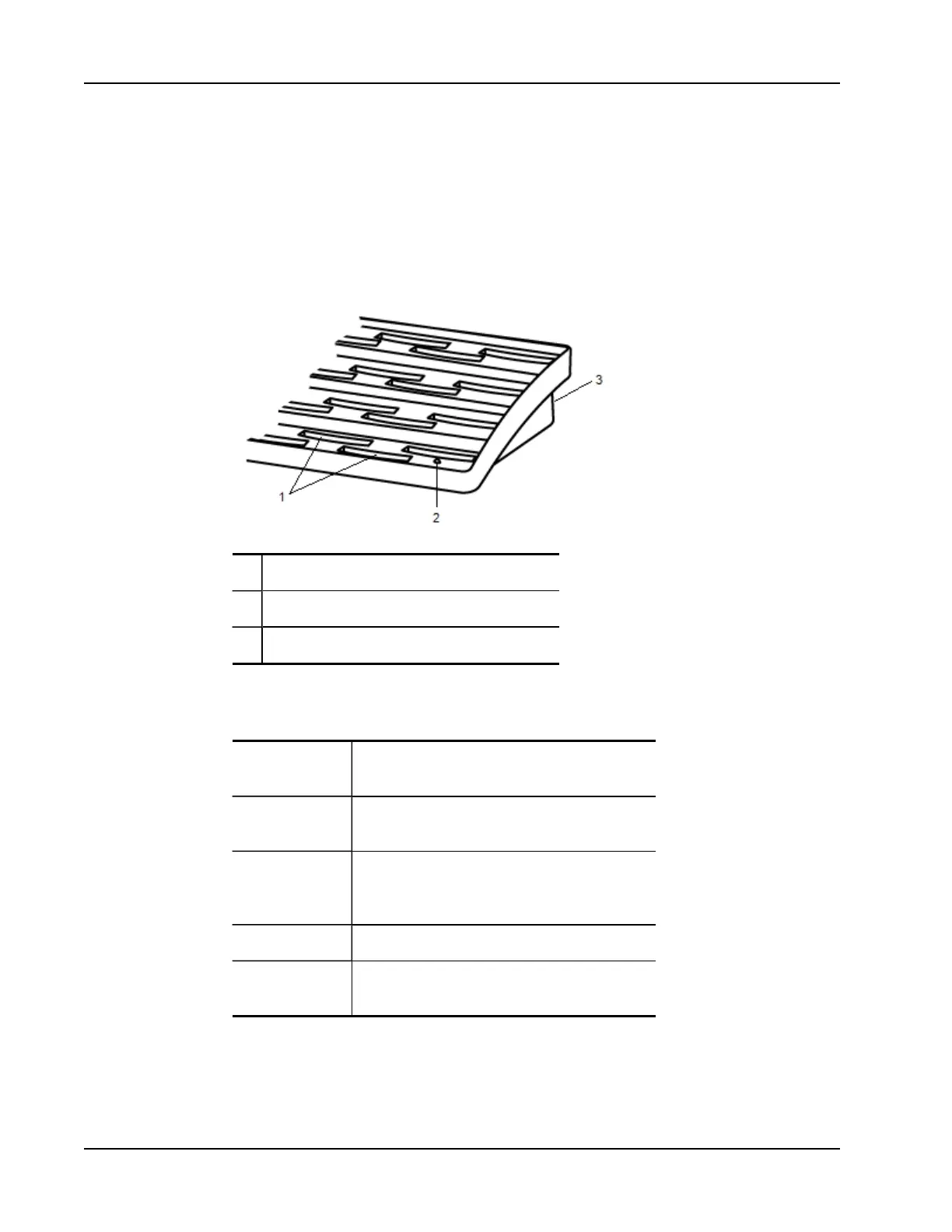
The following figure shows the major components of the MimioVote station.
1 MimioVote unit slot
2 Status light
3 Power connector
Status Lights
The status light visually shows the status of the MimioVote station.
Off Not receiving power; Powercable is not
connected.
Solid Green MimioVote is connected and receiving power;
MimioStudio software is running.
Flashing Green
MimioVote is connected or connecting, and
receiving power; MimioStudio software is not
running.
Solid Amber MimioVote cannot find an available MimioHub.
Flashing Amber MimioVote is searching for an available
MimioHub.
About the MimioVote Units
The MimioVote system includes either 24 or 32 MimioVote units. The MimioVote units
slide into the MimioVote station to recharge or to store.
94



 To Next Page