Getting Started
n Setting Up the MimioTeach Stylus
n Setting Up the MimioTeach Bar
n Setting Up Interactive Mode
Setting Up the MimioTeach Stylus
The MimioTeach stylus is powered by a rechargeable lithium-ion battery. The battery
recharges whenever the stylus is docked on the MimioTeach bar.
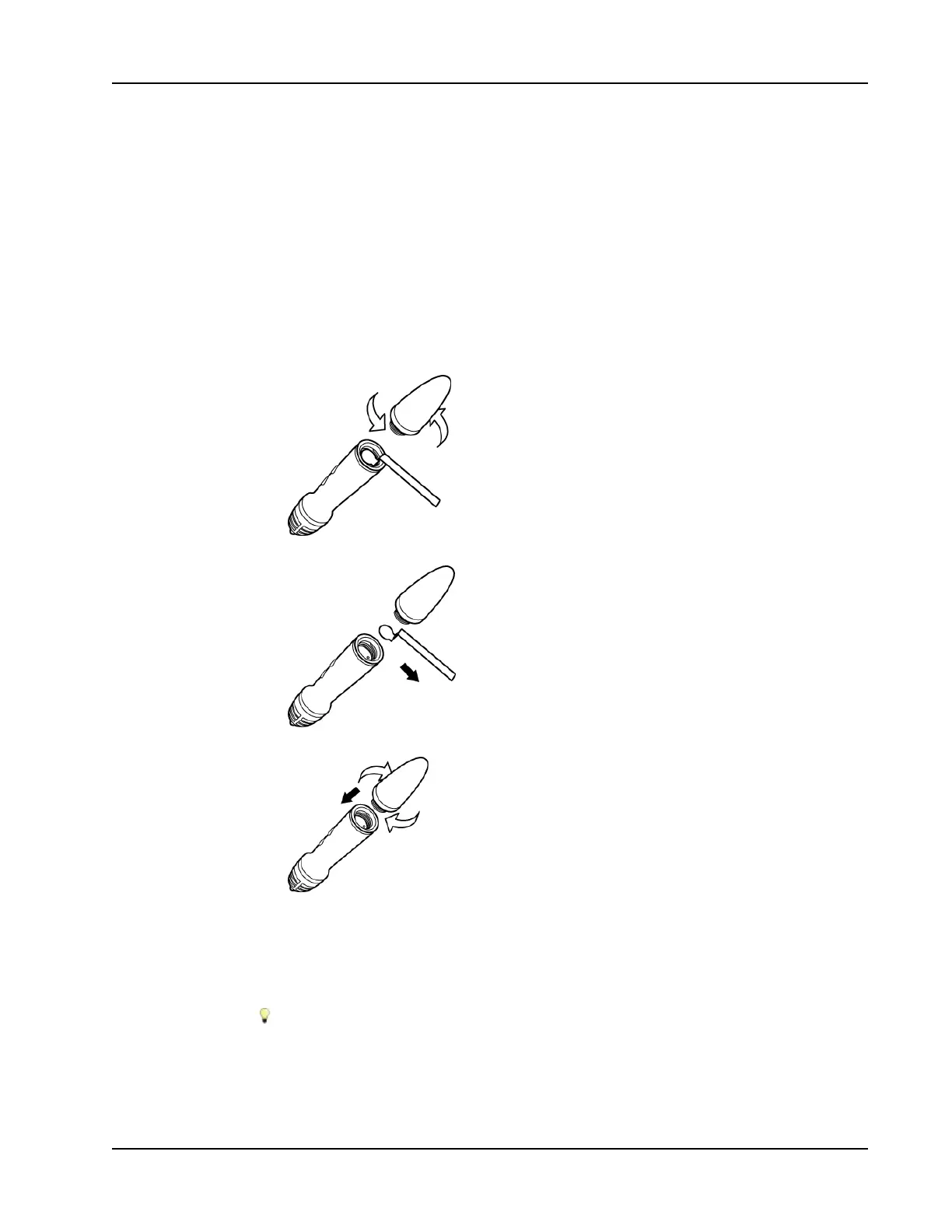
To set up the MimioTeach stylus
1. Turn the top of the stylus counter-clockwise to separate the top from the body of the
stylus.
2. Remove the plastic strip from the stylus.
3. Replace the top onto the body of the stylus and turn clockwise to attach.
Setting Up the MimioTeach Bar
The MimioTeach bar comes pre-linked to the included MimioHub. You can also use this
MimioHub to connect other MimioClassroom devices to your computer, such as
MimioVote.
When not in use, the MimioHub can be stored in the MimioHub dock on the back of
the MimioTeach bar.
MimioTeach is powered using the included USB cable and power adapter.
33



 To Next Page