6. Function blocks
6.1 Manufacturer function blocks
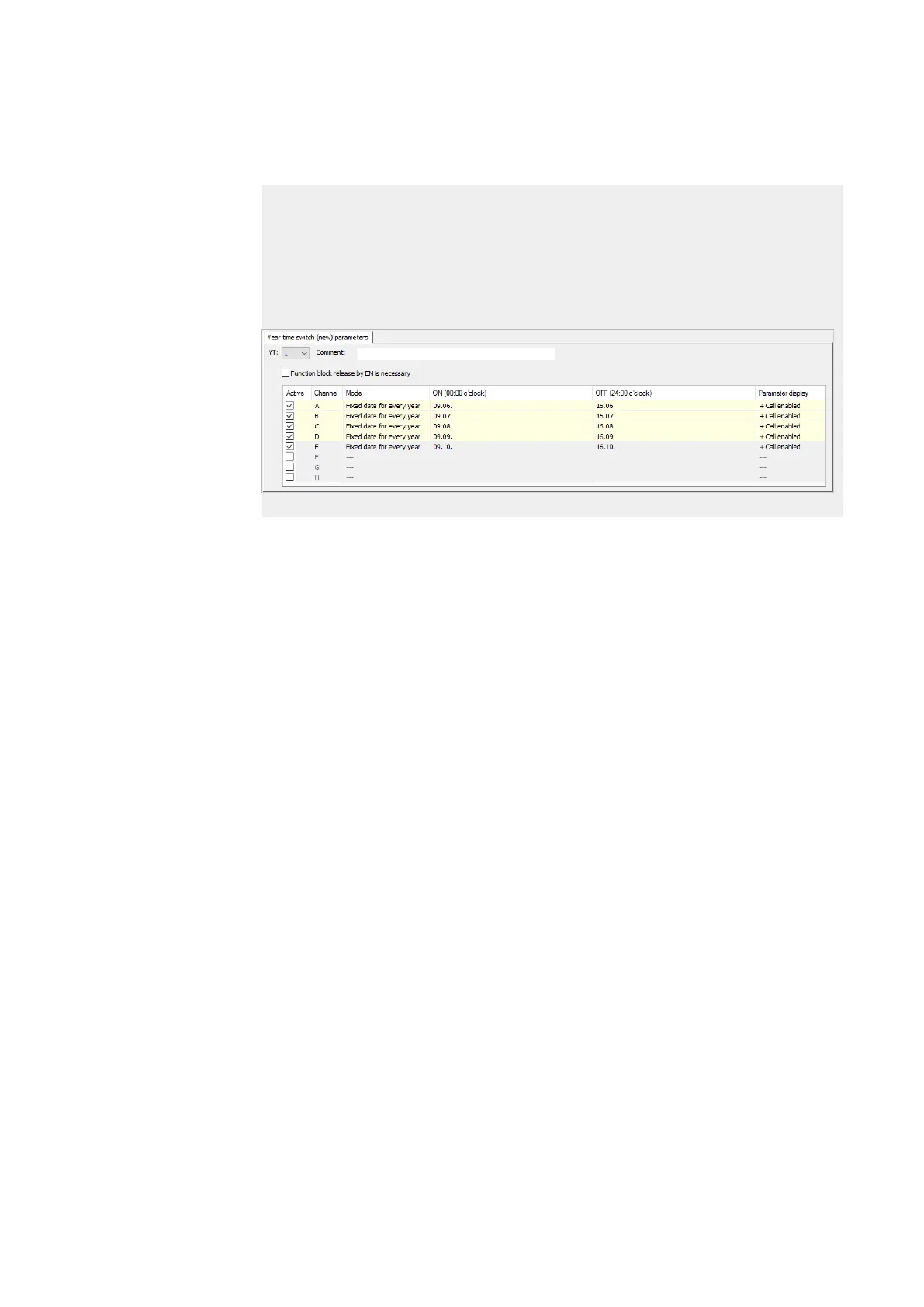
Example 5: Specific days of specific months
Year time switch YT01 should switch on on the 9th of months 6, 7, 8, 9, and 10 every
year at 00:00 and switch off on the 17th at 00:00.
The YT year time switch must be assigned the following parameters:
Programming view/YT01/Year time switch (new) parameters tab
Figure 129: Figure: Entry screen in the programming software
See also
→ Section "HW - Weekly timer (Hour Week)", page 168
→ Section "HY - Year time switch (Hora Year)", page 178
→ Section "OT - Operating hours counter ", page 188
→ Section "RC - Real-time clock", page 192
→ Section "T - Timing relay", page 195
→ Section "WT - Weekly timer (WeekTable)", page 215
214
easyE4 11/18 MN050009 EN www.eaton.com



 To Next Page