Document ID: OMM-00148 Rev. B
30
4.0 EFI Print Control Utility and EFI Pro 24f Control Window
This chapter covers the EFI Print Control Utility and the EFI Pro 24f Control window.
4.1 EFI Pro 24f Software Operational Overview
This section provides a general overview of the EFI Pro 24f’s Print Control Utility software and how to use it when printing.
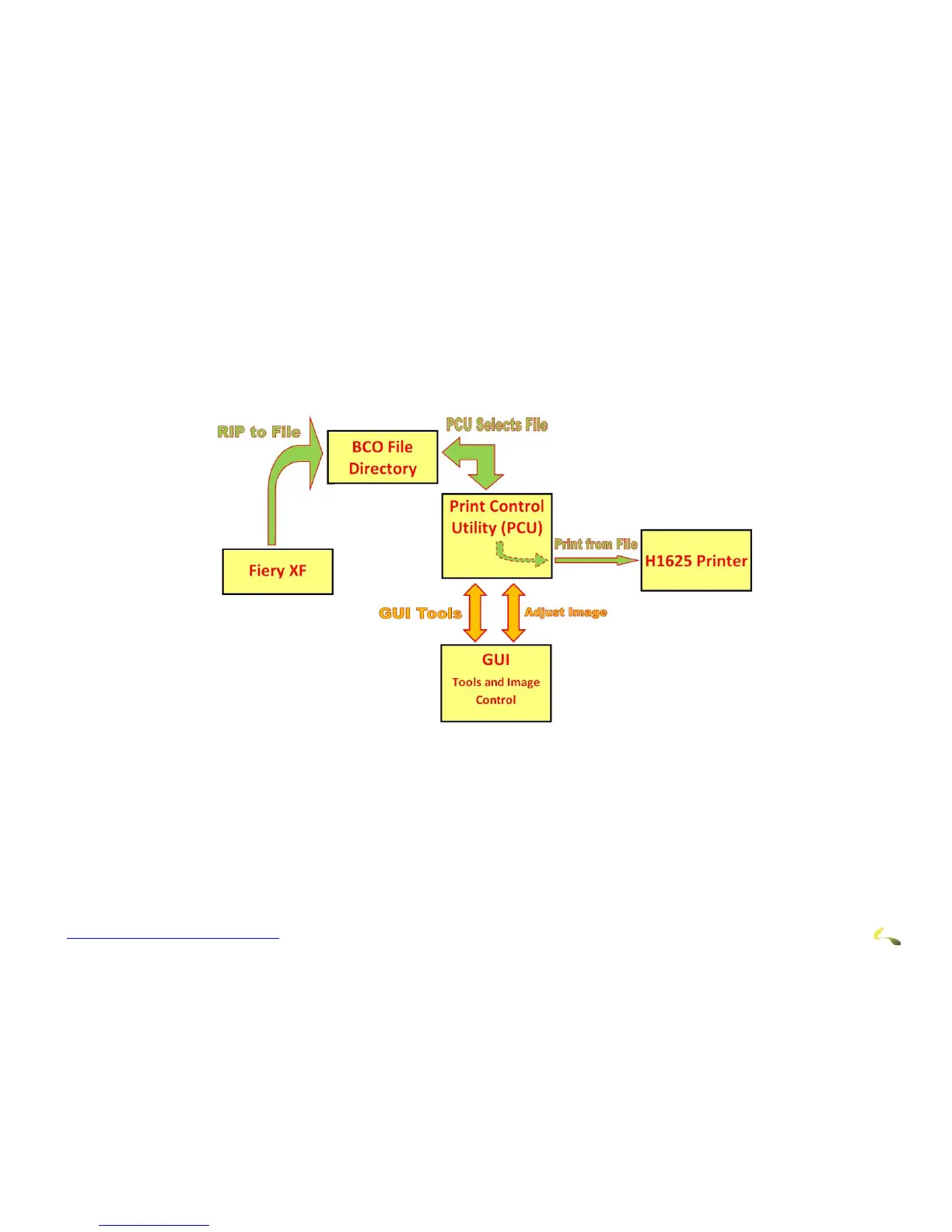
Figure 4-1: EFI Pro 24f Printing Data Flow
The EFI Pro 24f printer is operated directly using the EFI Pro 24f Print Control Utility. The system data flows as follows:
1. Fiery XF is used to rip images to a .bco file. This file contains all the printing information and is stored on the EFI Pro 24f computer.
2. The Print Control Utility is used to select and open pre-ripped .bco files and to print the files.
3. The Print Control Utility is also used to open the EFI Pro 24f Control window to use tools, adjust parameters, or adjust image infor-
mation.



 To Next Page