Document ID: OMM-00148 Rev. B
75
8.2.2 Ink Purge Procedures
The print heads should be purged and a head sweep should be performed in one of two ways:
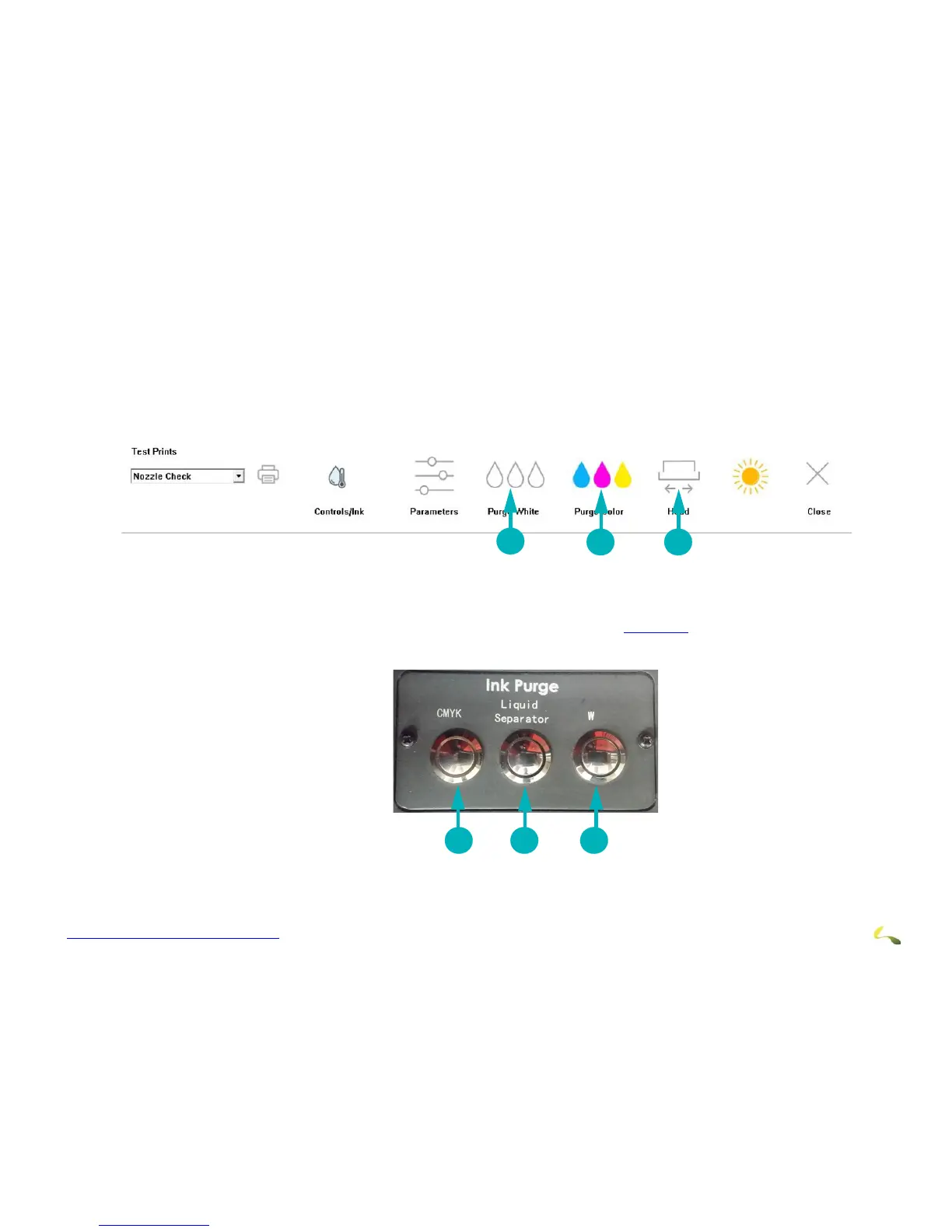
1. a. From the EFI Pro 24f Control screen, choose the Purge White icon to white print heads. The system automatically follows this up
with a head sweep.
b. From the EFI Pro 24f Control screen, choose the Purge CMYK icon
to purge the CMYK print heads. The system automatically fol-
lows this up with a head sweep.
2. Use the manual Ink Purge buttons located in t
he carriage HOME compartment (See Figure 8-5). Then follow up with a head sweep
performed from the EFI Pro 24f Control screen.
1 2 3
Figure 8-5: Manual Ink Purge Buttons
1Purges CYMK ink. Sweeps heads. 2 Empties the cyclonic vacuum system 3 Purges white ink. Sweeps heads.
2
1
3
Figure 8-4: Purge and Sweep Icons on EFI Pro 24f Control Screen
1Purges white ink. Sweeps the heads. 2 Purges CYMK ink. Sweeps the heads. 3 Sweeps all print heads.



 To Next Page