Document ID: OMM-00148 Rev. B
52
4.3.10 Control/Ink window
Choose the Controls/Ink button on the tool bar at the bottom of the EFI Pro 24f Control window to open the
Control/Ink window.
2
3
4
5
6
11
9
8
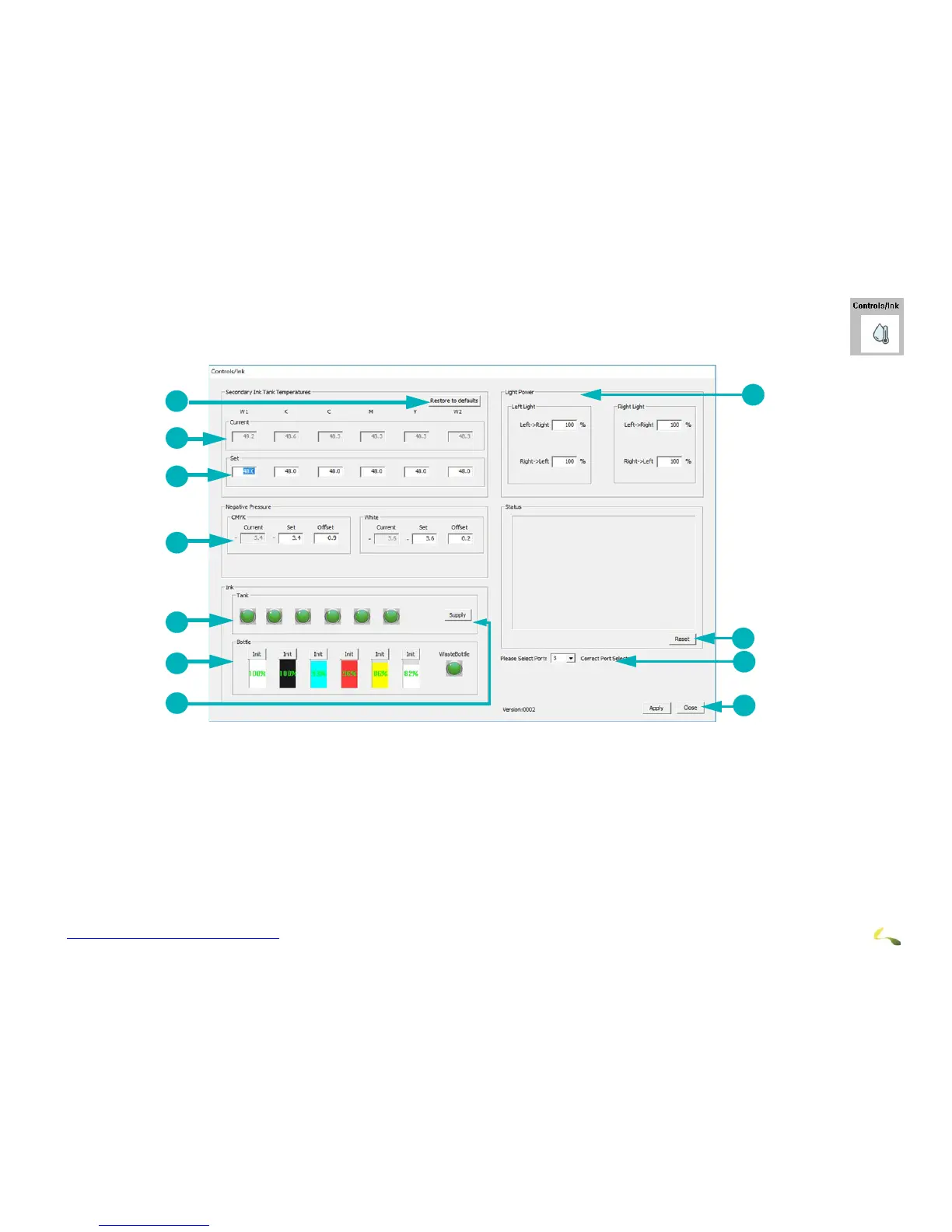
Figure 4-25: Ink System Information
1Restores Ink Tank Temp Factory Settings (Cyan, Magenta to
41° C; 42° C for White, Black, and Yellow)
7Supply: Fills All Secondary Ink Tanks
2Secondary Ink Tank Current Temperatures - View Only 8 Click Apply after every adjustment. System displays modi-
fication confirmation messages.
3Secondary Ink Tank Temperatures to be Set 9 During initial set up, select PLC connection port.
4Negative Pressure - CMYK and White 10Displays status and alarm messages. Alarm buzzer sounds
until you choose Reset.
5Ink Tank Status. Green = OK; Gray = Low/Empty 11LED Lamp Power Adjustment
6Level Indicator for Each Ink Tank and the Waste Bottle
7
10
1



 To Next Page