Tracks and Sequences
49
User Guide
Version 4.1
r
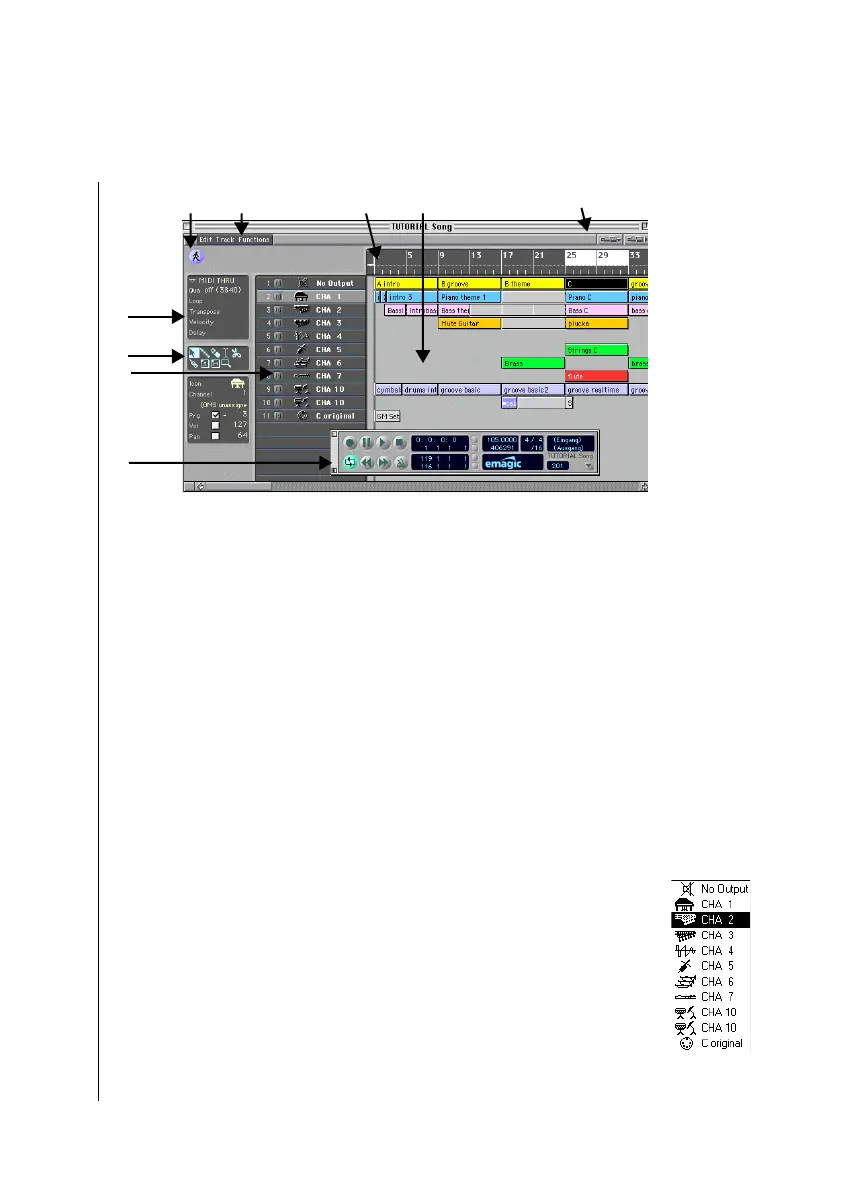
4.3 Tracks and Sequences
To start with, Logic fun offers the usual elements found in a
Windows or Macintosh program—the main menu bar, and vari-
ous windows that you can open and close, move and adjust to
size. After you load a song, you should see the Arrange window,
as seen above. This is where you record and arrange your songs.
Like a multitrack tape machine, Logic fun also works on the
12
3
4
5
6
7
8
9
1
Catch Button This is where you control
the Catch function of Logic fun. With Catch
turned on, the screen follows the song
position.
2
Main menu bar This is where you find
global functions, e.g. for saving and loading
songs or for opening various windows.
3
Bar ruler The bar ruler displays
MicroLogic’s time axis for you; here you can
set markers with the mouse, or jump to any
desired place in a song.
4
Arrange area, with sequences A track
may contain any number of sequences.
Sequences contain the actual data, such as
notes, controller data, etc. The data can be
edited in a variety of ways.
5
Zoom buttons If you click on the
telescope buttons, you can alter the
magnification factor of the window’s
contents and thus adapt to your screen.
6
Transport window The transport
window performs the same functions as the
transport field, but can be located at any
desired point of the screen and is variable in
size. A “slider” permits rapid approach from
far removed song positions.
7
Track column It is in the track column
that you determine the MIDI channel for
each track. It is likewise here that you can
swap tracks, insert them or delete them.
8
Toolbox You can select a particular tool
from this box in order to be able to edit
sequences, notes or other data in a variety of
ways.
9
Sequence parameter box The
sequence parameter box is where
quantization, transposition and other
aspects of the playback for a sequence can
be non-destructively edited.



 To Next Page