64
Chapter 4
MIDI Tutorial
Emagic
Logic fun
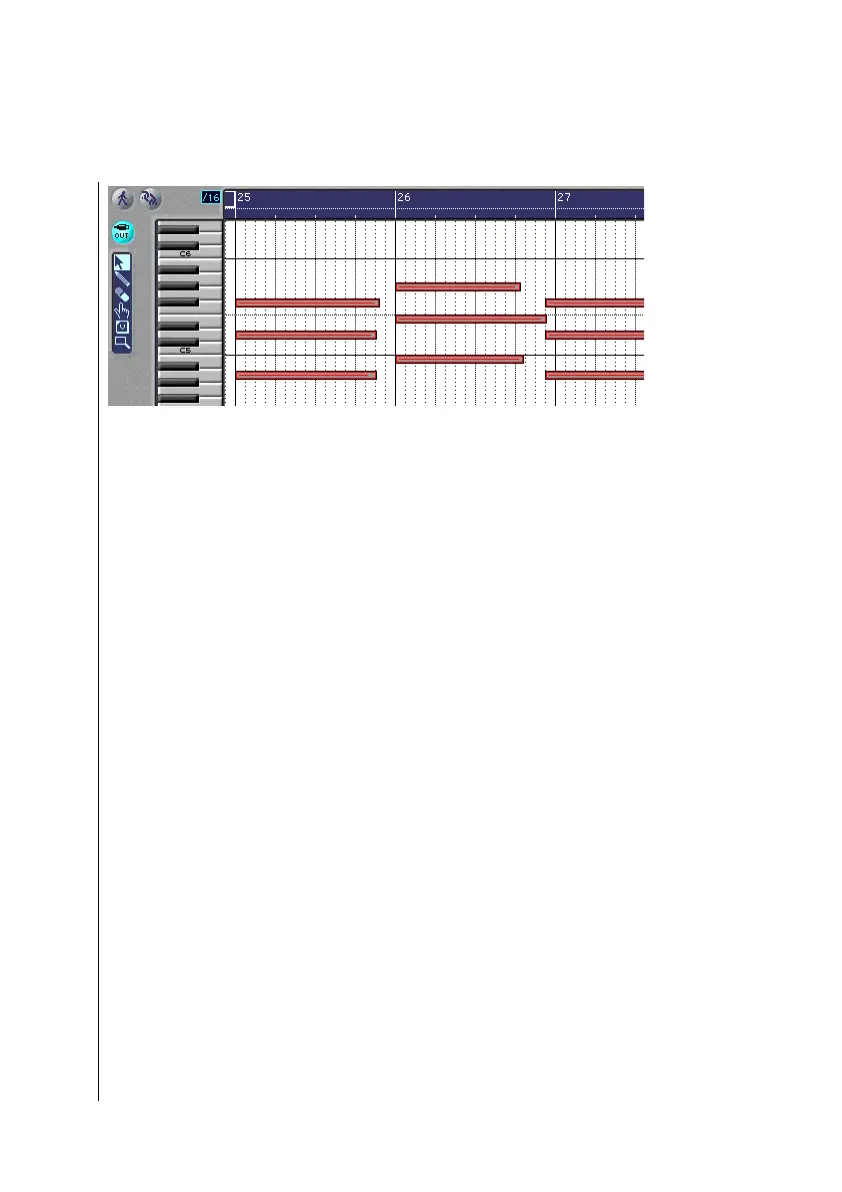
This picture shows the Matrix window for the sequence
“Strings C”.
•
Open the Matrix editor by holding the ç button
(Windows) or the O button (Macintosh), and double-
clicking the sequence “Strings C”.
You can see a keyboard along the left edge of the Matrix
window. By using this keyboard, you can see the pitch of the
notes in the display. A chord is represented by a group of over-
lapping bars. You can easily recognize that the note lengths of
the second chord are unequal. Also, there is a wrong note in the
4th chord.
Look at this sequence in the Event List as well, by choosing
Windows > Open Event List. These inconsistencies are not so
easily recognizable. Close the event list window again.
•
Selectnotes from the first chord by rubber band selecting it.
•
Now, grab the lower right corner one of the selected notes,
and drag it to measure 26, so that the end of the bar connects
with the beginning of the next chord.
Any edit to the length of one note, will affect all other selected
notes equally in the Matrix editor.
•
Repeat the process, to lengthen each chord so that it comes
up to the beginning of the next. This will create a legato
effect on playback. Choose a larger zoom level to better be
able to edit the events.



 To Next Page