Functional characteristics
MIG/MAG welding
Item No.: 099-004833-EWM01 63
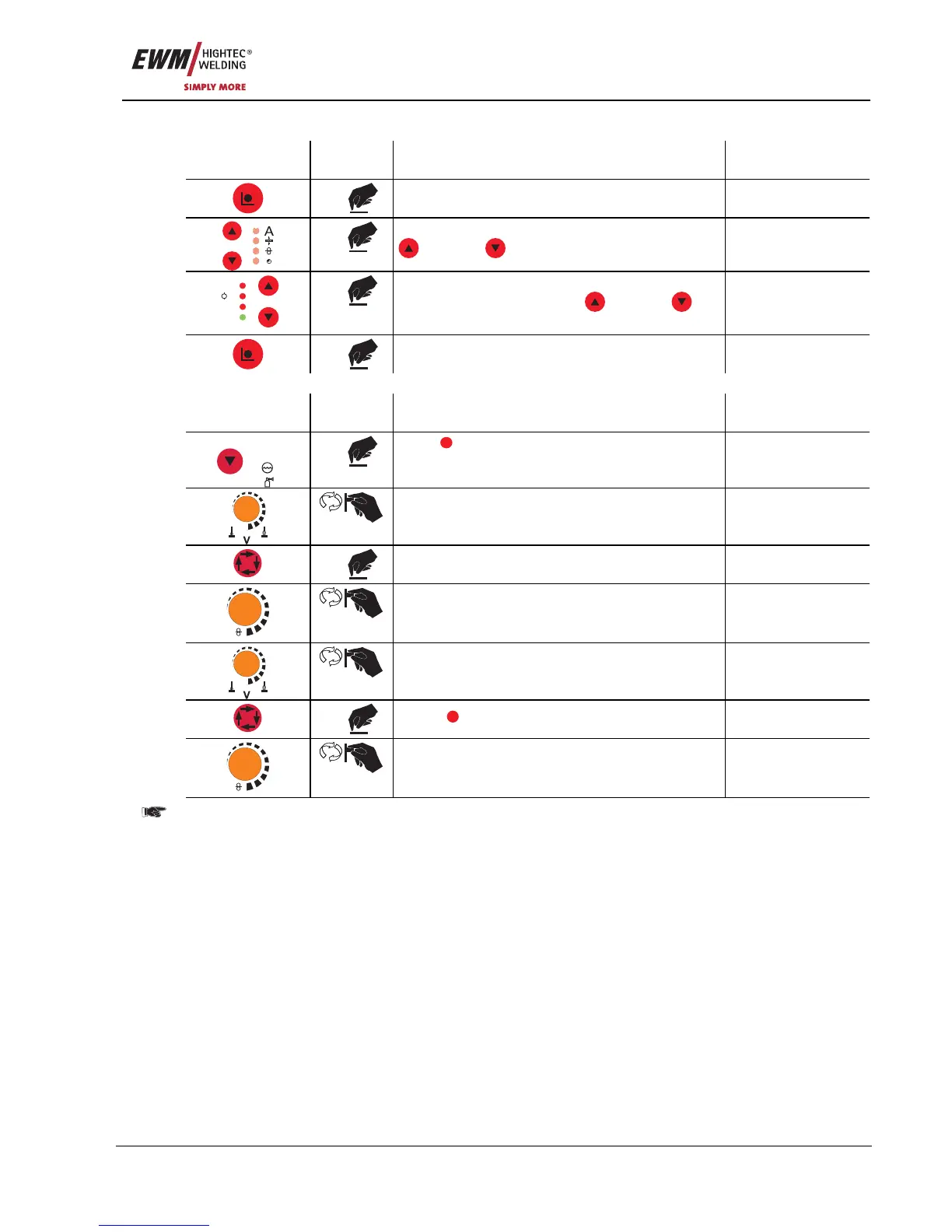
5.2.8.1 Selecting parameters (program A) using wire feed unit control M3.1x
Operating
element
Action Result Display
2 x
Select main program A mode Program A
x x
Select the welding parameters using the buttons
"Up" and "Down" (left)
V
Job Nr
Hold
A
M
x x
Change values for the selected welding
parameter using the buttons
"Up" and
"Down" (right)
2 x
Machine returns to Display mode
5.2.8.2 Selecting parameters (program A) using wire feed unit control M3.70
Operating
Element
Action Result Display
VOLT
PROG
x x
Press
PROG
(program number)
Select program number
x x
Select parameter LED “Main program (P
A
)”
m/min
Set wire speed
Set voltage correction
1 x
Select
DYN
Dynamics parameter
m/min
Set dynamics
Changes to the welding parameters can only be made when the key switch is in position "1".










 To Next Page