Functional characteristics
Advanced functions on the welding machine control
Item No.: 099-004833-EWM01 87
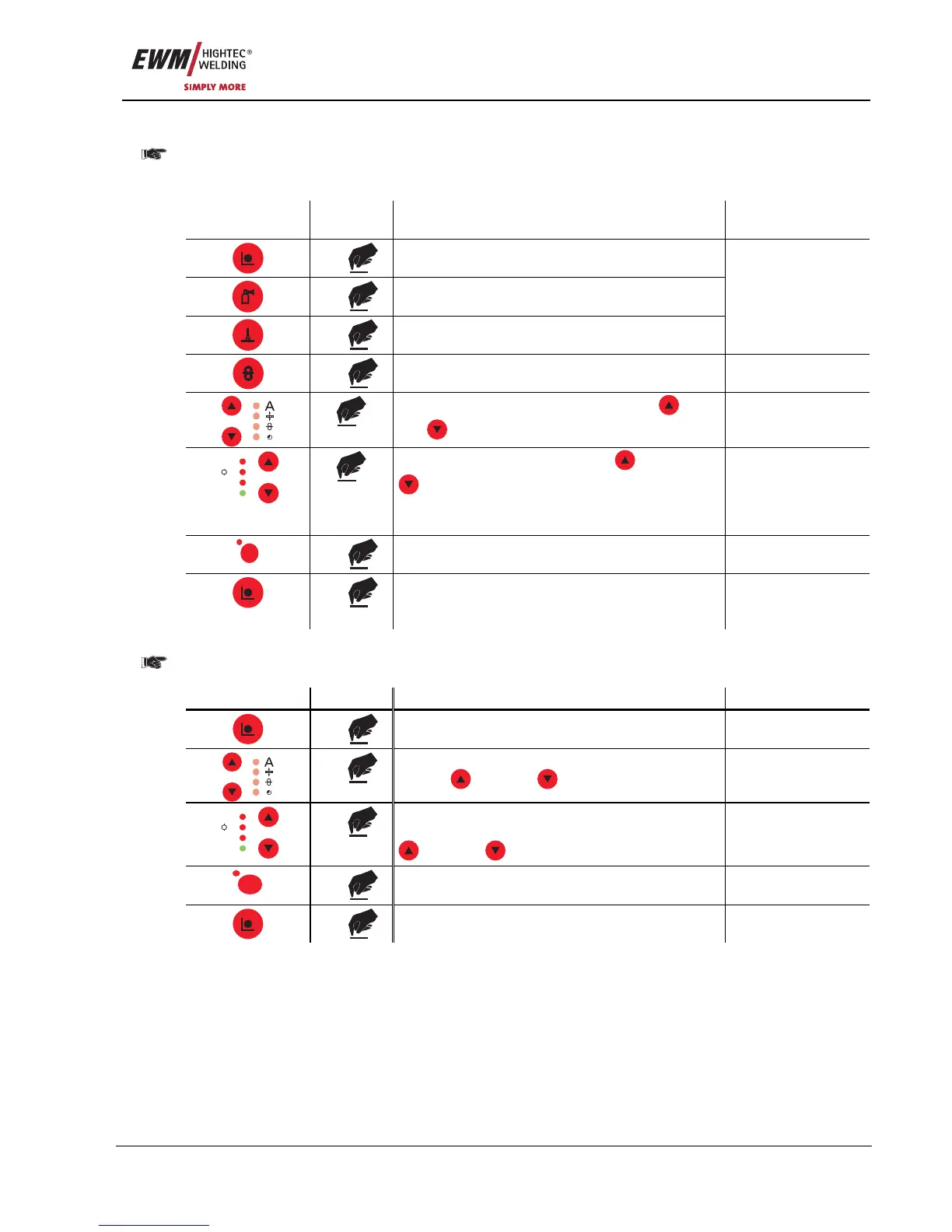
5.9.2.4 Using Block mode (Block JOB)
This function is only appropriate for use in combination with the M3.70 wire feed unit control and
a Powercontrol program torch.
See also the "Powercontrol program torch with one rocker (special function)" chapter
Operating
element
Action Result Display
1 x
Select "Special Mode"
1 x
2 x
Program steps
1 x
Special-Mode
Select the Block JOB function using the
"Up"
and
"Down" buttons (left)
Block Job 0
V
Job Nr
Hold
A
M
Switch Block JOB on or off using
"Up" and
"Down" buttons (right).
1 = Block JOB function switched on
0 = Block JOB function switched off
Block Job 1
Block Job 0
Superpuls
S
1 x
Save change No change
1 x
Exit "Special Mode" Last parameters
selected are
displayed
5.9.2.5 Resetting an existing JOB to the factory setting (Reset JOB)
If a pre-programmed JOB (JOB 1 to 128) has been changed accidentally, it is possible to reset it to
the factory settings.
Control element Action Result Display
3 x
Select Job Manager mode Job Manager
x x
Select the Job Reset function using the key
buttons
"Up" and "Down" (left)
Res. Job: xxx
V
Job Nr
Hold
A
M
x x
Select the job (JOB1-128) to be reset to the
factory settings using the key buttons
"Up" and "Down" (right)
Res. Job: xxx
Superpuls
S
1 x
JOB has been reset Res. Job: xxx
1 x
Machine returns to Display mode










 To Next Page