Functional characteristics
Advanced functions on the welding machine control
88 Item No.: 099-004833-EWM01
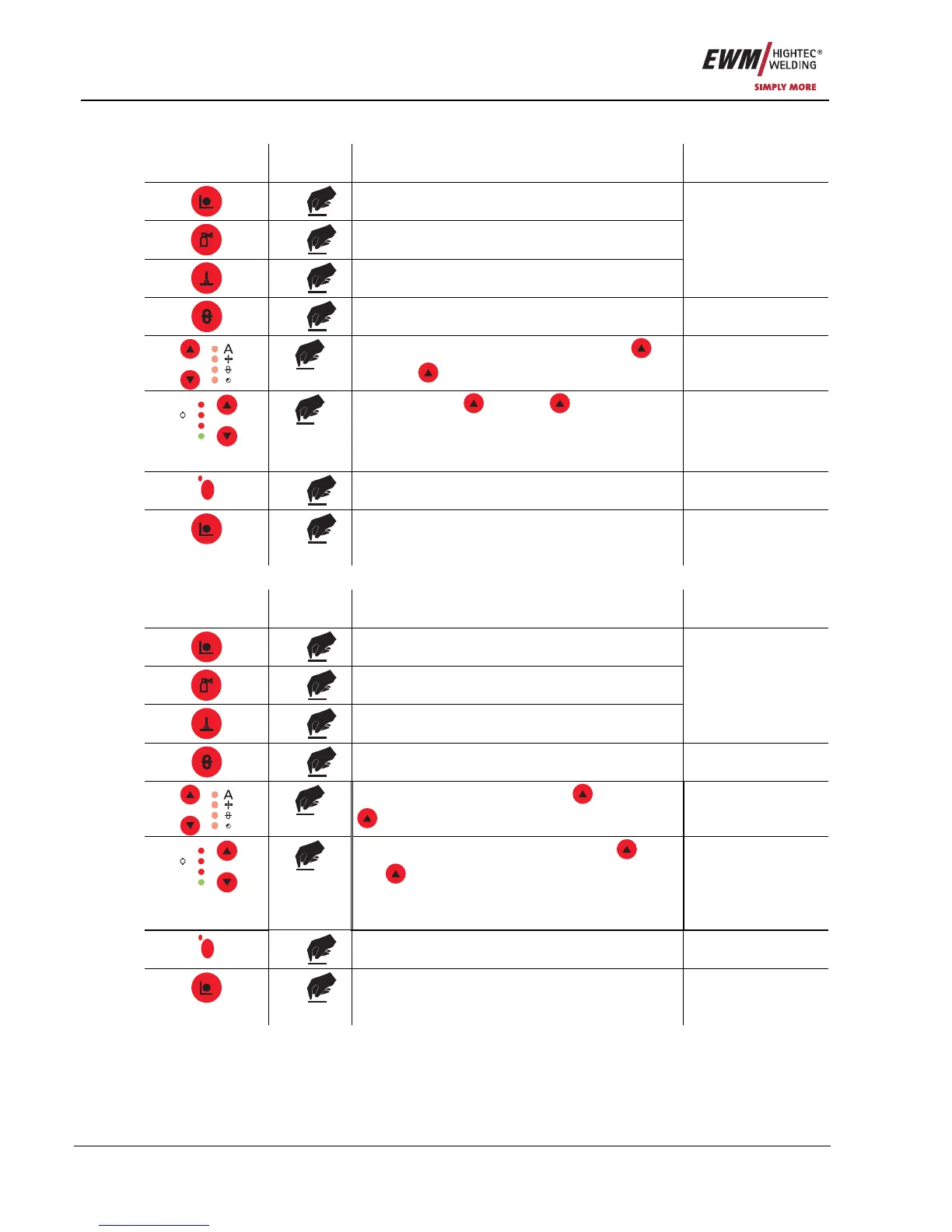
5.9.3 Switching the Hold function on and off
Operating
element
Action Result Display
1 x
Select “Special Mode”
1 x
2 x
Program steps
1 x
Special Mode
Select the Hold function using the buttons
“Up” and
“Down” (left)
Hold-Fct 1
V
Job Nr
Hold
A
M
Use the buttons
“Up” and “Down” (right)
to switch the Hold function on or off.
1 = Hold function on
0 = Hold function off
Hold-Fct 1
Hold-Fct 0
SuperpulsSuperpuls
S
1 x
Save change No change
1 x
Exit “Special Mode” Last selected
parameters are
displayed
5.9.4 WF speed switching (absolute / relative)
Operating
element
Action Result Display
1 x
Select “Special Mode”
1 x
2 x
Program steps
1 x
Special Mode
Select function using the buttons
“Up” and
“Down” (left)
Abs-Fct 0
V
Job Nr
Hold
A
M
Switch the function on and off using the
“Up”
and
“Down” (right) buttons
1= Absolute wire feed speeds activated
0= Relative wire feed speeds activated
Abs-Fct 0
Abs-Fct 1
SuperpulsSuperpuls
S
1 x
Save change No change
1 x
Exit “Special Mode” Last selected
parameters are
displayed










 To Next Page