IN1806 and IN1808 Series Scaling Presentation Switchers • Internal Web Pages 106
Setting a password
The factory configured passwords for all accounts on this device have been set to the
device serial number. This password is administrator level. Passwords are case sensitive.
To assign new administrator and user passwords:
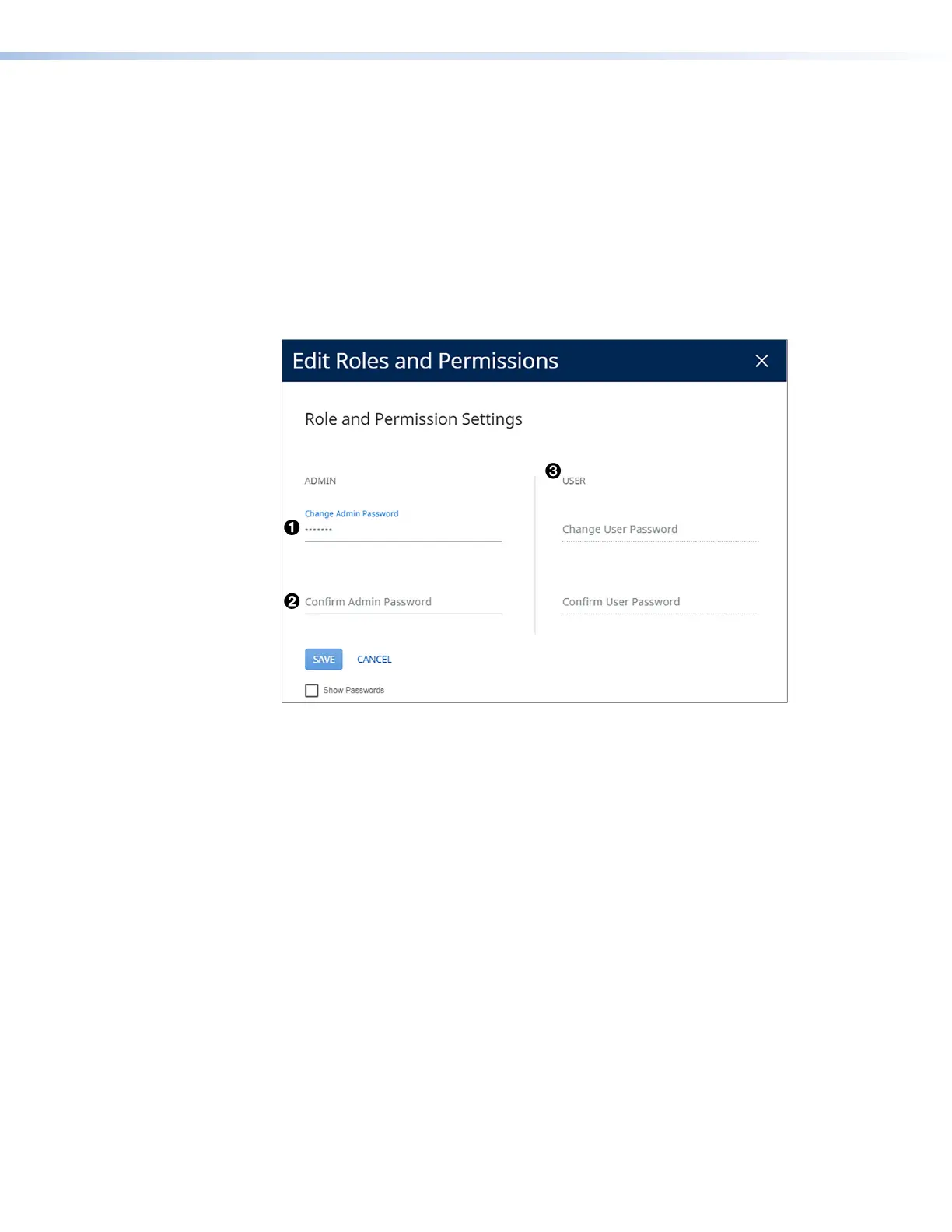
1. In the Roles and Permissions panel, click Edit. The Role and Permission
Settings dialog box opens
2. In the Admin panel, click the Change Admin Password link and enter the new
administrator password in the field below (see figure 50,
1
).
3. Click in the Confirm Admin Password field (
2
) and repeat the password from the
Change Admin Password field.
Figure 50. Passwords Dialog Box with Administrator Password Entered
4. If you want to assign a user password, repeat steps 2 and 3 in the User panel (
3
).
5. When finished, click Save to set the passwords. To close the window without saving a
password, click Cancel or the X in the upper-right corner.
To remove an assigned password:
1. In the Change Admin Password or Change User Password field, enter a single space.
2. Enter a single space in the appropriate Confirm Password field.
3. Click Save.
50













 To Next Page