IN1806 and IN1808 Series Scaling Presentation Switchers • Configuration Software 95
Software Connection
Open the PCS program from the Start menu or desktop shortcut. The Extron Product
Configuration Software window opens with the Device Discovery panel open.
Connect to the scaler using the Device Discovery panel or the TCP/IP panel.
Device Discovery Panel
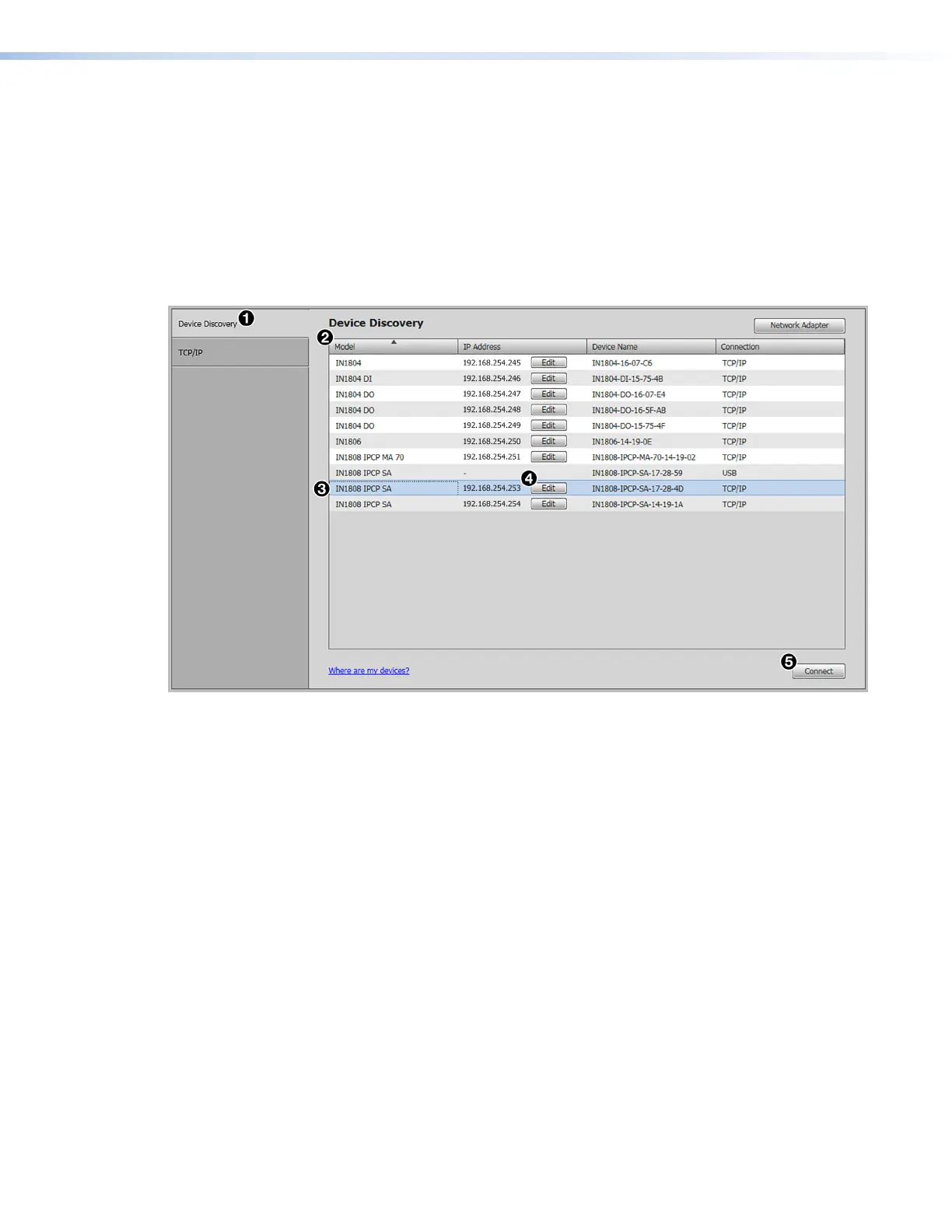
The Device Discovery panel displays accessible Extron devices connected directly to
the PC or to a LAN or WAN. Devices are identified and sorted by model, IP address, device
name, or connection method.
Figure 35. Device Discovery Screen
To sort the list of available devices:
1. Click the Device Discovery tab (see figure 35,
1
).
2. Click the desired column heading (
2
) to sort it in ascending or descending order.
To connect to a device:
1. Click the Device Discovery tab (
1
).
2. Select the desired device (
3
).
3. Click the Connect button (
5
). A new device configuration tab opens.
To edit communication settings from the Device Discovery panel:
1. Click the Device Discovery tab (
1
).
2. Click the Edit button of the desired device (
4
). The Communication Settings dialog
box opens.
3. Finalize the settings in one of the following ways:
• Click the Apply button to accept the changes and return to the Device
Discovery panel.
• Click the Apply and Connect button to accept the changes and connect to the
selected device. A new device configuration tab opens.
• Click the Cancel button to cancel any pending changes and return to the Device
Discovery panel.
35













 To Next Page