XTP CrossPoint Series • Programming Guide 102
Command Function
SIS Command
(Host to Unit to Endpoint)
Response
(Endpoint to Unit to Host)
Additional Description
XTP T FB 202, XTP T FB 202 4K, XTP T UWP 202, XTP T UWP 202 4K, and XTP T UWP 302
switcher commands (continued)
HDCP status
View input HDCP status
E
I
X^
HDCP
} X1#]
View HDCP status of all inputs
E
I*HDCP
} X1#
1
X1#
2
X1#
3
...
X1#
n
]
Input video format
Set format
X^
*
X2(
\ Ityp
X^
*
X2(
*
X3)]
Set input
X^
to
X2(
video format. The
endpoint reports the detected video
format,
X3)
, in the response.
Example:
1*0\
Ityp01*0*5
]
Set input 1 to auto. The endpoint
reports RGB video.
View format
X^
\
X2(
*
X3)]
View set (
X2(
) and detected (
X3)
) video
format of input
X^
.
Image reset
Execute an image reset
E
T
X^
*1*2AADJ
}
AadjT
X^
*1*2
]
Reset input signal timing to Extron
default for input
X^
, sub-input 1.
Pixel phase (available for RGBHV and non-interlaced component video (YUVp) video inputs)
Set a specific pixel sampling phase
E
I
X^
*
X3!
PHAS
}
PhasI
X^
*
X3!]
Specify the pixel sampling phase.
Increment sampling value
E
I
X^
+PHAS
}
PhasI
X^
*
X3!]
Increase the phase value.
Decrement sampling value
E
I
X^
–PHAS
}
PhasI
X^
*
X3!]
Decrease the phase value.
View the sampling value
E
I
X^
PHAS
} X3!]
Show the pixel sampling phase.
Horizontal shift
Specify a value
E
I
X^
*
X3@
HCTR
}
HctrI
X^
*
X3@]
Set the horizontal location of first active
pixel in input
X^
.
Increment value
E
I
X^
–HCTR
}
HctrI
X^
*
X3@]
Increase the value by one pixel (shift the
image to the right).
Decrement value
E
I
X^
+HCTR
}
HctrI
X^
*
X3@]
Decrease the value by one pixel (shift
the image to the left).
View
E
I
X^
HCTR
} X3@]
Show the horizontal location of first
active pixel in input
X^
.
Vertical shift
Specify a value
E
I
X^
*
X3@
VCTR
}
VctrI
X^
*
X3@]
Set the vertical location of first active
pixel in input
X^
.
Increment value
E
I
X^
+VCTR
}
VctrI
X^
*
X3@]
Increase the value by one line (shift up).
Decrement value
E
I
X^
–VCTR
}
VctrI
X^
*
X3@]
Decrease the value by one line (shift down).
View
E
I
X^
VCTR
} X3@]
Show the vertical location of first active
pixel in input
X^
.
Input sync detection
View all input connections
0LS
X%
1
X%
2
X%
3
...
X%
n
]
16 or
32 (
n
)
X%
s; each is the
connection status of an input, starting
from input 1.
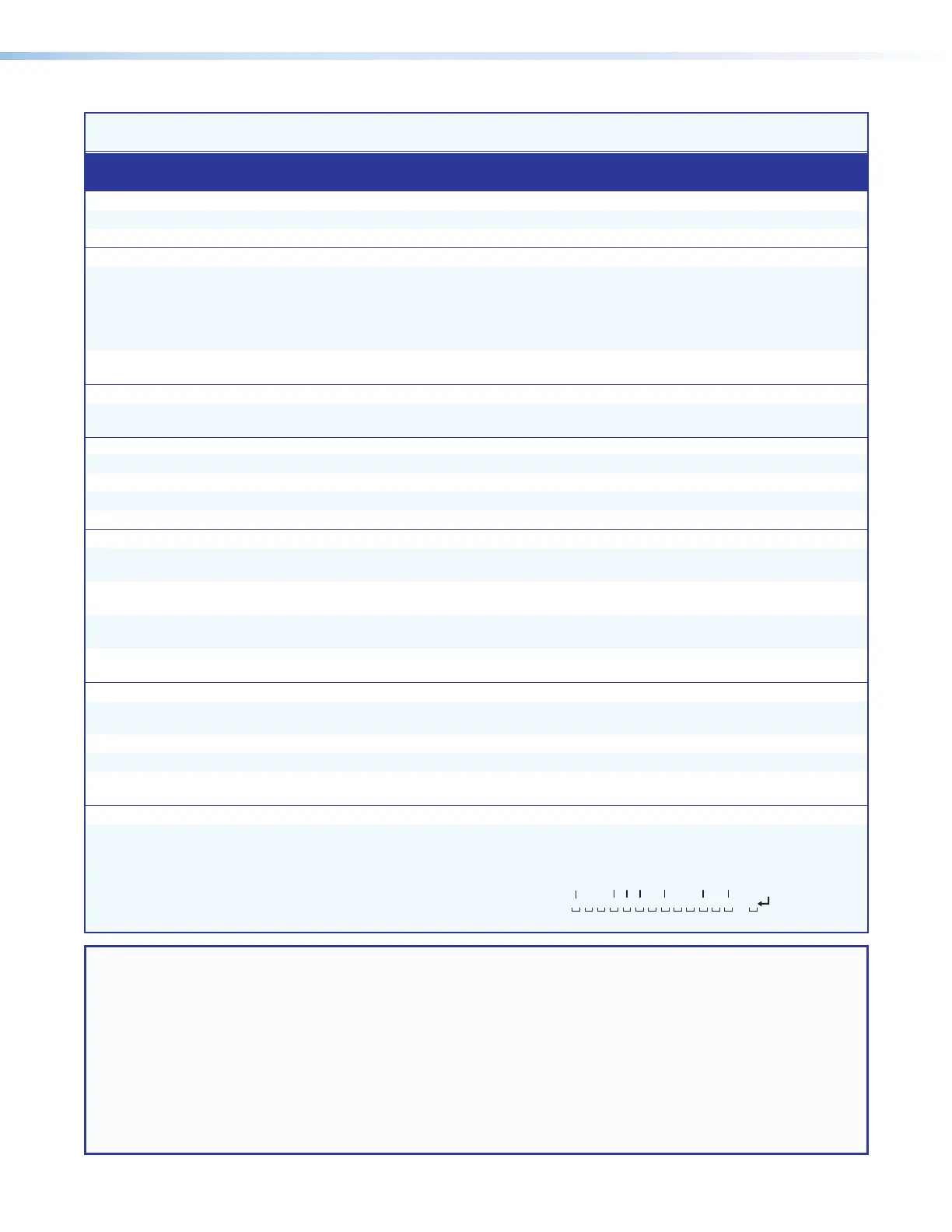
Example
(XTP CrossPoint 3200):
0LS
Input:
Response Status:
No input detected
Sync detected Sync detected
1 2345
6
7 8 9
1011
12
13
32
0 0 0 1 1 1 0 1 0 0 1 0 1. . .0
NOTE: X%
= Input signal status 0 = No signal detected 1 = Sync detected
X^ = Input number (for other than tie) 01 – 16 or
32
X1@ = HDCP authorized device 0 = Off 1 = On (default)
X1# = HDCP status (for inputs) 0 = No source device connected 2 = Source connected is not HDCP-compliant
1 = Source connected is HDCP-compliant
X2( = Input video source 0 = Auto (default)
1 = Video 3 = RGBcvS (SCART) 5 = RGB
2 = S-video 4 = YUV interlace 6 = YUV
X3) = Detected video format 0 = no signal detected
1 = Video 3 = RGBcvS (SCART) 5 = RGB
2 = S-video 4 = YUV interlace 6 = YUV
X3! = Picture adjustments 000 through 255 (128 = default)
X3@ = Shift 00000 through 65535



 To Next Page