XTP CrossPoint Series • Operation 45
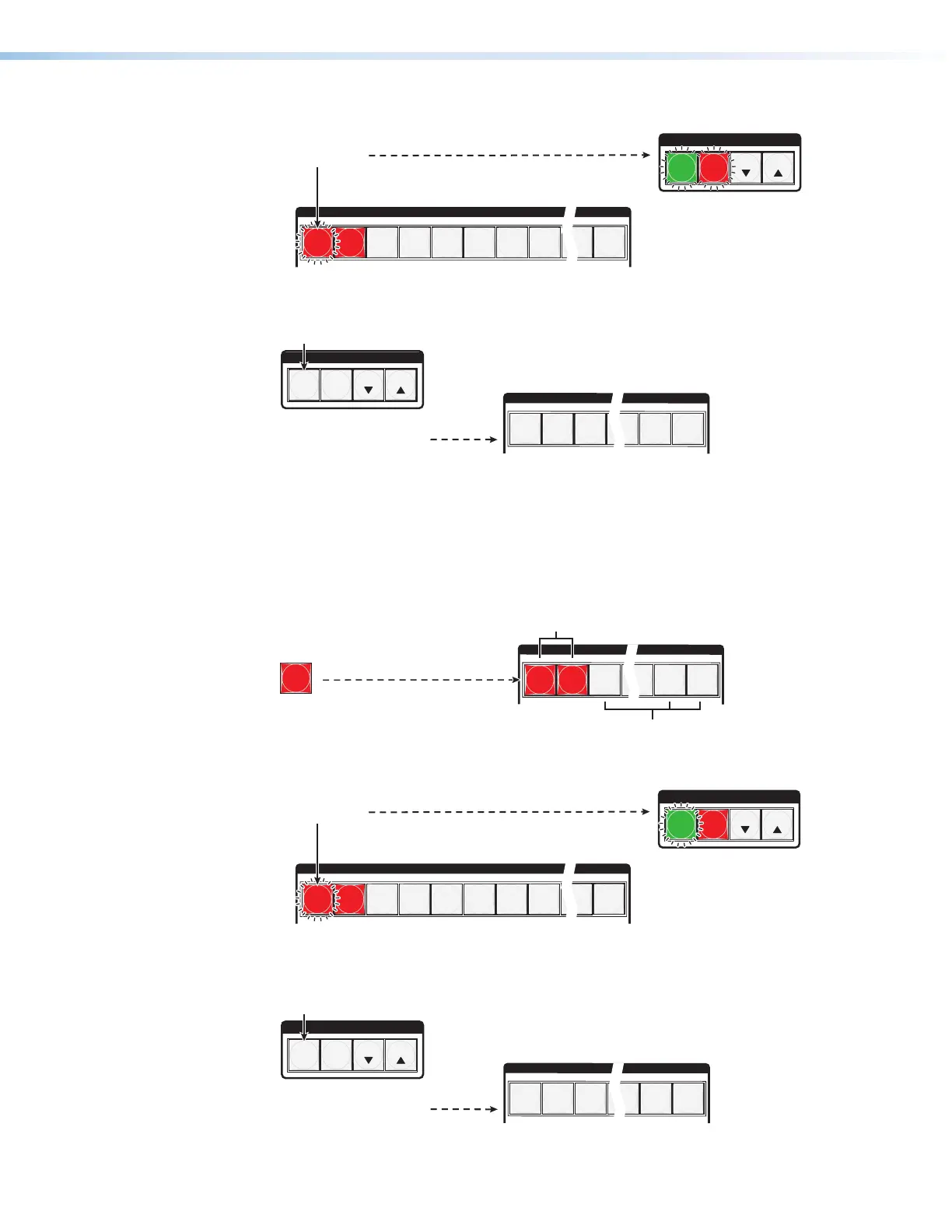
3. Select the preset: Press and release the input or output button for the desired preset.
C O N T R O L
PRESET
ENTER
ESCVIEW
INPUTS
1
2
3
4
5
6 7
8
15
16
The Enter button blinks
to indicate the need to
save the preset.
The Preset button
continues to blink.
Press the button.
The button blinks to indicate that this
preset number is selected but not saved.
•
•
4. Save the Preset: Press and release Enter to save the preset. The current
configuration is now stored in the selected memory location.
C O N T R O L
PRESET
ENTER
ESCVIEW
1
2
3
14
15
16
The Enter and Preset
buttons return to unlit or
background illumination.
Press the button.
All input buttons return to unlit or background illumination.
Example 6: Recalling a preset
In the following example, a preset is recalled to become the current configuration. The steps
show the front panel indications that result from your action.
1. Clear all selections: Press and release Esc.
2. Select Recall Preset mode: Press and release Preset.
PRESET
1
2
3
14
15
16
Press and release the button.
The Preset button lights.
All input buttons with assigned
presets light red.
Preset Assigned
No Preset Assigned
3. Select the preset: Press and release the input button or output button for the desired
preset.
C O N T R O L
PRESET
ENTER
ESCVIEW
INPUTS
1
2
3
4
5
6 7
8
15
16
The Enter button blinks to
indicate the need to recall
the preset.
Press the button.
The button blinks to indicate that this
preset number is selected but not recalled.
4. Recall the preset: Press and release Enter. The configuration stored in the selected
memory location is now the current configuration and can be viewed in the View-only
mode (see example 4 on page 42).
C O N T R O L
PRESET
ENTER
ESCVIEW
1
2
3
14
15
16
The Enter and Preset
buttons return to unlit or
background illumination.
Press the button.
All input buttons return to unlit or background illumination.



 To Next Page